
iLaunch: Manage Bookmark,History,Tab and More
Manage bookmark, history, tab, extension & Quick command launch tool
As of May 2026, iLaunch: Manage Bookmark,History,Tab and More has 654 users and a 4.71/5 rating from 7 reviews in the Workflow & Planning category.
Usersdown 3.3 percent−3.3%
654
654
Ratingno change0%
4.71
7 reviews
Reviewsno change0%
7
Version
1.3.1
Manifest V3
History
2 snapshotsTracking since Apr 25, 2026.
View as table
| Date | Users | Rating | Reviews | Version |
|---|---|---|---|---|
| Apr 25, 2026 | 676 | 4.71 | 7 | 1.3.1 |
| May 22, 2026 | 662 | 4.71 | 7 | 1.3.1 |
| Now | 654 | 4.71 | 7 | 1.3.1 |
Permissions & access
- Permissions
- tabsactiveTabbookmarksbrowsingDatahistoryscriptingsearchstoragemanagementunlimitedStorage
- Host access
- https://www.googleapis.com/*, https://gstatic.com/*, *://*/*
Screenshots


About
With commands, you can use browser like a pro.

Using iLaunch, you can use browser like a professional, with shortcut commands, quickly start and manage open tabs, bookmarks, browsing history, efficiently manage your extensions, you can also perform all sorts of actions and more, it is your efficiency multiplier tool.

Quick start hotkey by default
Windows: alt+Q
Mac: control+Q
You can also visit "chrome://extensions/shortcuts" management interface to set it by yourself

●Shortcut command

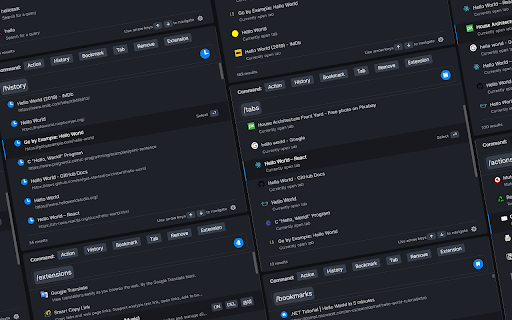
"/action"  - enter "/a" quick start.
Integrate more than 50 actions to improve efficiency, such as mute tabs, create various documents, full screen, clear cache, etc.

"/bookmarks" - enter the "/b" quick start.
With this command you can quickly search and browse your bookmarks.

"/extensions" - enter the "/e" quick start.

With this command, you can quickly manage your extensions.

"/history"  - enter the "/h" quick start.
With this command, you can quickly search your history.

"/tabs" - enter the "/t" quick start.
With this command, you can quickly switch, open, search tabs.

"/remove" - enter the "/r" quick start.
With this command, you can quickly search and close open tabs and delete useless bookmarks.

More shortcut commands are under development.

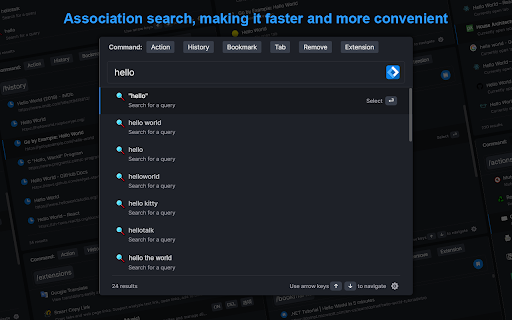
●Associative search
Support search engine customization, and it can intelligently associative search to quickly find what you need.

●Multiple themes
It contains multiple themes, light mode, dark mode..., you can use different color schemes according to your own preferences.

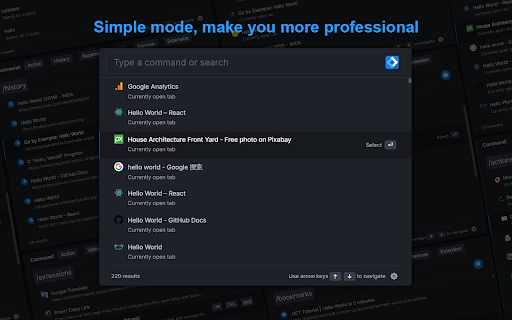
●Minimalist mode
Hide shortcut command buttons to let you use browser like a pro.

iLaunch lets you use browser more efficiently.
Technical
- Version
- 1.3.1
- Manifest
- V3
- Size
- 2.07MiB
- Min Chrome
- 88
- Languages
- 2
- Featured
- Yes
Metadata
- ID
- akidhgondomkboblkncnijoiofggpgfo
- Developer ID
- u97330581a26deb1b95260d319217adc2
- Developer Email
- [email protected]
- Created
- Apr 5, 2022
- Last Updated (Store)
- Apr 5, 2022
- Last Scraped
- May 22, 2026
- Website
- —
- Support URL
- —
Similar extensions
Alternatives to iLaunch: Manage Bookmark,History,Tab and More, ranked by description similarity.

Browser Commands
Manage your browser using word commands. Save time and be more productive on your browser time by using only commands!
30
★ 5.0

Tablyt
Quickly access tabs, bookmarks, history, and context-aware actions through a command-palette.
47
★ 5.0

Launchtab
Keyboard-driven tabless browsing with a Quick Switcher modal.
7

Super Focus Tabs
Quickly find out tab/page. Reduce much more time while working with multiple tabs/pages.
1.0K
★ 3.9

mima omnibox
Boost your browsing speed with simple search bar commands! No more navigating through endless menus and settings.
1

Quick Tab Search
Quickly search and switch between open tabs
209
★ 5.0

Browser Shortcuts
Streamline your browsing and save time with custom right-click menu shortcuts that fit your workflow.
13
★ 5.0

Q Search
Query all kinds of records and massive Internet resources of the management browser in one place
1.0K
Data sourced from the Chrome Web Store · last verified May 22, 2026.