
Q Search
Query all kinds of records and massive Internet resources of the management browser in one place
As of May 2026, Q Search has 1,000 users in the Workflow & Planning category.
Usersup 1328.6 percent+1328.6%
1.0K
1,000
Ratingno change0%
—
— reviews
Reviewsno change0%
—
Version
1.0.3
Manifest V3
History
1 snapshotsTracking since May 26, 2026.
View as table
| Date | Users | Rating | Reviews | Version |
|---|---|---|---|---|
| May 26, 2026 | 70 | — | — | 1.0.3 |
| Now | 1.0K | — | — | 1.0.3 |
Permissions & access
- Permissions
- browsingDatatabsscripting
- Host access
- <all_urls>
Screenshots


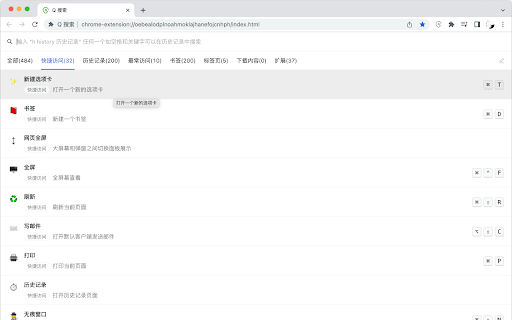
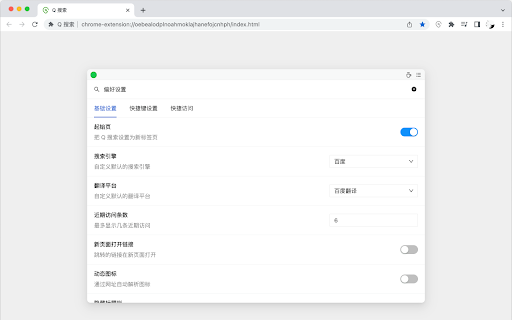

About
- If you want to find information, do you still enter the search engine URL and click the text box to enter the keyword and click the query button?
- If you want to translate the meaning of the word, are you still typing the word after opening the translation platform URL and clicking the query button?
- If you want to find the bookmarks you have collected before, open the bookmarks management panel and struggle to find them one by one?
- Want to access the previous history, open the history management panel one by one powerless to find?
- Want to view the downloaded file but can't find where the file was downloaded? Open the file download panel, find the file and click the link to view it?
- Want to quickly switch from a staggering number of tabs, from collapsing to tabs with no title to see one by one?
No, no.

Are you still using the browser so inefficiently? How about doing these operations in one place? Q search, your efficiency artifact, pay attention to data security, forever free, travel the Internet from Q search!

Q search is an extension that improves the efficiency of browser use. Using Q search, you can quickly query and manage the most frequently used websites of the browser, bookmarks, history records, currently open tabs, downloaded file records, installed extensions, etc.; You can use a search engine to search for the keywords you want to query; you can use a translation platform to quickly translate various texts, you can view today's news, and so on.

Use

Click the Q search icon button in the upper right corner of the browser or press the following shortcut to evoke or exit the Q search panel; enter the keywords you want to query.

On Windows: Ctrl + Shift + Space
The space bar : ⌘ + ⇧ + Mac platform

Features

- Search, toggle, open, pin, mute and close tabs
- Search, access and delete favorite bookmarks
- Search, access and delete past browsing history
- Search and open the most visited URLs
- Search, view, re-download, delete files and delete records of downloaded files
- Search, enable/disable, open settings page and uninstall browser extensions
- Common operations (support customization), such as opening a new tab, printing the current web page, closing the current tab, etc
- Automatically switch day or night mode according to computer settings
- Set as new tab page
- Automatically resolve the icon of the website dynamically through the URL
- Common shortcuts and support customization
- Built-in search and translation functions, support for custom search engines and translation engines
- Identify the number of recent visits and support custom display
- Support custom index range, such as just want to find labels, etc
- Hot news and more

More new features are under active development, so stay tuned~

Text User Guide 👉🏻 https://ranhe.xyz/qsearch
Video version of the guide 👉🏻 https://www.bilibili.com/video/BV1jd4y1t71X
Feedback 👉🏻 https://support.qq.com/product/459103
Technical
- Version
- 1.0.3
- Manifest
- V3
- Size
- 369KiB
- Min Chrome
- 88
- Languages
- 3
- Featured
- No
Metadata
- ID
- jibacboccpgnplkbadlmcbdgoiljpigp
- Developer ID
- u2c4a9094bebc3729dfb6c0fdf00b5c12
- Developer Email
- [email protected]
- Created
- Nov 24, 2022
- Last Updated (Store)
- Dec 7, 2022
- Last Scraped
- May 26, 2026
- Website
- https://ranhe.xyz/
- Support URL
- https://support.qq.com/product/459103
- Privacy Policy
- http://circlereader.com/privacy
Similar extensions
Alternatives to Q Search, ranked by description similarity.

X Query Search
Advanced X.com search with templates and query builder
17

Quick Search (Save Search for Later)
Search via popular engines directly from the popup. Add search query to search later.
6

Quick Tab Search
Quickly search and switch between open tabs
209
★ 5.0

跨站快搜 - Mooogor
Mooogor 只需输入一次关键词,即可在自定义的多个网站内部搜索内容。(并且还支持跨浏览器书签同步哦~)
88

QuicKey – The quick tab switcher
Add keyboard shortcuts to switch tabs via Quicksilver-style search or a most recently used list
10.0K
★ 4.6

SuperTab标签页
SuperTab以清新优雅的界面为载体,巧妙融合了多引擎搜索、网站捷径、备忘录随记、时间管理局、静态壁纸和动态壁纸切换等丰富多样的实用功能,为用户打造一站式、定制化的浏览器新体验。
1.0K
★ 3.2

iLaunch: Manage Bookmark,History,Tab and More
Manage bookmark, history, tab, extension & Quick command launch tool
654
★ 4.7

Pinwheel - 浏览器效率工具箱
一款提升浏览器效率的全能工具。支持跨标签页、书签、历史记录的综合搜索,自定义 go/xxx 短链快速跳转,标签页分组批量管理,书签可访问性检测,跨设备数据同步。让浏览器管理变得简单高效。
3
Data sourced from the Chrome Web Store · last verified May 26, 2026.