
net2phone for Chrome
A net2phone browser extension to connect with net2phone features.
As of June 2026, net2phone for Chrome has 2,000 users and a 5.00/5 rating from 6 reviews in the Workflow & Planning category.
Usersno change0%
2.0K
2,000
Ratingno change0%
5.00
6 reviews
Reviewsno change0%
6
Version
2.6.3
Manifest V3
History
2 snapshotsTracking since Apr 16, 2026.
View as table
| Date | Users | Rating | Reviews | Version |
|---|---|---|---|---|
| Apr 16, 2026 | 2.0K | 5.00 | 6 | 2.6.3 |
| Apr 26, 2026 | 2.0K | 5.00 | 6 | 2.6.3 |
| Now | 2.0K | 5.00 | 6 | 2.6.3 |
Permissions & access
- Permissions
- notificationsstoragegcm
- Host access
- None declared
Screenshots


About
With the net2phone | Click2Call extension, all phone numbers are displayed on web pages, and your CRM becomes clickable!
When you click on a number, we connect your call directly to you. No Need to dial!

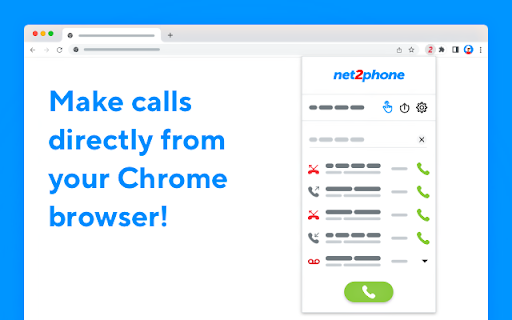
net2phone for Chrome seamlessly connects to your net2phone account to provide an easy and convenient way to call from your browser.

Net2phone Chrome Extension functionality:

- Dial-pad to call any number right from the toolbar
- Click-to-call any number on any website
- See all your history, recent calls, and take action - all without leaving the page
- Listen to your voicemail
- Choose which of your net2phone numbers you’d like to place the call from
- Use the URL Feature to create “screen pops” on incoming calls. This feature, when configured and turned on, will trigger your browser to open a new tab with a URL of your choice upon receiving an incoming call.

Install net2phone for Chrome and supercharge your web browsing experience today!

Click-to-Call usage:
You can use the extension dial pad to call a number or call back a recent number by clicking the green phone icon.

You can also type "-call" in the chrome URL box followed by a number. This will give you the option to dial directly without leaving the page.
Additionally, you can place a call using the "Click to Call" feature. Click the phone icon next to any number on any web page, and the call will be connected to your selected line.


URL Feature usage:
By using the URL Feature located behind the gear icon, you will be able to automatically open a new browser tab with a predetermined URL. This feature will be triggered upon receiving an inbound call. When a call comes in, your browser will open “Screen Pop”, a new tab to your preconfigured URL.

URL Feature usage example:
You would like to have a new tab opened to your browser-based CRM using the caller info to take you right to your client’s CRM contact page.

Example: https://www.google.com/search?q=&=%7Bfrom_number%7D
If you receive a call from 1-212-555-1212, https://www.google.com/search?q=12125551212 will open on your screen.
Technical
- Version
- 2.6.3
- Manifest
- V3
- Size
- 1.79MiB
- Min Chrome
- 88
- Languages
- 1
- Featured
- No
Metadata
- ID
- nlagodpbpbdgiekgdjlajdgjelbjleaj
- Developer ID
- uf345253487323b306f890e9f6d442109
- Developer Email
- [email protected]
- Created
- Sep 18, 2019
- Last Updated (Store)
- Mar 24, 2026
- Last Scraped
- Jun 21, 2026
- Website
- —
- Support URL
- —
- Privacy Policy
- https://www.net2phone.com/privacy-policy
Similar extensions
Alternatives to net2phone for Chrome, ranked by description similarity.

net2phone Canada for Chrome
A net2phone browser extension to connect with net2phone features.
681
★ 4.2

NEXTGEN Click to Call
Integration powered by NEXTGEN
86
★ 5.0

Click To Call Chrome Extension
This chrome extension use for click to call any number from chrome browser developed by TechExtension (www.techextension.com).
6.0K
★ 3.4

Click-to-Call for Web and CRM
Click to Call dialing from web pages, integration with any softphone, screen pops in Salesforce and other CRMs
4.0K
★ 4.7

MyOperator Click to Call
Use MyOperator's Click2Call feature to work more efficiently - directly call numbers displayed in your Chrome browser without…
1.0K
★ 4.0

RingCentral RingCX Chrome Extension
RingCentral RingCX Chrome Extension
3.0K
★ 4.0

TeleVoIPs
Integration powered by TeleVoIPs
168

TeleGo
Dial Right From Your Browser
1.0K
★ 4.7
Data sourced from the Chrome Web Store · last verified Jun 21, 2026.