
MyOperator Click to Call
Use MyOperator's Click2Call feature to work more efficiently - directly call numbers displayed in your Chrome browser without…
As of June 2026, MyOperator Click to Call has 1,000 users and a 4.00/5 rating from 4 reviews in the Workflow & Planning category.
Usersno change0%
1.0K
1,000
Ratingno change0%
4.00
4 reviews
Reviewsno change0%
4
Version
2.0.9
Manifest V3
History
2 snapshotsTracking since Apr 18, 2026.
View as table
| Date | Users | Rating | Reviews | Version |
|---|---|---|---|---|
| Apr 18, 2026 | 1.0K | 4.00 | 4 | 2.0.9 |
| Apr 27, 2026 | 1.0K | 4.00 | 4 | 2.0.9 |
| Now | 1.0K | 4.00 | 4 | 2.0.9 |
Permissions & access
- Permissions
- storagenotificationstabs
- Host access
- None declared
Screenshots


About
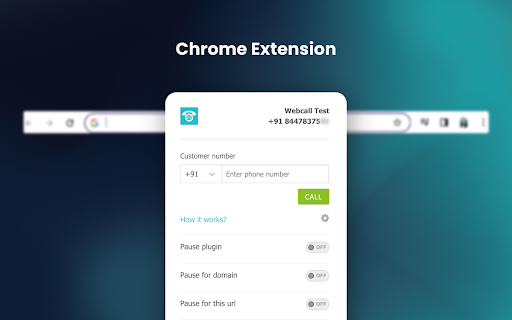
Use MyOperator's Click2Call feature to work more efficiently - directly call numbers displayed in your Chrome browser without having to go to your MyOperator dashboard

This increases the work efficiency by making calls from your CRM web page without having to copy-paste the number.

How it works?
1. Add this extension to your chrome browser
2. Sign in to your MyOperator account from https://app.myoperator.com/ or Create a MyOperator demo account from https://myoperator.com/
3. Go to any CRM that your use or website (say your prospective client's website) where phone number is given
4. MyOperator chrome extension will automatically detect phone numbers present on that page and add a MyOperator call icon beside these phone numbers
5. Press on Call button to make the call

You can also initiate calls from the extension popup itself without having to go to MyOperator Dashboard. Just click on the extension icon on the address bar, and type in the number that you want to call.

MyOperator is a cloud-based call management system that provides solutions such as IVR, virtual number, toll-free number, cloud EPABX, automatic call distribution, call tracking & recording, reports etc. for business.

PLEASE NOTE: MyOperator account is required to use this extension. For a free trial of MyOperator business phone system: https://myoperator.com
The incoming call notification is supported on Chrome version 116+.

*Currently only serving Indian accounts.
Technical
- Version
- 2.0.9
- Manifest
- V3
- Size
- 245KiB
- Min Chrome
- 88
- Languages
- 1
- Featured
- No
Metadata
- ID
- hnlocbghekoeogmbhhphhpjldbipmnhd
- Developer ID
- uf17876f3ad332dcb77ba382f8651ed0b
- Developer Email
- [email protected]
- Created
- Dec 16, 2018
- Last Updated (Store)
- Dec 12, 2025
- Last Scraped
- Jun 2, 2026
- Website
- myoperator.com
- Support URL
- —
Similar extensions
Alternatives to MyOperator Click to Call, ranked by description similarity.

net2phone Canada for Chrome
A net2phone browser extension to connect with net2phone features.
681
★ 4.2

net2phone for Chrome
A net2phone browser extension to connect with net2phone features.
2.0K
★ 5.0

Plivo CX Service
Call any phone number from your helpdesk, CRM or any website.
65

Click To Call Chrome Extension
This chrome extension use for click to call any number from chrome browser developed by TechExtension (www.techextension.com).
6.0K
★ 3.4

RingCentral RingCX Chrome Extension
RingCentral RingCX Chrome Extension
3.0K
★ 4.0

KrispCall Dialer
Easily dial phone numbers on any web page. Make a phone call to the numbers available on CRM platforms with the tap of a button.
892
★ 4.7

TeleGo
Dial Right From Your Browser
1.0K
★ 4.7

Ooma Office for Chrome
Ooma Office for Chrome extension brings your Ooma Office experience to your Chrome browser.
5.0K
★ 5.0
Data sourced from the Chrome Web Store · last verified Jun 2, 2026.