
npSURFER
An overlayed, interactive grid for opening links.
As of June 2026, npSURFER has 1 users in the Workflow & Planning category.
Usersno change0%
1
1
Ratingno change0%
—
— reviews
Reviewsno change0%
—
Version
0.0.0.6
Manifest V3
History
1 snapshotsTracking since May 3, 2026.
Not enough history yet for this metric — the chart fills in as we collect more snapshots.
View as table
| Date | Users | Rating | Reviews | Version |
|---|---|---|---|---|
| May 3, 2026 | — | — | — | 0.0.0.6 |
| Now | 1 | — | — | 0.0.0.6 |
Permissions & access
- Permissions
- None declared
- Host access
- None declared
Screenshots


About
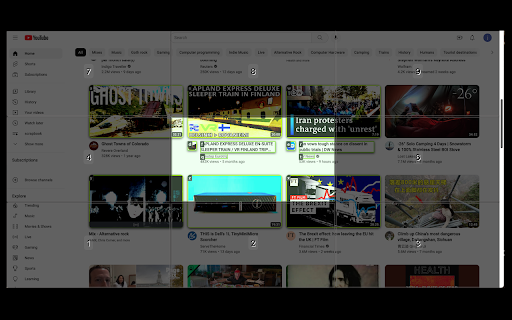
npSURFER lets you browse websites without clicking the mouse.  You just use your number pad.

When you press a numberpad key, a grid appears on top the web page and it is divided into cells corresponding to the numberpad keys.  For any number key that is pressed, that is the cell that is highlighted on the overlayed grid.  This isolates for you the area where the hyperlink is located that you want to click.  Within that cell, all of the links are labeled with key labels ('a','s','d','f', etc.).  Press the key (like 'f') for the link that you want to click.

Watch the video demo to see it in action.

npSURFER works for conventionally-coded websites like Google, YouTube, Twitter, but is not without occasional glitches when the websites are coded differently.


Future releases:

--- Address incompatibility with websites that make use of the shadow DOM, like MSN.com.
Technical
- Version
- 0.0.0.6
- Manifest
- V3
- Size
- 210KiB
- Min Chrome
- 88
- Languages
- 1
- Featured
- No
Metadata
- ID
- adooldnhbmjlcpekjbcmeiphkdfhgffc
- Developer ID
- ue04993f1e2a730b5afc03c2a74babe67
- Developer Email
- [email protected]
- Created
- Nov 17, 2022
- Last Updated (Store)
- Dec 6, 2022
- Last Scraped
- Jun 2, 2026
- Website
- npsurfer.com
- Support URL
- —
- Privacy Policy
- http://redesign.codes/pp/
Similar extensions
Alternatives to npSURFER, ranked by description similarity.

Key Surf
Supercharge your browsing with Key Surf. Ditch the clicks, boost your speed, and navigate the web like a pro. Download now! 🚀
34
★ 5.0

ChromeKeys
Extra keyboard shortcuts from Chrome
26
★ 5.0

Page Surfer
Auto-scroll web pages at your desired speed with the click of a button. Start, stop, and adjust scrolling speed with ease.
—

Spacebar Drag
Use spacebar to scroll the window around with precision.
14

Keyboard Navigation
Allows you to brows only with your keyboard. Press '.' and required chars to jump to link. Press 'n' or 'p' to scroll down or up.
133
★ 5.0

Page Turner
Navigate paginated webpages using your keyboard's arrow keys. Perfect for search results, image galleries and more.
129
★ 4.1

browserkeynav
Fast browser navigation/interaction with keyboard only
Click using keyboard
- press 'f' to display key overlay (this will display…
—

WebLook
Peek inside any link instantly without leaving your page. Hold Shift and hover to preview links with a clean, adaptive UI.
14
Data sourced from the Chrome Web Store · last verified Jun 2, 2026.