HelloClips
A free and private clipping tool for writers, podcasters, sales professionals — anyone compiling text research for any purpose.
As of June 2026, HelloClips has 104 users and a 3.67/5 rating from 3 reviews in the Workflow & Planning category.
Usersdown 8.0 percent−8.0%
104
104
Ratingno change0%
3.67
3 reviews
Reviewsno change0%
3
Version
0.52
Manifest V3
History
3 snapshotsTracking since Apr 1, 2026.
View as table
| Date | Users | Rating | Reviews | Version |
|---|---|---|---|---|
| Apr 1, 2026 | 113 | 3.67 | 3 | 0.52 |
| May 2, 2026 | 116 | 3.67 | 3 | 0.52 |
| Jun 1, 2026 | 111 | 3.67 | 3 | 0.52 |
| Now | 104 | 3.67 | 3 | 0.52 |
Permissions & access
- Permissions
- tabsclipboardWritecontextMenus
- Host access
- https://*/*, http://*/*
Screenshots


About
HELLOCLIPS HAS EVOLVED! A massively new and improved version is now available, but renamed as OutlierClips, with more functionality coming very soon.

PLEASE CHECK OUT OUTLIERCLIPS: https://chrome.google.com/webstore/detail/outlierclips/nedaclhgmnpefbdepagkknapbgdalcej

Easily clip and prepare text-based research for your blog posts, news stories, research papers, sales calls, or any other upcoming event.

No account required!

If you spend any amount of time clipping online research in text form, but want the freedom of using whatever note or research app you like, HelloClips is the perfect companion.

Gathering background information for an upcoming meeting with a sales prospect? HelloClips is a great capture tool for this.

Researching a topic for a new story or blog post? HelloClips makes compiling and preparing this easy.

Doing due diligence on an employee for the hiring process? HelloClips is a great, free choice.

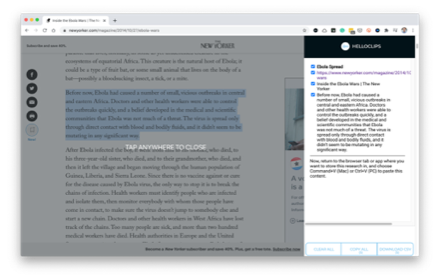
Simply highlight the text you want on any page, right-click and select HelloClips from the pop-up context menu that appears OR click the HelloClips extension icon in the top right corner of your browser, then name your clip. Three things are instantly captured at once by activating the extension:

1) The text you highlighted/selected
2) The URL of the web page you're on
3) The web page title
4) The name you gave that clip

You can deselect any of these three that you don't need to capture. And you don't have to choose File | Copy or use any other shortcut.

You then continue clipping text research from one website to another. Spend 10 minutes, or an hour, or whatever amount of time researching your topic. HelloClips adds each clip to create a clean, running capture of content.

When you're done clipping, click the bottom button in the HelloClips overlay that says "Copy All," then open up your app or tool of choice to paste all of the content you've captured: Google Docs, Evernote, Notion, Apple Notes, whatever you prefer.

Simply type Ctrl-V (PC) or Command-V (Mac) to paste all of your content in plain text. No matter how many clips of content you captured. One or 1,000.

If you're using Google Sheets or Airtable or some other database to paste your content in a more structured way, HelloClips supports this. You can tap the "Download CSV" button at the bottom of the screen after clipping your last item of research and the .csv file will download to your computer. You can import into Google Sheets or any database tool, like our favorite, Airtable.

That's it. Faster research, encouraging you to do more to prepare your podcast episodes.
Technical
- Version
- 0.52
- Manifest
- V3
- Size
- 28.63KiB
- Min Chrome
- 88
- Languages
- 1
- Featured
- No
Metadata
- ID
- acfipnalhoifpkjjkmbpbogkihffnifi
- Developer ID
- ud5ef847459e4357d339d73412fab5d2f
- Developer Email
- [email protected]
- Created
- Jun 29, 2019
- Last Updated (Store)
- Dec 13, 2024
- Last Scraped
- Jun 1, 2026
- Website
- —
- Support URL
- https://helloclips.carrd.co
- Privacy Policy
- https://helloclips.co/
Similar extensions
Alternatives to HelloClips, ranked by description similarity.
OutlierClips
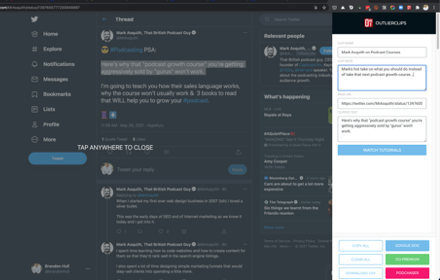
A free and private clipping tool for podcasters needing to capture text content to prepare their podcast episodes.
45
★ 2.0

Clipper
Easy click to copy & pase text clips from extension, dedicated 'Email' button. Create notes, bookmarks, email templates, etc.
5.0K
★ 4.2

ClipKeep - Web Clipper
ClipKeep is a web clipper that allows users to effortlessly capture, organize, and revisit key insights from the web.
137
★ 4.6

ClipSnap
Clip text and links with one click.
2

Duster Clips
Capture text and URLs from any website into your Duster Clips projects
7
★ 5.0

Instant ClipBoard
A powerful clipboard manager with a floating button that works on any tab
3
★ 5.0

Clipity: Bookmarks, Clip with Highlight
Capture short clips from your favorite website and store them in an easy to use interface.
117
★ 5.0

NoteSkrib Clipper
Capture web content, videos, and images to your NoteSkrib account
6
Data sourced from the Chrome Web Store · last verified Jun 1, 2026.