
Microsoft Single Sign On
Sign in to supported websites with your Microsoft work or school accounts on Windows and macOS platforms.
As of May 2026, Microsoft Single Sign On has 36,000,000 users and a 2.24/5 rating from 938 reviews in the Workflow & Planning category.
Usersno change0%
36.0M
36,000,000
Ratingdown 0.9 percent−0.9%
2.24
938 reviews
Reviewsup 2.7 percent+2.7%
938
Version
1.0.11
Manifest V3
History
2 snapshotsTracking since Apr 25, 2026.
View as table
| Date | Users | Rating | Reviews | Version |
|---|---|---|---|---|
| Apr 25, 2026 | 36.0M | 2.26 | 913 | 1.0.11 |
| May 21, 2026 | 36.0M | 2.25 | 930 | 1.0.11 |
| Now | 36.0M | 2.24 | 938 | 1.0.11 |
Permissions & access
- Permissions
- nativeMessaging
- Host access
- None declared
Screenshots

About
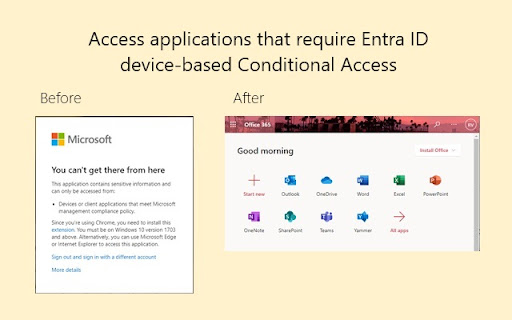
Use this extension to sign in to supported websites with Microsoft work or school accounts on Windows (10 and later versions) or macOS (11 and later versions). If you have a Microsoft Entra ID on your Windows or macOS computer, this extension enables improved Single Sign On for supported websites. You may still see additional authentication prompts like multi-factor verification depending on the access requirements for various applications, resources, and organizations.


This extension is required for certain device-based conditional access policies for Microsoft Entra ID. https://learn.microsoft.com/en-us/entra/identity/conditional-access/concept-conditional-access-conditions#supported-browsers


For macOS, this extension requires the device to be managed and requires the additional installation of Company Portal: https://learn.microsoft.com/en-us/mem/intune/user-help/enroll-your-device-in-intune-macos-cp


Note: If you are experiencing difficulties with signing in or accessing resources, it could be related to your organization’s device policies. Please submit a support ticket directly to Microsoft through your tenant’s subscription. The developer email address for the extension is not an avenue for customer support.
Technical
- Version
- 1.0.11
- Manifest
- V3
- Size
- 8.05KiB
- Min Chrome
- 88
- Languages
- 1
- Featured
- No
Metadata
- ID
- ppnbnpeolgkicgegkbkbjmhlideopiji
- Developer ID
- u1ba5d2e6b1765ac1983d3e1f17abc3fb
- Developer Email
- [email protected]
- Created
- Jan 31, 2017
- Last Updated (Store)
- Aug 1, 2024
- Last Scraped
- May 21, 2026
- Website
- —
- Support URL
- https://learn.microsoft.com/en-us/entra/fundamentals/how-to-get-support#open-a-support-request
- Privacy Policy
- https://privacy.microsoft.com/en-us/PrivacyStatement
Similar extensions
Alternatives to Microsoft Single Sign On, ranked by description similarity.
Use My Current Account To Login Microsoft SSO
Log in Microsoft SSO silently using your MSA account (Live ID, AAD, Azure AD, Outlook 365). Remove CONNECTED TO WINDOWS account.
—
★ 5.0

USO Chrome Extension for Web Apps
For Single Sign-On to web apps for Windows, MacOS and Linux
72

Workplace by OS33
Login to a company-branded dashboard with secure access to all your web and hosted applications.
30.0K
★ 3.7
mSecure
Companion browser extension for mSecure that provides auto-login features in your web browser.
3.0K
★ 2.1

Single Sign-on Assistant
A secure way for Access Manager, CloudAccess and SecureLogin users to automate web and app logins for a single sign-on experience.
—
★ 4.4

My Apps Secure Sign-in Extension
My Apps Secure Sign-in Extension
2.0M
★ 2.2

USO Chrome Extension (Chrome Manifest V3)
USO Extension for Chrome Native Messaging.
200.0K

Silverfort
Silverfort Multi-Factor Authentication
6.0K
★ 4.8
Data sourced from the Chrome Web Store · last verified May 21, 2026.