Screenshot to Notion & Annotate
Snap and embed website and scrolling screenshots directly to Notion with annotation tools like arrows, callouts, crop +30 more tools
As of May 2026, Screenshot to Notion & Annotate has 2,000 users and a 4.80/5 rating from 20 reviews in the Productivity category.
Usersdown 33.3 percent−33.3%
2.0K
2,000
Ratingdown 4.0 percent−4.0%
4.80
20 reviews
Reviewsup 5.3 percent+5.3%
20
Version
1.0.3
Manifest V3
90-day change · In the last 90 days this extension lost 1.0K users.
History
2 snapshotsTracking since Apr 24, 2026.
View as table
| Date | Users | Rating | Reviews | Version |
|---|---|---|---|---|
| Apr 24, 2026 | 3.0K | 5.00 | 19 | 1.0.3 |
| May 19, 2026 | 3.0K | 5.00 | 19 | 1.0.3 |
| Now | 2.0K | 4.80 | 20 | 1.0.3 |
Permissions & access
- Permissions
- storageclipboardWriteactiveTabtabsdesktopCapturescriptingcookies
- Host access
- https://markuphero.com/, https://storage.googleapis.com/, https://api.notion.com/, <all_urls>
Screenshots

About
Screenshot to Notion is a free plugin from Markup Hero that supercharges Notion with instant website and scrolling screenshots embedded directly into documents and databases.

Then add powerful annotation tools on screenshots, images and PDF's with real-time updates direction inside Notion.

It's free, and no sign-up is required. Or upgrade to our paid version is $4/month for tons of pro features. Read below for a coupon code to try pro for free!

SCREENSHOTS TO NOTION

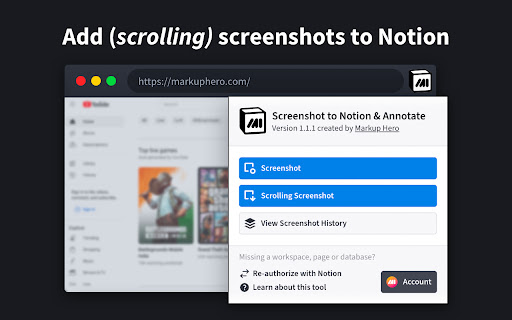
1️⃣ Website Screenshot - Snap and embed exactly what shows in the current tab
2️⃣ Scrolling Screenshot - Capture an entire website, from top to bottom of scroll

ANNOTATING FILES IN NOTION

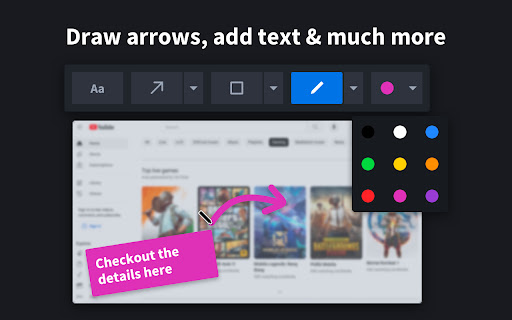
1️⃣ Markup Tools - Text, Callout, Arrow, Pen, Line, Shapes, Highlight
2️⃣ Editing Tools - Crop, Blur, Colors, Sizes, Multi-Select, Zoom
3️⃣ Insert Images - Add images or other screenshots to any markup
4️⃣ Multiple Pages - Add, remove and reorder pages just like a PDF
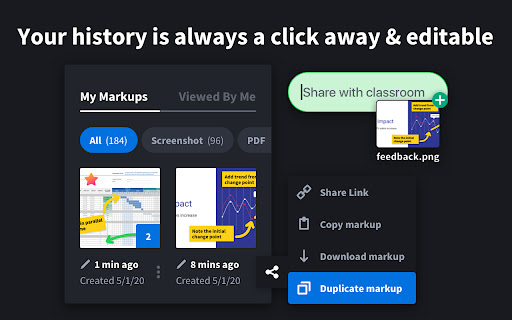
5️⃣ Sharing - Copy links for email, SMS, Slack, social media, + more
6️⃣ Copy to Clipboard - Paste screenshot with annotations anywhere
7️⃣ Download & Export - Save as an image or PDF to your computer
8️⃣ Stay Organized - Title screenshots, organize in folders, and search
9️⃣ Privacy - Share links anyone can view, private to you or enable collab
🔟 Collaborate - Allow others to add annotations to your screenshots

WHY NOTION USERS NEED MARKUP HERO

1️⃣ It's easy to paste an image into Notion, but we can't add arrows, highlights and other markup and instantly see the updates in Notion?
2️⃣ It's easy to share an entire page in Notion, but we can't share an image or PDF with annotations that are embedded in a document
3️⃣ It's easy to collaborate with people in Notion, but we can't share an image or PDF for multiple people to comment or add annotations to

------------------

NO ADS, WE RESPECT PRIVACY
Free version never has ads and we never sell your information.

FOREVER FREE OR UPGRADE
Use Markup Hero without even creating an account. Upgrade if you want advanced editing and annotation features and to save unlimited screenshots.

WANT A COUPON CODE
Upgrade and get 1 month free on the monthly plan (use code 1MONTHFREE) or get 3 months free on the annual plan (use code 3MONTHFREE).

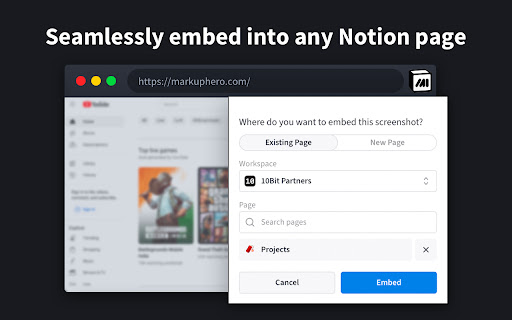
FAST AND EASY SCREENSHOT EMBEDS
Instantly snap entire websites and embed into any Notion document or database. Then add annotations with a single click and see the real-time changes in your Notion document.

SIMPLE AND POWERFUL ANNOTATION
Don't just take screenshots, add arrows, callouts, highlights, shapes, pen, blur and 20+ more tools. Always editable and saved forever.

COLLABORATE WITH OTHERS
Markup Hero is the only screenshot tool that let's other people add annotations to your markup. This can be enabled or disabled for each screenshot.

ADD SIGNATURES
Built in signature tool makes approvals and document signing simple and fast.

CROP, ROTATE, AND ZOOM
Crop and un-crop any screenshot instantly, rotate the entire canvas, and zoom in/out on desktop, browser or mobile device.

FREE DESKTOP SCREENSHOT APP
Install our desktop screenshot tool as well and replace the built in Mac or Windows app that is very limited in capability. All screenshots from Chrome or Desktop are saved in the same place. A single repo for all your screenshots and annotations.

------------------

PRODUCTIVITY BENEFITS

1️⃣ Capture Ideas - Instantly capture and share ideas with Markup Hero's screenshot app and image / PDF uploader. Also make sure to check out our Google Drive App to quickly annotate and draw on Google Docs, Google Sheets and Google Slides.
2️⃣ Communicate Clearly - Clearly communicate your message on any image, PDF or website with easy to use annotation tools.
3️⃣ Save Time - Access all your markups and annotations with a click and make edits on the fly.
4️⃣ Stay Organized - Keep all your markups organized with titles, collections, history and custom privacy settings.

WHO IS THIS FOR

1️⃣ MILLIONS of NOTION users who want embed and annotate screenshots, PDF's and images.
2️⃣ Entrepreneurs - Literally do a million things with Markup Hero.
3️⃣ Marketers - Create comps, collect feedback, showcase concepts.
4️⃣ Product Managers - Gather input, show features, explain faster.
5️⃣ Educators - Grade work, give feedback to students.
6️⃣ Students - Complete assignments, ask questions.
7️⃣ Engineers - Showcase code, do QA, get input.
8️⃣ Freelancers - Build comps, share ideas.
9️⃣ Sales People - Create sales collateral, send feedback.
🔟 Creators - Tell stories, get feedback, make things.

------------------

WE HEAR YOU
Highly active development. More features every month. Highly stable platform. Responsive customer support. Easy billing, refunds. No hassle. Literally the easiest, best, simpliest and most versitile tool you will ever use.

1️⃣ Check our roadmap for updates and planned features at https://roadmap.markuphero.com
2️⃣ Visit our support portal or chat bubble to submit a ticket or get help at https://help.markuphero.com
3️⃣ Download our desktop app at https://markuphero.com/download
4️⃣ Get our free Slack integration at https://markuphero.com/integrations/slack-app.html
5️⃣ Get our free Google drive app at https://markuphero.com/integrations/google-drive-app.html
6️⃣ Integrate our API with your SaaS application, learn more at https://markuphero.com/integrations/annotation-api.html
7️⃣ See our pricing and feature list at https://markuphero.com/pricing

If you use Notion like we use Notion then you know the only thing missing is embedding screenshots and annotating files directly from Notion pages. Markup Hero for Notion is the most powerful plugin you will ever try.
Technical
- Version
- 1.0.3
- Manifest
- V3
- Size
- 173KiB
- Min Chrome
- 88
- Languages
- 1
- Featured
- Yes
Metadata
- ID
- lkedoimppfegdfhggggbfohioeafkmlp
- Developer ID
- ub5008d6b08f99061971c459f9e4cede0
- Developer Email
- [email protected]
- Created
- Jan 14, 2024
- Last Updated (Store)
- Jan 24, 2024
- Last Scraped
- May 19, 2026
- Website
- markuphero.com
- Support URL
- https://help.markuphero.com
- Privacy Policy
- https://markuphero.com/privacy
Similar extensions
Alternatives to Screenshot to Notion & Annotate, ranked by description similarity.

Scrolling Screenshot & Full Page Capture
Capture long websites. Upload PDF's. 20+ annotation tools. Crop, export, share links. 5+ screenshot modes. Edit forever.
50.0K
★ 4.2

MarkupShot – Screen Recorder, Full Page Screenshot & Annotation Tool
Screen recorder with webcam, full-page screenshots, annotation, website quotes, and social sharing in one tool.
—
★ 5.0

SnipNote
High-performance screenshot notebook and markdown notes
3

SnapNote Pro
Screenshot, Record & Annotate Like a Pro
6
★ 5.0

SnapShot Pro - Screenshot & Annotate Tool
Capture screenshots & annotate instantly. Draw arrows, add text, blur sensitive info. Professional screen capture for Chrome.
3

MarkShot: Make Screenshot & Annotate
Make screenshots instantly, annotate with a pencil. Result is auto-copied to clipboard. No registration, no cloud, no accounts.
25

Notionizer
Convert markdown (tables, lists, etc.) to Notion-compatible format with one click
4

Instant Annotator
Stop taking messy screenshots. Instantly draw, highlight, blur, and annotate any webpage with one clean, powerful toolbar
27
★ 5.0
Data sourced from the Chrome Web Store · last verified May 19, 2026.