
Bulk Image Grabber
Bulk Image Grabber: Download all page images.
As of June 2026, Bulk Image Grabber has 9 users in the Developer Tools category.
Usersup 125.0 percent+125.0%
9
9
Ratingno change0%
—
— reviews
Reviewsno change0%
—
Version
1.0
Manifest V3
History
7 snapshotsTracking since Apr 4, 2026.
View as table
| Date | Users | Rating | Reviews | Version |
|---|---|---|---|---|
| Apr 4, 2026 | 4 | — | — | 1.0 |
| Apr 20, 2026 | 5 | — | — | 1.0 |
| Apr 29, 2026 | 9 | — | — | 1.0 |
| May 9, 2026 | 11 | — | — | 1.0 |
| May 17, 2026 | 10 | — | — | 1.0 |
| May 26, 2026 | 9 | — | — | 1.0 |
| Jun 4, 2026 | 11 | — | — | 1.0 |
| Now | 9 | — | — | 1.0 |
Permissions & access
- Permissions
- None declared
- Host access
- None declared
Screenshots
About
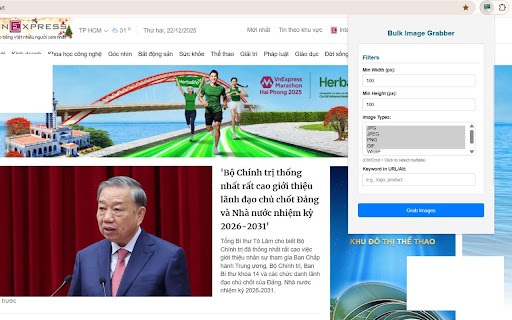
Bulk Image Grabber is a powerful and easy-to-use Chrome extension that allows users to quickly collect and download all images from a web page in one action.

Instead of saving images individually, this extension scans the current page and gathers available images automatically, helping users save time and streamline repetitive tasks. It is especially useful for designers, marketers, researchers, content creators, and anyone who needs to collect visual assets from websites efficiently.

Bulk Image Grabber supports a wide range of image types commonly used on modern websites. By simplifying the image collection process, it enables faster workflows for design reference, content review, research, and offline access to visual materials.

The extension is lightweight and operates directly in the browser without complex setup. It works on the active tab, performs quickly, and does not interfere with normal browsing performance. Bulk Image Grabber is designed for productivity and convenience, without collecting personal data.

Key features include:

Download all images from a webpage in one action

Save time compared to manual image downloading

Ideal for design, research, and content workflows

Simple and user-friendly interface

Lightweight and fast performance

Whether you are gathering design inspiration, preparing presentations, or collecting reference materials, Bulk Image Grabber provides a practical solution for efficiently downloading images from web pages.
Technical
- Version
- 1.0
- Manifest
- V3
- Size
- 36.2KiB
- Min Chrome
- 88
- Languages
- 1
- Featured
- No
Metadata
- ID
- pledfejlddoehomkffgokfnggifobdcf
- Developer ID
- ub8e4b34dc11d4ccfcd894f8035149edf
- Developer Email
- [email protected]
- Created
- Dec 22, 2025
- Last Updated (Store)
- Dec 27, 2025
- Last Scraped
- Jun 4, 2026
- Website
- —
- Support URL
- https://mi88at.com/
- Privacy Policy
- —
Similar extensions
Alternatives to Bulk Image Grabber, ranked by description similarity.

Image Grabber
Extracts and downloads images from the current web page.
27

Image Downloader & Scraper – Save All Images in Bulk
Download all images from any webpage in one click. Batch download, filter by type, and save images fast
366
★ 4.5

Image URL Extractor
Extract and display all image URLs from the current page with a vibrant UI.
319

Bulk Domain Checker
Check domain availability in bulk with Bulk Domain Checker. Search multiple domains, filter by TLD, sort results, export to CSV.
10

Bulk Image URL Scraper
Extracts and collects all image URLs from any webpage with a single click
132

Web Image Collector
Collect all images from the current page and download them.
10

PixGrab - Bulk Image Downloader
Simple bulk image downloader with filters and downloads across multiple websites.
17

PictureHarvest - Bulk Image Downloader
Extract all images (visible, hidden, CSS, data, blob, iframes) from any webpage and download them individually or as a ZIP.
85
★ 5.0
Data sourced from the Chrome Web Store · last verified Jun 4, 2026.