
Bulk Domain Checker
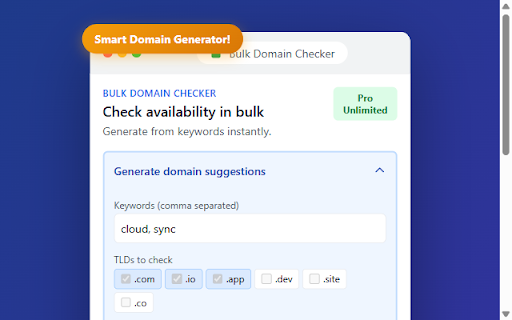
Check domain availability in bulk with Bulk Domain Checker. Search multiple domains, filter by TLD, sort results, export to CSV.
As of June 2026, Bulk Domain Checker has 10 users in the Developer Tools category.
Usersup 100.0 percent+100.0%
10
10
Ratingno change0%
—
— reviews
Reviewsno change0%
—
Version
1.0.16
Manifest V3
90-day change · In the last 90 days this extension 3 version updates.
History
9 snapshotsTracking since Apr 1, 2026.
View as table
| Date | Users | Rating | Reviews | Version |
|---|---|---|---|---|
| Apr 1, 2026 | 5 | — | — | 1.0.9 |
| Apr 16, 2026 | 4 | — | — | 1.0.9 |
| Apr 22, 2026 | 6 | — | — | 1.0.11 |
| Apr 27, 2026 | 6 | — | — | 1.0.12 |
| May 4, 2026 | 5 | — | — | 1.0.12 |
| May 10, 2026 | 6 | — | — | 1.0.16 |
| May 21, 2026 | 7 | — | — | 1.0.16 |
| May 27, 2026 | 8 | — | — | 1.0.16 |
| Jun 3, 2026 | 12 | — | — | 1.0.16 |
| Now | 10 | — | — | 1.0.16 |
Permissions & access
- Permissions
- storage
- Host access
- https://rdap.org/*, https://cloudflare-dns.com/*, https://bulkdomainchecker.site/*
Screenshots



About
Tired of right-clicking to save images one by one? Need to download all images from a webpage but they're scattered, lazy-loaded, or hidden in CSS backgrounds?

Bulk Image Downloader solves this in one click. No more manual downloads—save all images from any website instantly.

⚙️ How It Works (3 Simple Steps)

1. Scan → Click the extension icon and hit "Scan Page for Images"
2. Filter → Choose images by size, type, or custom patterns
3. Download → Get them individually or as a single ZIP file

Done. That's it. No complicated settings, no sign-ups, no subscriptions.

🎯 Perfect For

📸 Designers & Artists — Grab inspiration boards, collect reference images, download design mockups from portfolio sites or galleries.

🛍️ E-commerce & Research — Save product photos in bulk for catalogs or competitor analysis.

📚 Content Creators — Pull images from galleries for blog posts, social media content, or presentations.

🎨 Web Developers — Extract assets, icons, backgrounds from websites for analysis or testing.

📂 Archiving & Backup — Preserve entire image galleries before they disappear.

🔧 Powerful Features

✅ Smart Image Detection — Finds all images including <img> tags, CSS backgrounds, srcset, <picture> elements, and data URIs.

✅ Advanced Filters
• Filter by minimum dimensions (width/height in pixels)
• Select specific types: JPG, PNG, WEBP, GIF, SVG
• Quick presets: "Select All" or "Large Only (≥500px)"

✅ Custom Filename Patterns — Rename using tokens: {title}, {hostname}, {width}x{height}, {index}, {date}, {alt}

✅ Dual Download Modes
• Individual Downloads — Save each image separately
• ZIP Archive — Package everything into one file

✅ Preview Grid — See thumbnails before downloading. Select/deselect specific images.

📋 How to Use

1. Visit any webpage with images
2. Click the extension icon in your Chrome toolbar
3. Click "Scan Page for Images"
4. Review results and apply filters if needed
5. Click "Download All" or "Build ZIP"

🔒 Privacy & Permissions

🔐 100% Local Processing — All scanning happens on your device
🔐 No External Servers — We never send your data anywhere
🔐 No Tracking — Zero analytics or data collection
🔐 No Ads — Clean interface, no distractions

Permissions explained:
• downloads — To save images to your computer
• storage — To remember your filter preferences
• tabs — To scan the current page
• scripting — To detect images on the page
• host_permissions — To fetch cross-origin images

❓ FAQ

Q: Does it work on all websites?
A: Yes! Works on social media, galleries, e-commerce, portfolios, news sites, and more.

Q: Can it get lazy-loaded images?
A: Yes! Scroll to load images, then scan.

Q: What formats are supported?
A: JPG, PNG, WEBP, GIF, and SVG.

Q: Is there a download limit?
A: No artificial limits. Download thousands of images if needed.

⚡ Performance

🚀 Lightning fast scanning (< 1 second on most pages)
🚀 Efficient ZIP creation (handles 1000+ images)
🚀 Minimal memory footprint
🚀 Chrome Manifest V3 compliant

🆚 Why Choose This?

✅ No Sign-Up Required — Install and use immediately
✅ Truly Free — No hidden costs or locked features
✅ No Data Collection — Complete privacy
✅ Modern Architecture — Built with Manifest V3
✅ Active Development — Regular updates

🚀 Get Started

1. Click "Add to Chrome"
2. Pin the extension to your toolbar
3. Visit any webpage with images
4. Click the icon and start downloading!

⭐ Love it? Leave a review!

📧 Support: [email protected]
Technical
- Version
- 1.0.16
- Manifest
- V3
- Size
- 1.03MiB
- Min Chrome
- 88
- Languages
- 54
- Featured
- No
Metadata
- ID
- achelnonefebpapficmoldoanenogonh
- Developer ID
- u20855373b752db606842224856294d42
- Developer Email
- [email protected]
- Created
- Dec 19, 2025
- Last Updated (Store)
- May 1, 2026
- Last Scraped
- Jun 9, 2026
- Website
- —
- Support URL
- https://bulkdomainchecker.site/support
- Privacy Policy
- https://bulkdomainchecker.site/privacy
Similar extensions
Alternatives to Bulk Domain Checker, ranked by description similarity.

Image Downloader & Scraper – Save All Images in Bulk
Download all images from any webpage in one click. Batch download, filter by type, and save images fast
366
★ 4.5

Web Image Collector
Collect all images from the current page and download them.
10

Smart Image Downloader
Find, filter and download all images from any webpage - individually or in bulk
41
★ 1.0

Image Downloader
Download images from the selected page.
4
★ 5.0

Imagery
Download images from any website individually or as a ZIP file with format and size options.
17

Img Wheel Snapper
Download images with a middle click, even if they are hidden under other elements. Converts WebP to PNG/JPEG.
16
★ 5.0

PixGrab - Bulk Image Downloader
Simple bulk image downloader with filters and downloads across multiple websites.
17

Bulk Image Grabber
Bulk Image Grabber: Download all page images.
9
Data sourced from the Chrome Web Store · last verified Jun 9, 2026.