
Tab Search Cleanup
Closes all chrome tabs according to search list.
As of May 2026, Tab Search Cleanup has 4 users and a 5.00/5 rating from 1 reviews in the Productivity category.
Usersno change0%
4
4
Ratingno change0%
5.00
1 reviews
Reviewsno change0%
1
Version
1.0.2
Manifest V3
Permissions & access
- Permissions
- tabsstoragesessions
- Host access
- None declared
Screenshots
About
I usually end up every work week with tons of open tabs that I have to clean up before I start a new week.
Many of the tabs I have to close are just duplicates of the same pages, like Jira/Confluence, search tabs, or other services I'll re-open anyway next time I need them.

So I designed this extension to help me fight the cluttering in my Chrome tabs by going through a pre-defined search list and closing all tabs in which URLs appear in the list.

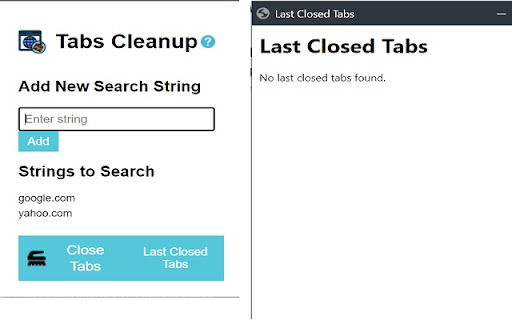
You can also get a list of closed tabs, post-closing, and restore any tab you still need or closed by mistake.

Directions for use:
1) click the extension icon to open the popup.
2) enter any search text in the text box, press "add" or "enter".
3) you can add as many search strings as you would like, they will be saved for you.
4) to remove a search string, click it in the list.
5) to close the tabs filtered by the search list, click "Close Tabs".
6) after tabs were closed, press "Last Closed Tabs" to see a list and restore tabs. (you can also use the built-in history in chrome).

Icons were taken from:
https://www.flaticon.com/free-icons/cleanup
Technical
- Version
- 1.0.2
- Manifest
- V3
- Size
- 116KiB
- Min Chrome
- 88
- Languages
- 1
- Featured
- No
Metadata
- ID
- pkfoapcabnfhgeagindjngakaanlhggb
- Developer ID
- u47fb0935092cf187a2469604d0706caa
- Developer Email
- [email protected]
- Created
- Dec 6, 2023
- Last Updated (Store)
- Dec 6, 2023
- Last Scraped
- May 24, 2026
- Website
- —
- Support URL
- —
- Privacy Policy
- —
Similar extensions
Alternatives to Tab Search Cleanup, ranked by description similarity.

Closed Tabs Recovery: Fast Tab Restore & Search
Instantly recover recently closed tabs. Search and restore multiple tabs with one click.
8

Close all tabs
A Chrome extension to instantly close all open tabs. Simplify your online browsing and web management with one click.
40
★ 5.0

Tab Search
Search through your tabs
7

Card Style Tab Search
List and manage all open tabs in card style, efficiently
10

Close Tabs
Close tabs, save tabs to improve computer performance. Easy open tabs, find tabs, group tabs, backup tabs, manage tabs.
—

Recently Closed Tabs
A Google Chrome extension to reopen recently closed tabs.
55
★ 4.0

Undo Tab Close
Easily restore recently closed tabs
68

Tab Cleaner
Cleans tabs based on selected mode and domain list.
1
Data sourced from the Chrome Web Store · last verified May 24, 2026.