
Copy hyperlink as Edge does
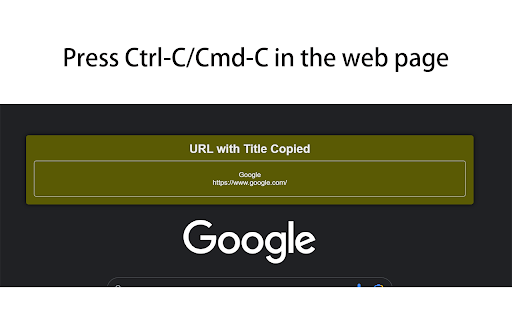
Copy hyperlink as Edge does, just press Ctrl-C/Cmd-C in the web page. Shortcut is configurable.
As of June 2026, Copy hyperlink as Edge does has 246 users and a 2.83/5 rating from 6 reviews in the Productivity category.
Usersup 19.4 percent+19.4%
246
246
Ratingdown 11.6 percent−11.6%
2.83
6 reviews
Reviewsup 20.0 percent+20.0%
6
Version
0.6
Manifest V3
90-day change · In the last 90 days this extension 1 version update, changed permissions.
History
5 snapshotsTracking since Apr 26, 2026.
View as table
| Date | Users | Rating | Reviews | Version |
|---|---|---|---|---|
| Apr 26, 2026 | 206 | 3.20 | 5 | 0.1 |
| May 24, 2026 | 203 | 2.83 | 6 | 0.1 |
| May 30, 2026 | 216 | 2.83 | 6 | 0.6 |
| Jun 6, 2026 | 229 | 2.83 | 6 | 0.6 |
| Jun 15, 2026 | 243 | 2.83 | 6 | 0.6 |
| Now | 246 | 2.83 | 6 | 0.6 |
Changelog
- May 24, 2026description
Copy hyperlink as Edge does, just press Ctrl-C/Cmd-C in the web page. Derived from [Copy url with title].
# Copy Hyperlink as Edge Does

A Chrome extension that mimics Microsoft Edge's built-in "copy page as link" feature — available on any webpage.

## How It Works

Press **Cmd+C** (macOS) or **Ctrl+C** (Windows/Linux) on any webpage **without selecting any text**. Instead of copying nothing, the extension automatically copies the page title and URL as a rich-text hyperlink (an anchor element `<a href="URL">Title</a>`).

If you have text selected, the shortcut behaves normally and copies the selected text.

A small toast notification confirms the copy action.

## Use Cases

Paste the copied hyperlink into any rich-text editor that understands HTML or JavaScript DOM objects, for example:

- Rich-text input fields in web apps (Gmail, Notion, etc.)
- [Obsidian](https://obsidian.md/) and other Markdown editors that accept pasted hyperlinks
- Word processors that preserve hyperlink formatting on paste

## Options

Open `chrome://extensions` → find **Copy hyperlink as Edge does** → **Details** → **Extension options** to customize the shortcut. Click **Record**, press the desired combination (e.g. `Ctrl+Shift+L`), then **Save**.

## Permissions

- Runs on all `http://` and `https://` pages as a content script
- `storage` — to remember your custom shortcut (synced via your Chrome account)
- No background service worker; no data is collected or transmitted

## Source Code

https://github.com/qxj/copy-hyperlink
- May 24, 2026short_description
Copy hyperlink as Edge does, just press Ctrl-C/Cmd-C in the web page.
Derived from [Copy url with title].
Copy hyperlink as Edge does, just press Ctrl-C/Cmd-C in the web page. Shortcut is configurable.
- May 24, 2026category
productivity/workflow
productivity/tools
- May 24, 2026permissions
(empty)
storage
Permissions & access
- Permissions
- storage
- Host access
- None declared
Screenshots

About
# Copy Hyperlink as Edge Does

A Chrome extension that mimics Microsoft Edge's built-in "copy page as link" feature — available on any webpage.

## How It Works

Press **Cmd+C** (macOS) or **Ctrl+C** (Windows/Linux) on any webpage **without selecting any text**. Instead of copying nothing, the extension automatically copies the page title and URL as a rich-text hyperlink (an anchor element `<a href="URL">Title</a>`).

If you have text selected, the shortcut behaves normally and copies the selected text.

A small toast notification confirms the copy action.

## Use Cases

Paste the copied hyperlink into any rich-text editor that understands HTML or JavaScript DOM objects, for example:

- Rich-text input fields in web apps (Gmail, Notion, etc.)
- [Obsidian](https://obsidian.md/) and other Markdown editors that accept pasted hyperlinks
- Word processors that preserve hyperlink formatting on paste

## Options

Open `chrome://extensions` → find **Copy hyperlink as Edge does** → **Details** → **Extension options** to customize the shortcut. Click **Record**, press the desired combination (e.g. `Ctrl+Shift+L`), then **Save**.

## Permissions

- Runs on all `http://` and `https://` pages as a content script
- `storage` — to remember your custom shortcut (synced via your Chrome account)
- No background service worker; no data is collected or transmitted

## Source Code

https://github.com/qxj/copy-hyperlink
Technical
- Version
- 0.6
- Manifest
- V3
- Size
- 14.68KiB
- Min Chrome
- 88
- Languages
- 1
- Featured
- No
Metadata
- ID
- pindpfknjjhmjdpgpfdempcnheecfkah
- Developer ID
- u863d77d7d7a002e8c890dc0ad8c0ccce
- Developer Email
- [email protected]
- Created
- Jun 18, 2023
- Last Updated (Store)
- May 11, 2026
- Last Scraped
- Jun 15, 2026
- Website
- —
- Support URL
- —
- Privacy Policy
- —
Similar extensions
Alternatives to Copy hyperlink as Edge does, ranked by description similarity.

Copy Link Helper
Copy selected text or links in plain text, Markdown, or HTML list format with shortcuts and notifications.
3

Cute Copier
Copy page title and URL as clickable HTML link
7

Paste Assistant
Copie le titre de l'article avec un lien 'voir en ligne' dans le presse-papiers.
8
★ 5.0

Copy Page Title
A simple extension to copy the page title and url.
15
★ 5.0

提取标题/网址 Copy Title/网址
一键提取当前网页的文章标题和网址
33

Copy title and url
quick copy current chrome tab's title and url
15

Copy page title and URL from context menu
Copy the page title and URL from the context (right-click) menu
43
★ 5.0

Copy Text as Link
Copy the selected text as a HTML link to the clipboard that can be pasted in in supported editors with the hyperlink intact.
1.0K
★ 3.5
Data sourced from the Chrome Web Store · last verified Jun 15, 2026.