
BrickTinker
Adds useful features for sellers on BrickLink.com
As of May 2026, BrickTinker has 182 users in the Workflow & Planning category.
Usersdown 8.1 percent−8.1%
182
182
Ratingno change0%
—
— reviews
Reviewsno change0%
—
Version
1.2.2
Manifest V3
History
2 snapshotsTracking since Apr 26, 2026.
View as table
| Date | Users | Rating | Reviews | Version |
|---|---|---|---|---|
| Apr 26, 2026 | 198 | — | — | 1.2.2 |
| May 24, 2026 | 183 | — | — | 1.2.2 |
| Now | 182 | — | — | 1.2.2 |
Permissions & access
- Permissions
- storage
- Host access
- None declared
Screenshots

About
BrickTinker adds useful features for sellers on BrickLink.com. All features can be individually enabled/disabled. Features include:

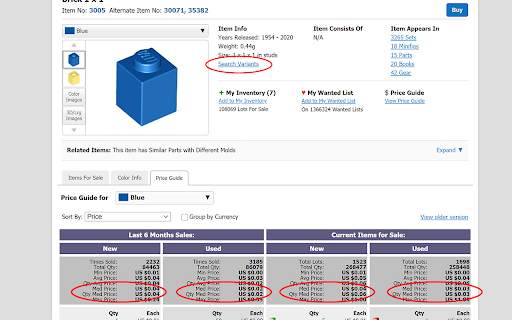
Search Variants Link
Adds a link to catalog entry page to search for variants of that item (e.g., pieces with stickers).

USA Sellers
Defaults the "Items for Sale" list on catalog entry to only USA sellers when the page loads. You can still switch it afterwards.

Show Median Price
Calculates and shows the median price in the Price Guide section of catalog entry and the stand-alone Price Guide, but only if sorted by Price.

USPS Tracking Link
Adds a link on Orders Received page to USPS website for each order that has a tracking number entered. Must have Tracking Number column showing using "Customize Display".

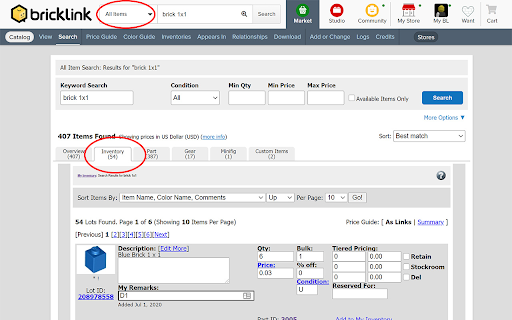
Inventory Tab in Default Search
Adds a tab to "All Items" search results that includes a search of your inventory.

Default to Catalog Search
Defaults the search bar to "Catalog Items" instead of "All Items".

Inventory Page Width
Expands the width of the default inventory page so that inventory category titles to do not line wrap.

"Add to Inventory" Link
Adds a link to each item in inventory detail listing allowing you to add another item of that type to your inventory.

Streamline Inventory Add Page
Removes less used options and explanatory text in the inventory add page and rearranges remaining options to give a more streamlined and compact page that requires less scrolling and/or tabbing. Includes an option to revert back to the standard page if full options are needed.

Auto Show Price Guide
Automatically shows/refreshes the price guide on Inventory Add page when the page loads or the color changes.

Advanced Color Picker
On Inventory Add page, adds a button next to the color drop-down menu that opens a window showing all known colors as images. Click one of the images to select a color.

Show Correct Color Image
On Inventory Add page, automatically refreshes the picture on the inventory add page when the selected color changes.

Default to Full Forum Threads
Modifies all links to show full threads when selecting messages in the forum.

NEW - Collapse Quotations
When reading a response in a forum post, the quoted text from the response being replied to is collapsed. Clicking the collapsed area expands it to show the quoted text. Only works in full thread view.

Forum Filter
Grays out common forum posts such as sales and catalog change requests.

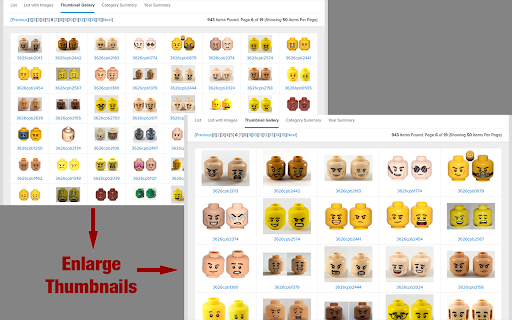
NEW - Enlarge Thumbnail Images
Makes thumbnail images appear twice as big (in Search, Catalog, Store, Order)

NEW - 'Esc' to Close Image Previews
Enables 'Esc' key to close any pop-up image previews (in Search, Catalog, Item, Store, Order).
Technical
- Version
- 1.2.2
- Manifest
- V3
- Size
- 67.56KiB
- Min Chrome
- 88
- Languages
- 1
- Featured
- Yes
Metadata
- ID
- pikfjcohcfpohlckdhdggpcpfdkekomf
- Developer ID
- u6ad47bb0eed854a61a2e7eebdbfc1982
- Developer Email
- [email protected]
- Created
- Jul 25, 2020
- Last Updated (Store)
- Jan 28, 2024
- Last Scraped
- May 24, 2026
- Website
- —
- Support URL
- —
- Privacy Policy
- —
Similar extensions
Alternatives to BrickTinker, ranked by description similarity.

Unofficial Bricklink Booster Pack
A tool that adds useful features to Bricklink
61

AMZ Chrome Bot
A simple chrome extension that will navigate, search & get data from Seller Central and Amazon website in every page loaded
54
★ 5.0

BrickBuddy
BrickBuddy makes your orders of LEGO parts on Bricklink much easier checking what items you are still missing from your Wanted List
32
★ 5.0

NX Enhanced
Adds quality-of-life features to NextDNS website for a more practical usability
1.0K
★ 4.7

AliExpress速卖通welcome deal原价透视
速卖通welcome deal,New User,big sale链接原价透视,选中SKU后显示原价,查评价
5.0K
★ 5.0

Goodreads Librarian Tools
Simplifying typical librarian actions on Goodreads.
11

Lattice
Helping Your Vine Grow – dashboard for Amazon Vine (orders, reviews, stats).
200
★ 5.0

Vextend Office - Simplify Vend/Lightspeed
Add extra functions to the Vend/Lightspeed back office functions
271
★ 5.0
Data sourced from the Chrome Web Store · last verified May 24, 2026.