
Mirror Extension
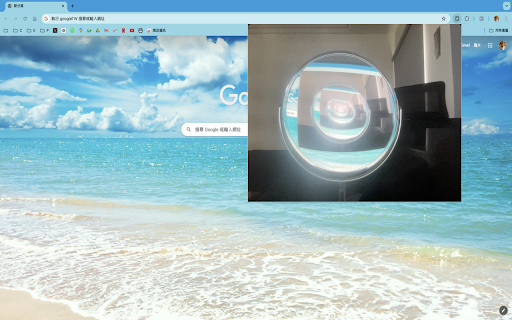
A Chrome extension that displays a popup below the extension icon and requests camera access, acting like a mirror.
As of May 2026, Mirror Extension has 267 users and a 5.00/5 rating from 1 reviews in the Productivity category.
Usersup 1.1 percent+1.1%
267
267
Ratingno change0%
5.00
1 reviews
Reviewsno change0%
1
Version
3.0
Manifest V3
History
1 snapshotsTracking since Apr 25, 2026.
View as table
| Date | Users | Rating | Reviews | Version |
|---|---|---|---|---|
| Apr 25, 2026 | 264 | 5.00 | 1 | 3.0 |
| Now | 267 | 5.00 | 1 | 3.0 |
Permissions & access
- Permissions
- activeTabcamera
- Host access
- None declared
Screenshots
About
Feature Overview
The Camera Preview Extension is a practical tool designed specifically for the Chrome browser, allowing you to easily use your computer's camera to preview your image directly in the browser with left-right mirroring. This extension features an elegant interface design, providing an excellent user experience.

Key Features
Real-Time Camera Preview: Simply click the extension icon to open the embedded camera window without any additional steps.
Left-Right Mirror Effect: Provides left-right mirror effects, simulating a real mirror for convenient daily use.
Flip Functionality: Easily flip your camera preview horizontally with a single click, enhancing usability for different scenarios.
High-Quality Design: A beautifully designed interface that makes your camera preview more refined.
Easy to Use: With just a few setup steps, you can use it effortlessly without complicated operations.
Why Choose This Extension?
Instant Efficiency: Preview your camera image directly in the browser without opening other applications, convenient and fast.
Multi-Scenario Application: Whether it's for video conferences, online teaching, or daily photos, it can handle it with ease.
Lightweight Tool: Does not take up too many system resources, ensuring smooth usage.
High-Quality Interface: Simple yet sophisticated design provides a premium visual experience.
Installation Guide
Open the Chrome browser and go to the extension store.
Search for "Camera Preview Extension" and click the "Add to Chrome" button.
Follow the prompts to complete the installation.
Once installed, click the extension icon at the top right corner of the browser to start using it.
Usage Tips
Before video conferences or online teaching, preview your image to ensure you present your best look.
Use the flip functionality to switch the camera preview direction according to your preference.
The Camera Preview Extension is an essential tool for every Chrome browser user.
Install it now and enjoy a more convenient and efficient camera experience!
User Feedback and Improvements
Continuously improve the extension's functionality based on user feedback, such as adding window size adjustment and filter effects.

Security Considerations
Data Privacy: The extension should not store or transmit user image data; all processing should be done locally.
Camera Permissions: The extension should request camera access only when the user clicks on it, and release the permissions immediately after use.
If you encounter any issues, you can visit the support page or contact customer service for assistance.
Technical
- Version
- 3.0
- Manifest
- V3
- Size
- 6.92KiB
- Min Chrome
- 88
- Languages
- 1
- Featured
- No
Metadata
- ID
- phjalkbgdbmbdlpclmbmfigmlbbmniac
- Developer ID
- u3bc957f811906edfa9ced76053d3d802
- Developer Email
- [email protected]
- Created
- Jul 31, 2024
- Last Updated (Store)
- Aug 8, 2024
- Last Scraped
- May 22, 2026
- Website
- —
- Support URL
- —
- Privacy Policy
- —
Similar extensions
Alternatives to Mirror Extension, ranked by description similarity.

Front Mirror - One click camera check
A one-click camera check, right from the chrome toolbar.
564
★ 5.0

Mirror Me - Notch Edition
A camera mirror with professional filters in a beautiful notch design. Apply filters, adjust settings, and take screenshots.
14
★ 5.0

Mirror Extension
A Chrome extension that displays a popup below the extension icon and requests camera access, acting like a mirror.
39
★ 5.0

OPTIC - Webcam Control and Optimization
An extension to control and configure hardware settings of webcams from Chrome on Windows
2.0K
★ 5.0

Rotate Image
Image Rotate – use extension to rotate an image or create a mirror image. А simple tool to flip pictures in your browser.
1.0K
★ 4.6

Advanced Image Viewer and Converter
Hover to zoom and view high-definition images. Instantly enlarge visuals, crafted for all your favorite websites—and for you.
38
★ 5.0

Scrsht Screen Recorder
Screen Recorder is a software that allows you to capture and record your computer screen right in the browser!
189
★ 4.6

Camera Flipper for Meet
Flip your Google Meet camera to see yourself as others see you
355
Data sourced from the Chrome Web Store · last verified May 22, 2026.