
Vimmatic
Vimmatic enables Vim-like key binds in your web browser for easier and faster navigation.
As of June 2026, Vimmatic has 317 users and a 5.00/5 rating from 4 reviews in the Workflow & Planning category.
Usersup 7.5 percent+7.5%
317
317
Ratingno change0%
5.00
4 reviews
Reviewsno change0%
4
Version
0.8.3
Manifest V3
History
5 snapshotsTracking since Apr 19, 2026.
View as table
| Date | Users | Rating | Reviews | Version |
|---|---|---|---|---|
| Apr 19, 2026 | 295 | 5.00 | 4 | 0.8.3 |
| May 4, 2026 | 286 | 5.00 | 4 | 0.8.3 |
| May 13, 2026 | 286 | 5.00 | 4 | 0.8.3 |
| May 25, 2026 | 328 | 5.00 | 4 | 0.8.3 |
| Jun 7, 2026 | 326 | 5.00 | 4 | 0.8.3 |
| Now | 317 | 5.00 | 4 | 0.8.3 |
Permissions & access
- Permissions
- historysessionsstoragetabsnotificationsbookmarks
- Host access
- None declared
Screenshots

About
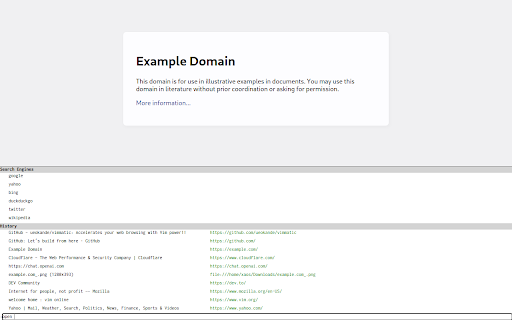
This extension enables you to navigate pages, switch tabs, and open a site you want with your keyboard.  The extension provides a Vim-like experience on your browser and a new choice for Vim users.  You can configure keymaps and browse pages with your preferences.

# Quick start

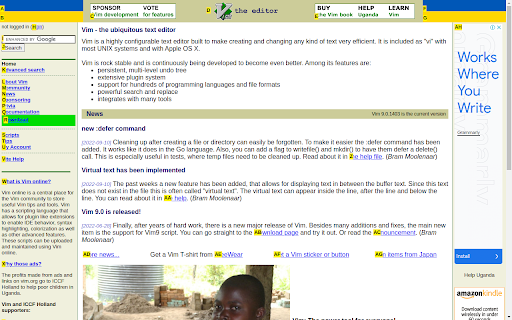
After installation, you can control Firefox with vim-like keymaps. To scroll a page in the browser, press `k`, `j`, `h` and `l` keys. You can scroll to the top or the bottom of a page by `gg` and `G`.  To select a left and right of current tab, use `K` and `J` respectively. To close current tab, use `d` and to restore closed tabs, use `u`.  To open a link, press `f` to enter the follow mode to select a link. Then you can select links by alphabetic keys.

Vimmatic supports command line to run commands that control tabs and opens a tab. To open command line, press `:`.  To open a tab with URL, use `open` command.  You can select completed items by `Tab` and `Shift`+`Tab`

For usage and more detailed information, check out our documentation:
https://ueokande.github.io/vimmatic/

The development of Vimmatic is publically available as open-source software.  Feel free to contact us at github.com:
https://github.com/ueokande/vimmatic
Technical
- Version
- 0.8.3
- Manifest
- V3
- Size
- 1.91MiB
- Min Chrome
- 88
- Languages
- 1
- Featured
- No
Metadata
- ID
- pghmfgnakhjiphmlcnhfpgopkcjhiedc
- Developer ID
- uf82f26178d1e8d69e0bdff5fabb65be4
- Developer Email
- [email protected]
- Created
- Mar 16, 2023
- Last Updated (Store)
- Sep 1, 2025
- Last Scraped
- Jun 7, 2026
- Website
- —
- Support URL
- https://github.com/ueokande/vimmatic/issues
- Privacy Policy
- —
Similar extensions
Alternatives to Vimmatic, ranked by description similarity.

Moly Keys
Optimum key bindings.
135
★ 2.6

Keyboard Navigator
Your virtual assistant on the web
2

Tab Ahead
Tab Ahead lets you type ahead to quickly find open tabs by title and URL.
1.0K
★ 4.7

Mouseless
For a mouseless future, but on chrome
64
★ 3.0

YouTube Skip Ad Clicker
Click on YouTube Skip Ad button without using the mouse. Press Ctrl+Shift+K and then press Enter to skip ads.
—

Browser Commands
Manage your browser using word commands. Save time and be more productive on your browser time by using only commands!
30
★ 5.0
Peek-a-tab, Tabs Manager for Google Chrome™
Search, preview, jump across, and close tabs quickly in your chrome browser.
7.0K
★ 4.3

Tab Scroll - Switch tabs with your scroll wheel
Scroll through your tabs with the mouse wheel. Move to the top of any page and scroll to switch tabs.
246
★ 2.9
Data sourced from the Chrome Web Store · last verified Jun 7, 2026.