
ConCat - Help copy and paste on web pages
This extension helps copy and paste by copying repeating elements on a web page together
As of May 2026, ConCat - Help copy and paste on web pages has 47 users in the Accessibility category.
Usersdown 14.5 percent−14.5%
47
47
Ratingno change0%
—
— reviews
Reviewsno change0%
—
Version
1.1.0.0
Manifest V3
History
2 snapshotsTracking since Apr 25, 2026.
View as table
| Date | Users | Rating | Reviews | Version |
|---|---|---|---|---|
| Apr 25, 2026 | 55 | — | — | 1.1.0.0 |
| May 22, 2026 | 51 | — | — | 1.1.0.0 |
| Now | 47 | — | — | 1.1.0.0 |
Permissions & access
- Permissions
- contextMenusactiveTabscripting
- Host access
- None declared
Screenshots
About
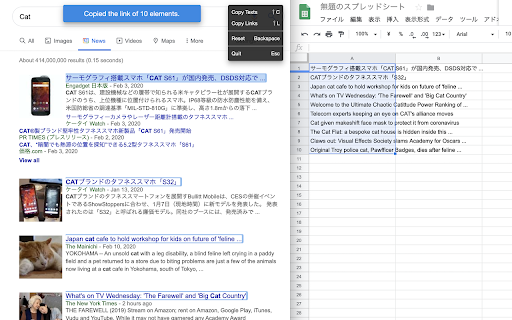
By using this extension from the context menu, you can easily copy the title of the item displayed in the list and its link to the spreadsheet.

If the expected elements are not selected, adding additional base elements with a click will present you with new repeating elements.

Also, this extension does not require an internet connection to work.
Therefore, you can use this extension on any web page, including intranets.


[Note] The current extension has the following restrictions:

+ Cannot keep non-existent elements as blanks.
+ Cannot be used for iframe elements.
Technical
- Version
- 1.1.0.0
- Manifest
- V3
- Size
- 378KiB
- Min Chrome
- 88
- Languages
- 1
- Featured
- No
Metadata
- ID
- pemfddepjgkelgbanochmpmhehmleopm
- Developer ID
- u2c18ece742bcf50f9ee8a55f5dc1fe02
- Developer Email
- [email protected]
- Created
- Feb 12, 2020
- Last Updated (Store)
- Sep 2, 2024
- Last Scraped
- May 22, 2026
- Website
- —
- Support URL
- —
- Privacy Policy
- —
Similar extensions
Alternatives to ConCat - Help copy and paste on web pages, ranked by description similarity.

Links in Clipboard
Open the links with your COPY
12
★ 5.0
Enable right click - allow copy & select
Enable context menus on protected websites. Unblock right click menu. Highlight and allow copy option for all pages works again.
400.0K
★ 4.5

Table Keyboard Navigator
Enable keyboard navigation for table cells on selected webpages.
6

Enable Copy Paste Extension
Enable copy paste on websites that have disabled copy paste
796
★ 5.0

Title & URL Picker
Get Title and URL of a Page
150

Click to Copy - Unified Content Grabbing
A focused tool to instantly capture any web content—text, links, or image files—using a single Alt+Click gesture.
3

Copy Tabs Title URL
Copy the title and URL from a Chrome tabs
315

Copy Please! - Clean, Format & Auto Copy Text Anywhere
Automatically copy selected text to clipboard and allow copying by removing copy protection.
86
★ 5.0
Data sourced from the Chrome Web Store · last verified May 22, 2026.