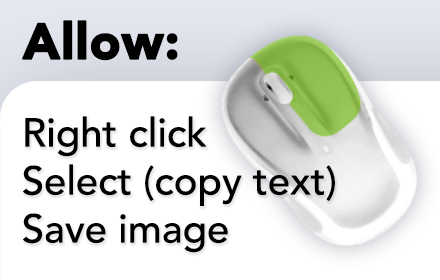
Enable right click - allow copy & select
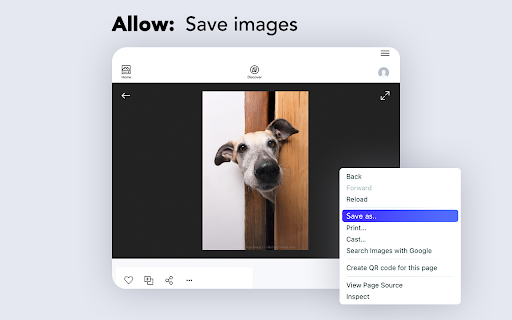
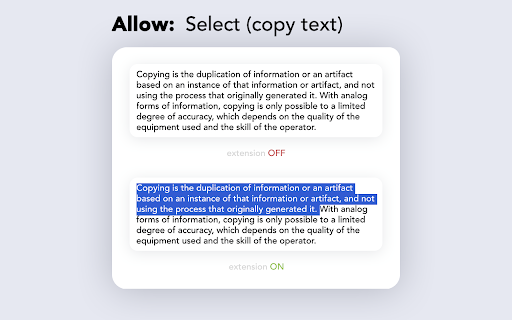
Enable context menus on protected websites. Unblock right click menu. Highlight and allow copy option for all pages works again.
As of June 2026, Enable right click - allow copy & select has 400,000 users and a 4.49/5 rating from 509 reviews in the Accessibility category.
Usersno change0%
400.0K
400,000
Ratingdown 0.4 percent−0.4%
4.49
509 reviews
Reviewsup 2.2 percent+2.2%
509
Version
1.0.9
Manifest V3
History
7 snapshotsTracking since Apr 2, 2026.
View as table
| Date | Users | Rating | Reviews | Version |
|---|---|---|---|---|
| Apr 2, 2026 | 400.0K | 4.51 | 498 | 1.0.9 |
| Apr 4, 2026 | 400.0K | 4.50 | 500 | 1.0.9 |
| Apr 14, 2026 | 400.0K | 4.50 | 501 | 1.0.9 |
| May 6, 2026 | 400.0K | 4.50 | 503 | 1.0.9 |
| May 22, 2026 | 400.0K | 4.50 | 504 | 1.0.9 |
| May 26, 2026 | 400.0K | 4.50 | 505 | 1.0.9 |
| Jun 17, 2026 | 400.0K | 4.49 | 507 | 1.0.9 |
| Now | 400.0K | 4.49 | 509 | 1.0.9 |
Permissions & access
- Permissions
- tabsscriptingstoragewebRequest
- Host access
- *://*/*
Screenshots

About
Enable Context Menu and Select, Allow select, Allow copy, Allow right click in so restricted pages.

Installing this free extension enables you to cut, copy, and paste via right-click menus and the ribbon toolbar when using Office on the web.

Due to limitations of web browsers, copying and pasting in Microsoft Office for the web through menus requires additional permissions which are provided through this extension.

Enable copy and right-click on protected websites.

Usage:
- Click browser action icon to enter "copy mode" for current site
Features:
- Unlocks copy (for real)
- Remembers which site to unblock for future visits

---> Once this extension is installed you must reload any open tabs in order for it to work<---

--->If you change the extension settings any open tabs must be reloaded in order for them to take effect <----

MAKE SURE TO RELOAD THE WEBPAGE AFTER INSTALLING THIS EXTENSION .

- Since the extension needs to know the active tabs , so the basic permission it requires is "tabs" . But Chrome will label it as "can read and change all your data on websites you visit " while asking for the permission .This extension does not track or use your browsing history in any ways.The only information it needs is the active states of the tabs.

Copy&Paste Pro extension "Enable Right Click" is a solution for websites that block Copy , Paste , Select Text and Right clicks .

- This extension works separately for each tab .
- Clicking on the extension icon will enable/disable it .
- The extension gets disabled on page reload .
- Check the status enabled (green tick) or disabled (grey tick) of the extension on the toolbar (top right corner).
Technical
- Version
- 1.0.9
- Manifest
- V3
- Size
- 152KiB
- Min Chrome
- 88
- Languages
- 25
- Featured
- Yes
Metadata
- ID
- mlloloooolpffjkjaclpfpeednngpjon
- Developer ID
- ucc4f4880b2eb47f2f26d7c8f9b68ab12
- Developer Email
- [email protected]
- Created
- Oct 23, 2022
- Last Updated (Store)
- Mar 25, 2026
- Last Scraped
- Jun 17, 2026
- Website
- —
- Support URL
- —
- Privacy Policy
- http://right-clickcopy.com/policy.html
Similar extensions
Alternatives to Enable right click - allow copy & select, ranked by description similarity.

Enable right click - allow copy & select
Enable copy and right-click on protected websites
117
★ 5.0

Enable Copy and Allow Right Click
Enable copy, right-click, and image saving on sites that blocked them. Unlock text selection and downloads.
1.0K
★ 4.3

Allow Copy & Right Click
Allow Copy & Right Click on restricted websites.
1.0K
★ 5.0

Allow Right Click & Copy
Prevents websites from blocking text selection, right-click and copying.
80

Click & Copy
Restores right-click, text selection, and copy/paste on all websites.
5

Enable Right Click
Enable Right Click on restricted websites.
7.0K
★ 4.7

Ctrl Right-Click
Disables right-click unless Ctrl is held.
4

Allow Copy Plus
Unlocks content with allow copy feature.
7.0K
★ 4.5
Data sourced from the Chrome Web Store · last verified Jun 17, 2026.