PrettifyMyWebApi for Microsoft Dataverse
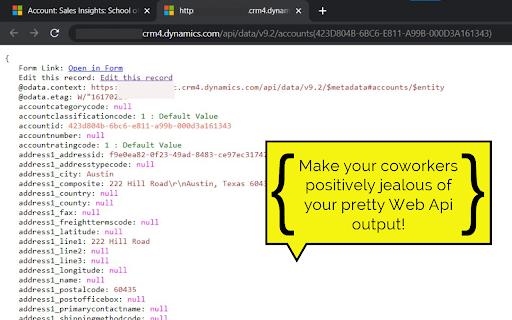
Open any row in the Dataverse Web Api and supercharge the output. Press to impress your coworkers!
As of May 2026, PrettifyMyWebApi for Microsoft Dataverse has 2,000 users and a 5.00/5 rating from 7 reviews in the Developer Tools category.
Usersno change0%
2.0K
2,000
Ratingno change0%
5.00
7 reviews
Reviewsno change0%
7
Version
1.1.0.1
Manifest V3
Permissions & access
- Permissions
- activeTabscripting
- Host access
- None declared
Screenshots

About
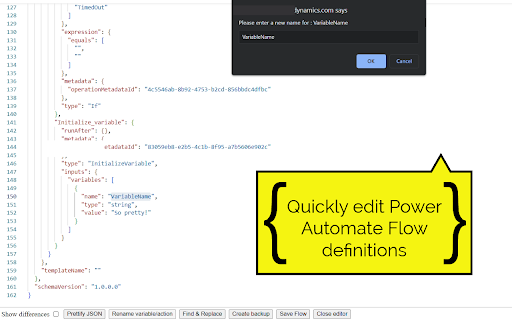
All of your rows can be quickly viewed and edited! Even when fields are not available on any form. Quickly view and edit Power Automate Flow definitions.

How to use:
- Click the extension button when viewing a form to open the current row in the Dataverse Web Api and prettify the output!
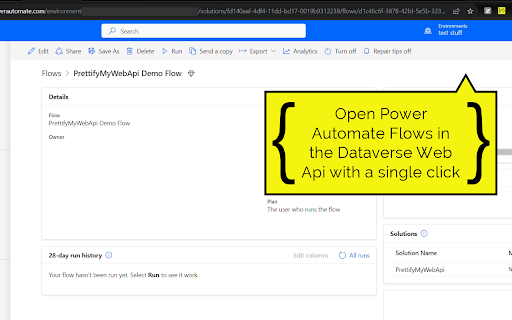
- When viewing a 'solution-aware' flow in make.powerautomate.com, use the extension to open it in the Dataverse Web Api. Click the Edit Flow button in the top right to edit your flow definition! This is very convenient for renaming actions/variables or as a last measure for working around bugs, when the default flow UI just doesn't want to cooperate (Power Automate developers will relate to this).
- When already viewing a row or query in the Dataverse Web Api, just use the extension to prettify!

You no longer need to open your solutions to view the values for your Option Sets/Choices. Simply open the row and prettify the output.

Browse to related rows for quick insights using the 'Preview' button on lookup columns.

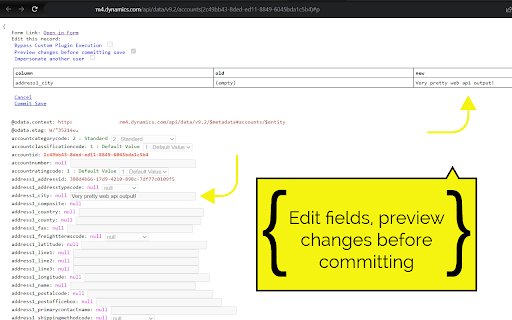
Update columns of a row by using the 'Edit this row' feature. Update text columns, Option Sets, numbers, lookups, etc. Very convenient for modifying data that is not available on a form. You also have the option to impersonate other users, skip custom plugins and skip Power Automate Flows when updating a row.

Create new rows by using the 'Create new row' button.

Browse related rows by using the 'View relationships' button. When viewing related rows, use the 'Disassociate this row' button to disassociate the row from the parent/related row.

Quickly copy the contents of a column to your clipboard by hovering and clicking the copy button.

You can prettify single rows, but also the results of your OData and FetchXml queries.
Technical
- Version
- 1.1.0.1
- Manifest
- V3
- Size
- 1.56MiB
- Min Chrome
- 88
- Languages
- 1
- Featured
- No
Metadata
- ID
- pcgbnpkpijlcjeleijaaahlonafdlfno
- Developer ID
- ubaedabf6e2ef7aa2939539dffd613e87
- Developer Email
- [email protected]
- Created
- Oct 4, 2022
- Last Updated (Store)
- Jan 9, 2025
- Last Scraped
- May 31, 2026
- Website
- —
- Privacy Policy
- —
Similar extensions
Alternatives to PrettifyMyWebApi for Microsoft Dataverse, ranked by description similarity.

Entity Explorer for Dynamics365/PowerApps
Model-driven style side pane for reviewing and editing Dataverse table columns.
34
★ 5.0

Toolshed for Power Platform / Dynamics 365
Utility Bot for Power Platform / Dynamics 365 Developers and Admins
992
★ 5.0

Power Automate Tools
This extension enables editing a Power Automate flow definition as JSON.
10.0K
★ 4.0

Flow Run Buddy
View run history for Power Automate Cloud Flows directly from the flow designer
121
★ 1.0

Dynamics 365 Flow History
View Power Automate flow runs for Dynamics 365 records. Find record-specific runs instantly.
53
★ 5.0

Power Automate Classic View Switcher
Switch Power Automate to classic designer automatically or with one click. Perfect for developers who prefer classic flow editor.
92
★ 5.0

APEX Shortcuts
Shortcuts: Ctrl+I (inputs), Ctrl+S (save), Ctrl+D (run). Enter confirms and closes Designer dialogs.
18

Power Automate Classic Designer V2
eine Erweiterung für den Power Automate Classic Designer.
23
Data sourced from the Chrome Web Store · last verified May 31, 2026.