
Salesforce Navigator for Lightning
Get more done in Salesforce - list and search records, make new ones, create a task or login as on the fly!
As of May 2026, Salesforce Navigator for Lightning has 8,000 users and a 4.39/5 rating from 23 reviews in the Workflow & Planning category.
Usersno change0%
8.0K
8,000
Ratingno change0%
4.39
23 reviews
Reviewsno change0%
23
Version
4.11.1
Manifest V3
Permissions & access
- Permissions
- activeTabmanagementstorageclipboardReadcookiesscripting
- Host access
- https://*.force.com/*, https://*.salesforce.com/*, https://*.cloudforce.com/*
Screenshots
About
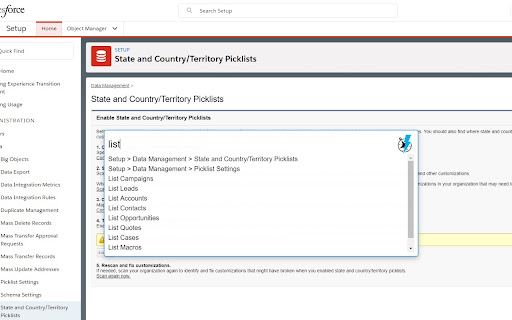
Get more done in Salesforce - list and search records, make new ones, create a task or login as on the fly! This extension helps you get to any Salesforce page quickly. Just type in what you need to do!

Compatible with Lightning and Classic

NEW Version 4.0+
- Near total rewrite, should perform faster and more consistently
- Themes are back!
- Groundwork for multilanguage support has been added - want to contribute? Translate to a new language from the GitHub link!
- Still a work in progress, please add bug reports to the Issues page on the repo

Open the Navigator and
- [New Permission] Can now save some settings, like theme and profile setup toggle, needs Storage permission to save preferences
- [New Feature] Toggle all checkboxes on the page for when subtracting from a selection is faster
- [Fix] Better Classic to Lightning URL mapping
- [Fix] Better loading checks so it won't error out trying to set the style of the search box
- Use the account merge tool by typing "Merge Accounts " Call the Classic Account Merge from either interface using the Account you are on and the Salesforce ID in your clipboard or entered into the command box. You can use a tool like Salesforce CopyPasteGo (https://summerlin.co/copypastego) to easily grab the ID of a Salesforce record
- Add tasks on the fly by typing "! "
- Search all records with "? "
- Go to your Home page with "Home"
- Object List views with "List "
- Create a new record with "New "
- Go directly a Setup page by typing it's name
- Access Object customizations with "Fields" (e.g. "Contact Fields")
- Switch between Lightning and Classic with "Toggle Lightning"
- Commands looking weird? Run "Refresh Metadata" to make sure you have what you need
- Login as another user with "Login as "

** You can hold shift or control when you press enter or click your mouse to open the selected item in a new tab **

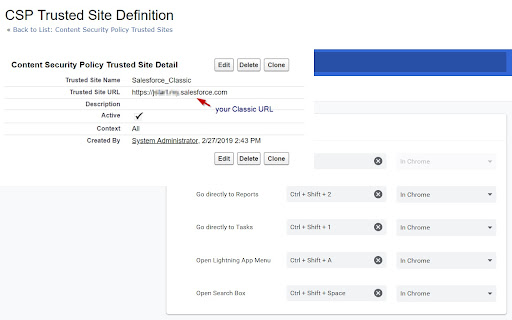
Default shortcut keys (use Command instead of Control on Mac, and/or customize your options at chrome://extensions/shortcuts)

Control + Shift + Space: Navigator Bar
Control + Shift + A: Lightning App Menu
Control + Shift + 1: Tasks
Control + Shift + 2: Reports

NOTES:
- If you have a custom instance Domain Name, you may have to create a CSP Trusted Site Definition for your Classic domain URL in order for this extension to work - more info here https://developer.salesforce.com/docs/atlas.en-us.lightning.meta/lightning/csp_trusted_sites.htm
- If you have activated the RequireHTTPOnly setting you will not be able to use this extension to navigate to custom objects (feel free to make a pull request to add proper login handling!)

Contribute to this extension at https://github.com/dannysummerlin/force-navigator

UPDATE NOTES
########################################
9/23/2024 - Added more shortcuts thanks to @Damecek

6/4/2024 - Simple update to Manifest V3 to make sure things work, but everyone should look at using alternative browsers and agitate for more user control

11/25/2023 - There still should be no such thing as billionaires, but fortunately @uri-tools has made a great contribution in getting things back to working as expected even with RequireHTTPOnly turned on, thanks Uri!

10/15/23 - There should be no such thing as billionaires, it is absolute fiction any person can "earn" that much -- Created a workaround for users with RequireHTTPOnly on to allow most functions to still work, excepting custom object navigation and Login As functionality

5/3/23 - #ZooeyZephyr is a duly elected member of the Montana House of Reps, but is not allowed to be present, silencing not just her but her constituents. You cannot say that you support democracy and yet exclude a representative because you don't like what they say. To be clear what Zephyr said was not an example of that stochastic terrorism (intentionally wording public statements to create an atmosphere of violence) that many members of the national Congress commit daily, but a strongly worded, impersonal criticism of proposed legislation. Trans rights are human rights.

7/5 - Pride Month never ends, go learn about Marsha P Johnson - fixed my fixing, Lightning URLs properly replace Classic links better now, still more to be done on this though 5/28 - Watch https://youtube.com/c/FDSignifire - Several fixes, added checkbox toggle, removed unused permission

9/11 - #justiceforbreonnataylor (182 days and counting) - Added the ability to call the Classic Account merge tool from an Account page. Be sure to have the ID of the Account you want to merge in your clipboard; added Lightning Record Page shortcut for custom objects

8/29 - Rest in Power Chadwick Boseman. Thanks to CKloppel for pointing out missing API and click handling, now updated to v49 and new-tab clicks work again

6/19 - Happy Juneteenth! Thanks to kacrouse for Custom Metadata Lightning handling, also updating several changed URLs across the platform

Maintainer(s): Danny Summerlin open to others! based on Salesforce Navigator by Daniel Nakov and Wes Weingartner

License
MIT License

Privacy Policy
This extension only runs locally in communication with your instance of Salesforce. No data is collected from any user, nor is extension activity tracked or reported to a third-party.

Terms of Service
This extension is not intended to support the work of any individual or organization that is discriminatory or outright illegal.
Technical
- Version
- 4.11.1
- Manifest
- V3
- Size
- 253KiB
- Min Chrome
- 88
- Languages
- 1
- Featured
- No
Metadata
- ID
- pbjjdhghffpemcglcadejmkcpnpmlklh
- Developer ID
- u57be099cf3568fb08d84824858566659
- Developer Email
- [email protected]
- Created
- Mar 2, 2019
- Last Updated (Store)
- Sep 24, 2024
- Last Scraped
- May 31, 2026
- Website
- http://www.summerlin.co/
- Privacy Policy
- —
Similar extensions
Alternatives to Salesforce Navigator for Lightning, ranked by description similarity.

Power BI Navigator
Get more done in Power BI
216

Dashboard Refresher & Tabs Revolver/Carousel
Automatically refresh salesforce dashboards, reports and rotate through open tabs. By Abaav
133

Enhance Salesforce Dashboard
Auto Refresh and up to 7 Columns Salesforce Dashboard.
20.0K
★ 4.3
Salesforce Shortcuts
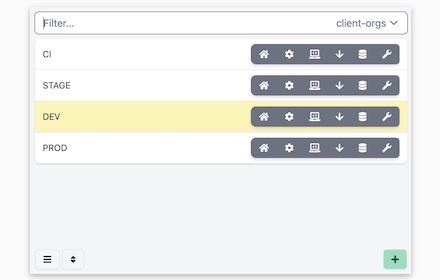
Provides quick shortcuts to most used URLs in Salesforce Orgs
77
★ 5.0

Salesforce Login Manager
Login to Salesforce Org with a single click using this Chrome Extension, effortlessly granting users instant access.
276
★ 5.0
Salesforce Shortcuts with Colored Favicons
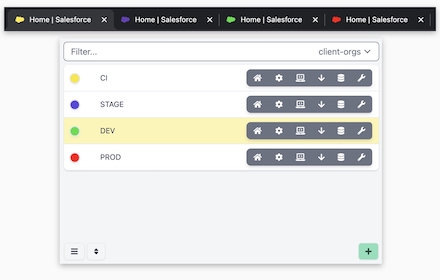
Allows you to quickly open the saved Salesforce orgs with keyboard shortcuts. It also enables you to set a colored favicon for them.
1.0K
★ 5.0

Salesforce Change Set Helper
Enhances the Salesforce change set. Adds last changed date and allows sorting, searching, validation and comparison with other orgs.
10.0K
★ 4.4

Enhance Salesforce Header
This extension displays logged in Org/User name, current time and Logout, Dev Console, My Settings and My Profile as separate links.
148
★ 4.6
Data sourced from the Chrome Web Store · last verified May 31, 2026.