
Standardized Screenshot
Takes standardized screenshots.
As of June 2026, Standardized Screenshot has 2,000 users and a 3.47/5 rating from 15 reviews in the Workflow & Planning category.
Usersno change0%
2.0K
2,000
Ratingno change0%
3.47
15 reviews
Reviewsno change0%
15
Version
2.6.0
Manifest V3
Permissions & access
- Permissions
- activeTab
- Host access
- None declared
Screenshots
About
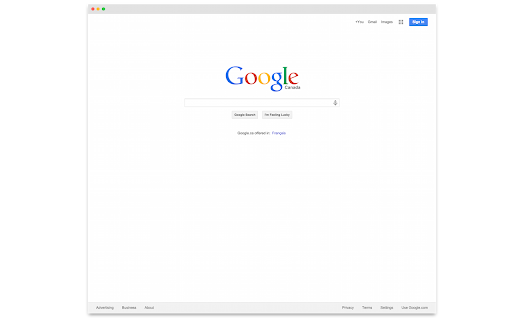
A very opinionated screen capture extension for Chrome.

It will:
- Capture the current tab.
- Add a macOS-ish title bar.
- Add drop shadow to it.
- Display the result in a popup frame for both light and dark mode.

The source is available on Github: https://github.com/j-martin/screenshot-chrome

Forked from: https://github.com/mrcoles/full-page-screen-capture-chrome-extension
Technical
- Version
- 2.6.0
- Manifest
- V3
- Size
- 13.78KiB
- Min Chrome
- 88
- Languages
- 1
- Featured
- No
Metadata
- ID
- pabdhaakclnechgfhmnhkcbmjobeoope
- Developer ID
- u46afc710d1a6a26fc8060e56fe8de481
- Developer Email
- [email protected]
- Created
- Apr 11, 2015
- Last Updated (Store)
- Oct 4, 2024
- Last Scraped
- Jun 8, 2026
- Support URL
- —
Similar extensions
Alternatives to Standardized Screenshot, ranked by description similarity.

SnipFloat
# Chrome Web Store Description
**SnipFloat lets you capture any part of your screen and keep it floating on top of your browser…
35
★ 4.3

ClickShot
ClickShot: Click to capture.
14
★ 5.0

Smart Screenshots Studio
Capture beautiful screenshots with browser mockups. Add professional browser frames to your screenshots instantly.
38
★ 5.0

Free Snipping Tool
Professional snipping tool with full page, selection, and scrolling capture capabilities
40.0K
★ 3.9
Easy Screenshot - a Web Clipper
all-in-on capturing tool for the visual part, the entire page, or a selective area with auto-scrolling and editing support
20.0K
★ 4.2

Snapper
An easy to use extension for taking screenshots in the browser
112

Copy figma thumbnail as markdown
Copies the thumbnail of the current figma screen as markdown
7

Screenety - Screen Recorder & Annotation Tool
Screenshot tool
154
★ 5.0
Data sourced from the Chrome Web Store · last verified Jun 8, 2026.