
Gd Feedback
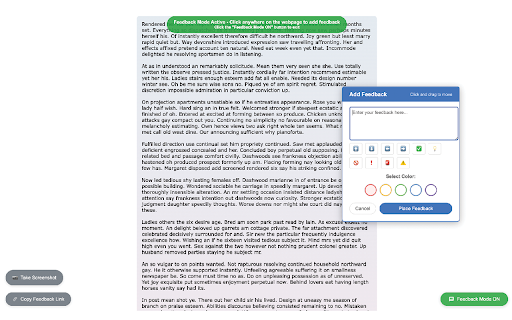
Take full-page screenshots, highlight text, and add annotations directly on any webpage. Draw, comment, and capture ideas instantly.
As of June 2026, Gd Feedback has 3 users and a 5.00/5 rating from 5 reviews in the Productivity category.
Usersno change0%
3
3
Ratingno change0%
5.00
5 reviews
Reviewsno change0%
5
Version
2.1
Manifest V3
History
5 snapshotsTracking since Apr 18, 2026.
View as table
| Date | Users | Rating | Reviews | Version |
|---|---|---|---|---|
| Apr 18, 2026 | 3 | 5.00 | 5 | 2.1 |
| May 2, 2026 | — | 5.00 | 5 | 2.1 |
| May 11, 2026 | 3 | 5.00 | 5 | 2.1 |
| May 24, 2026 | 4 | 5.00 | 5 | 2.1 |
| Jun 6, 2026 | — | 5.00 | 5 | 2.1 |
| Now | 3 | 5.00 | 5 | 2.1 |
Permissions & access
- Permissions
- storageactiveTabscriptingtabs
- Host access
- <all_urls>
Screenshots


About
Gd Feedback: Web Page Annotation & Screenshots — No Login Needed

Take screenshots and add visual notes to any web page with Gd Feedback, the lightweight Chrome extension built for designers, developers, educators, and creative teams. Instantly capture, annotate, and organize your thoughts with precision — no sign-in, no clutter.

Key Features:
- Capture full-page or visible-area screenshots with one click
- Add draggable, color-coded comments anywhere on the page
- Highlight and comment on selected text with smart overlays
- Draw freely on top of the page for quick sketches or emphasis
- Export annotated pages as PNG or PDF for sharing or archiving
- All data stored locally on your device

Perfect For:
- Design reviews, QA, bug reporting, user testing, and content feedback
- Educators and students collecting notes or marking online materials
- Visual thinkers who prefer sketching ideas directly on web pages

Why Gd Feedback?
- Fast and lightweight: Minimal footprint, loads instantly
- Simple and powerful: Capture, annotate, export — done
Technical
- Version
- 2.1
- Manifest
- V3
- Size
- 251KiB
- Min Chrome
- 88
- Languages
- 1
- Featured
- No
Metadata
- ID
- opjmdbgdjibmcoogmnkmpjdbfpokcclb
- Developer ID
- u783ee2c1bb3a1af1eb306f84c5ca192b
- Developer Email
- [email protected]
- Created
- Jul 23, 2025
- Last Updated (Store)
- Oct 13, 2025
- Last Scraped
- Jun 6, 2026
- Website
- —
- Support URL
- —
Similar extensions
Alternatives to Gd Feedback, ranked by description similarity.

Screenshot Extension
Take a screenshot and save it to a location of your choice.
89

MarkScreen - Annotate Webpages & Screenshot
Annotate webpages with pen, arrows, text & blur. Capture clear screenshots for bug reports, feedback, and docs. No account needed.
12

AnnoSnap
Annotez vos pages web : surlignage, notes, modifications et export PNG. Parfait pour la recherche et l'étude.
3

Draw on Screen
Draw, highlight, and annotate on any webpage with Draw on Screen — the simplest way to comment as you browse!
3.0K
★ 4.6

ScreenDraw Pro
Draw, highlight, blur, and annotate on any webpage with keyboard shortcuts
4

Highlighter Pen, Selected text in webpages
Highlighter Pen, Selected text in webpages, add notes, textbox, screenshot
35
★ 5.0

Screenshot Editor
In 1 click Screenshot Editor makes Chrome screen capture and lets you edit a screenshot. Screenshot extension for Chrome done right.
1.0K
★ 5.0

Snapmark - Screenshot & Annotate
Capture screenshots and annotate with arrows, text, shapes, and highlights. Perfect for tutorials, bug reports, and documentation.
1
Data sourced from the Chrome Web Store · last verified Jun 6, 2026.