
Screen Reader with On-Off Button
A screen reader you can turn on and off with the click of a button.
As of June 2026, Screen Reader with On-Off Button has 1,000 users and a 2.29/5 rating from 7 reviews in the Accessibility category.
Usersno change0%
1.0K
1,000
Ratingno change0%
2.29
7 reviews
Reviewsno change0%
7
Version
1.0
Manifest V3
Permissions & access
- Permissions
- storagetabs
- Host access
- None declared
Screenshots

About
Description:

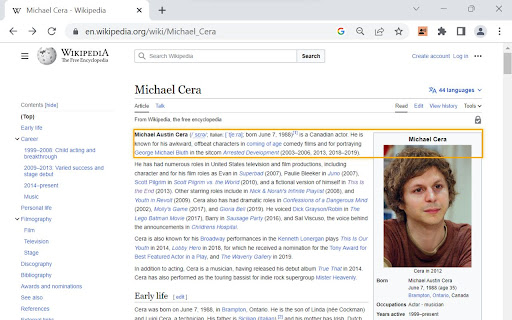
Make web browsing, web development, or website testing more accessible with the Screen Reader with On/Off Button extension. Designed with developers and users in mind, this frictionless, convenient tool provides a quick and hassle-free way to experience websites through screen reading capabilities. This extension reads ARIA labels, as well as  visible elements on the page.


Key Features:
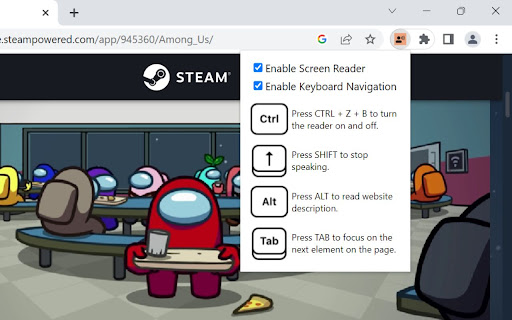
1. Convenient On/Off Button: Enable or disable the screen reading functionality with a simple and convenient toggle button that appears. Frictionlessly switch between regular browsing and screen reading, providing full control and flexibility.
2. Effortless Accessibility: Enable screen reading functionality to have web content read aloud, allowing developers to easily identify and verify the accessibility of their websites.
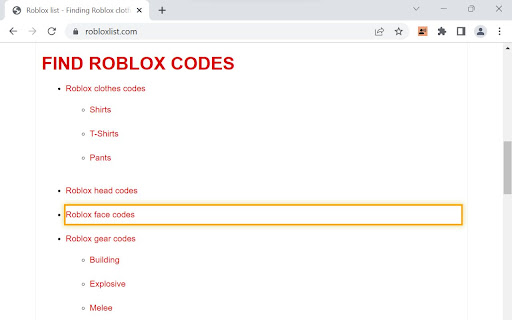
3. Streamlined Navigation with Keyboard Accessibility: Navigate through web pages using intuitive keyboard shortcuts and easily track the currently focused element with a customizable highlight, simplifying the testing process. The extension can also be fully accessed with mouse interactions.
4. Rapid Insights: Retrieve essential information about elements on the page, including tags, text content, links, form controls, and more. Gain quick insights into the structure and content of websites.
5. Meta Description Reading: Instantly access website descriptions provided in meta tags, enabling a quick overview of page content before diving in.
6. User-Friendly Experience: Enjoy a user-friendly interface and intuitive controls, ensuring a seamless and convenient experience while leveraging screen reading capabilities.
7. Designed for Convenience: Tailored specifically for both developers and users looking for a straightforward screen reader solution that’s easy-to-use, and easy to download.

Note: The Screen Reader With On/Off Button is not intended as a comprehensive screen reader solution for visually impaired users. It is designed for those looking for a quick, convenient, and simple screen reader tool.

Experience the power of frictionless screen reading at your fingertips today!
Technical
- Version
- 1.0
- Manifest
- V3
- Size
- 21.3KiB
- Min Chrome
- 88
- Languages
- 1
- Featured
- No
Metadata
- ID
- opfcfblanbkggiclagpppaegfcipejlc
- Developer ID
- uad357f9539b0a5b21b5b4a8cf3b27480
- Developer Email
- [email protected]
- Created
- Jul 21, 2023
- Last Updated (Store)
- Jul 21, 2023
- Last Scraped
- Jun 8, 2026
- Website
- —
- Support URL
- —
- Privacy Policy
- —
Similar extensions
Alternatives to Screen Reader with On-Off Button, ranked by description similarity.

Accessibility Helper
Helps people with disabilities overcome accessibility barriers on websites
3

AccessiRead
A screen reader extension that provides text-to-speech and navigation assistance for web pages
35
★ 5.0

Universal Accessibility Helper
One-click accessibility improvements for any website
2

Read Aloud: Read webpage using text-to-speech
Use text-to-speech to read aloud the entire webpage or a selected part. TTS engine is fully customizable. Support PC voice packages.
3.0K
★ 1.5

Sidepanel Screen Reader TTS
AI Screen Reader/ Text to speech tool but in the side panel.
5.0K
★ 4.1

EchoLog AI Voice Assistant
EchoLog AI Voice Assistant: Improve web accessibility with voice commands for hands-free browsing and a better user experience.
75
★ 4.9

ReadIt Web Text Reader
Select text on any webpage and listen instantly. Free, private, and works offline.
14
★ 5.0

Accessio for Accessibility
Enhance your browsing experience with customizable Accessibility features and a built-in Screen Reader for the current page.
12
★ 2.0
Data sourced from the Chrome Web Store · last verified Jun 8, 2026.