
Selection to Markdown Link
Copy selection and a link in Markdown format
As of June 2026, Selection to Markdown Link has 87 users and a 5.00/5 rating from 2 reviews in the Productivity category.
Usersup 13.0 percent+13.0%
87
87
Ratingno change0%
5.00
2 reviews
Reviewsno change0%
2
Version
1.0.0
Manifest V3
History
3 snapshotsTracking since Apr 23, 2026.
View as table
| Date | Users | Rating | Reviews | Version |
|---|---|---|---|---|
| Apr 23, 2026 | 77 | 5.00 | 2 | 1.0.0 |
| May 13, 2026 | 83 | 5.00 | 2 | 1.0.0 |
| Jun 8, 2026 | 95 | 5.00 | 2 | 1.0.0 |
| Now | 87 | 5.00 | 2 | 1.0.0 |
Permissions & access
- Permissions
- activeTabclipboardWritescripting
- Host access
- None declared
Screenshots

About
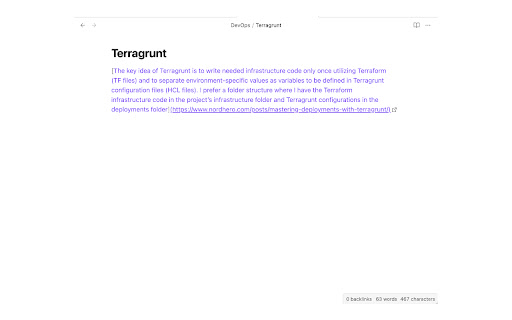
Chrome extension to copy selection and a link in Markdown. Click the extension icon or press the keyboard shortcut to copy link in Markdown format.
Select the text before copying to change the tab title in the link to the selected text instead.


The default keyboard shortcut is <kbd>Ctrl + Shift + C</kbd> (<kbd>Cmd + Shift + C</kbd> for macOS).
This can be changed from the browser's extension settings.
Technical
- Version
- 1.0.0
- Manifest
- V3
- Size
- 11.26KiB
- Min Chrome
- 88
- Languages
- 1
- Featured
- No
Metadata
- ID
- opfbfedpbnhhjicncbiminkgfkdanefo
- Developer ID
- u28c0b88e84b43b430b7eeb904c46cef9
- Developer Email
- [email protected]
- Created
- Dec 28, 2023
- Last Updated (Store)
- Dec 28, 2023
- Last Scraped
- Jun 8, 2026
- Website
- —
- Support URL
- —
- Privacy Policy
- —
Similar extensions
Alternatives to Selection to Markdown Link, ranked by description similarity.

Copy Formatter
Format copy pasted text
50

CopyURL
Copy link of current page in markdown format to clipboard
5

Copy Text as Link
Copy the selected text as a HTML link to the clipboard that can be pasted in in supported editors with the hyperlink intact.
1.0K
★ 3.5

Markdown Link
Copy Markdown link for current tab
672
★ 5.0

Copy as Markdown
Copy web page, selection, or link as Markdown via context menu
5

Quick Md Copy
Instantly copy Markdown links for pages or text selections (with highlight support)
9

Copy Link Helper
Copy selected text or links in plain text, Markdown, or HTML list format with shortcuts and notifications.
3

Addressy
This is a Chrome extension that allows you to quickly copy the current webpage's URL as Markdown, HTML, or plain text.
9
Data sourced from the Chrome Web Store · last verified Jun 8, 2026.