Dynamics 365 Integration for Gmail
Track emails, sync calendars, work with activities, convert important emails into Dynamics 365 activities without leaving Gmail and…
As of May 2026, Dynamics 365 Integration for Gmail has 705 users and a 4.47/5 rating from 15 reviews in the Workflow & Planning category.
Usersdown 3.8 percent−3.8%
705
705
Ratingno change0%
4.47
15 reviews
Reviewsno change0%
15
Version
10.3.0
Manifest V3
History
4 snapshotsTracking since Apr 20, 2026.
View as table
| Date | Users | Rating | Reviews | Version |
|---|---|---|---|---|
| Apr 20, 2026 | 733 | 4.47 | 15 | 10.3.0 |
| May 5, 2026 | 714 | 4.47 | 15 | 10.3.0 |
| May 16, 2026 | 713 | 4.47 | 15 | 10.3.0 |
| May 30, 2026 | 712 | 4.47 | 15 | 10.3.0 |
| Now | 705 | 4.47 | 15 | 10.3.0 |
Permissions & access
- Permissions
- storageidentitytabsunlimitedStoragealarms
- Host access
- https://www.googleapis.com/, https://accounts.google.com/o/oauth2/auth, https://accounts.google.com/o/oauth2/token, https://cgiprod.akvelon.net/, https://login.microsoftonline.com/, https://login.microsoftonline.com/*, https://*.dynamics.com/, http://www.linkedin.com/*, https://www.linkedin.com/*
Screenshots


About
Track emails, sync calendars, work with activities, convert important emails into Dynamics 365 activities without leaving Gmail and more:

✓ Track emails and conversations from Gmail to Dynamics 365
✓ Automatically sync emails to D365
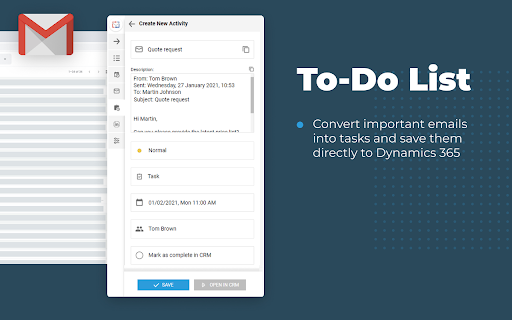
✓ Convert important emails into tasks, show them in convenient To-Do list and save directly into D365
✓ Add new prospects, contacts and companies from LinkedIn to D365 in one click
✓ Set the next actions and create new CRM activities directly from LinkedIn in order to plan and track all further communications with prospects
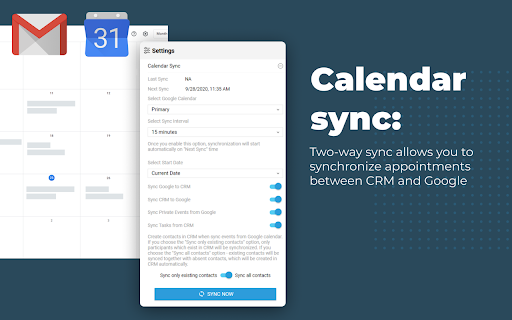
✓ Sync events between Google and D365 calendars
✓ Create, view, manage and navigate activities and entities
✓ Supports Custom objects and fields out-of-the-box
✓ Install in less than a minute, no additional configuration needed
✓ Track down emails, conversations and attachments from Gmail and save them directly into D365.

Akvelon’s Dynamics 365 Integration for Gmail is very pragmatic and includes countless possibilities for lead generation and organization in Gmail. It enables users to track down emails, conversations and attachments from Gmail and save them directly into D365.

Quickly find existing records in CRM or create new entity with just one click and track correlated emails. No additional set up needed, this extension works out-of-the-box, supporting custom entities and attributes.

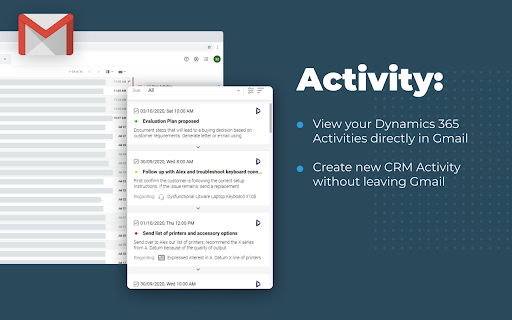
Replication of CRM Activities grid in Gmail provides users with the ability to quickly view, search, and manage CRM activities without leaving Gmail interface.

Google and D365 calendar sync allows users to keep all events up-to-date and organized. It syncs in background mode and does not require additional actions while you are working.

WE DON’T WANT YOUR DATA
- We do not store User Sensitive info excepting user ID and organization ID for license management purposes
- Akvelon protects your data with the industry's strongest encryption methods

REQUIRED PERMISSIONS:
"storage"
- to store users' data (events from Google calendar, CRM records,  Auth tokens)

"identity"
- to sign in to Gmail and D365 using Google OAuth and CRM OAuth accordingly (core functionality which is needed to integrate Gmail with CRM)

"downloads"
- to download log files - user has the ability to collect and send log file manually (does not contain any sensitive info) to Akvelon Support team in case he/she experiences any issues with the application

"tabs"
- to open new CRM windows to create new CRM activities and CRM records. Also it is needed to sign in to Google account in order to iterate with Gmail emails, contacts and Google calendar

"unlimitedStorage"
- to store events from Google calendar, CRM records, Auth tokens in browser's local storage (available only for user). This data is needed in order to iterate with Gmail and CRM and integrate them between each other

"webRequest"
- to connect to D365 On-Premise through ADFS (to confirm correctness of domain as we can't get this data beforehand - all users use different URL's)

"https://login.microsoftonline.com/*"
- to login to D365 CRM using OAuth

"https://*.dynamics.com/"
- to iterate with Dynamics 365 CRM (create new records, update existing ones, sync CRM and Google calendars)

"https://www.googleapis.com/
- to get data from Google API (get info about emails, contacts and calendar) which is needed to add information from Gmail to CRM

https://accounts.google.com/o/oauth2/auth
- login to Gmail using Google OAuth (user has to authorize in order to get access to his/her data located in Gmail, Google Calendar and Contacts (to save this data to CRM)

https://accounts.google.com/o/oauth2/token
- to get Google token for OAuth (it allows users to work with the app without necessity to re-login too often)

https://cgiprod.akvelon.net/
- to connect to Akvelon license server in order to manage subscription

BY INSTALLING THE APP, YOU AGREE TO PRIVACY POLICY AND TERMS OF USE:
Privacy Policy: https://akvelon.com/products-dynamics-crm-integration-for-gmail-privacy/
End-User License Agreement: https://akvelon.com/dynamic/CGIEULA.pdf

Third-party extensions installed in Chrome can potentially conflict with this extension, especially if those extensions integrate with Gmail. It can cause unexpected issues like missing icons/buttons or sidebar loading off-screen. To learn more about it please visit our user manual: https://avocado.software/manuals/cgiUserManual#

This extension use and transfer to any other app of information received from Google APIs will adhere to Google API Services User Data Policy, including the Limited Use requirements (https://developers.google.com/terms/api-services-user-data-policy#additional_requirements_for_specific_api_scopes).
Technical
- Version
- 10.3.0
- Manifest
- V3
- Size
- 706KiB
- Min Chrome
- 88
- Languages
- 1
- Featured
- No
Metadata
- ID
- opdeoodggbccmpenpleeenkbhckopmpk
- Developer ID
- ua2299a17af776bd9179154955c08a160
- Developer Email
- [email protected]
- Created
- Jul 22, 2015
- Last Updated (Store)
- May 26, 2025
- Last Scraped
- May 30, 2026
- Website
- https://avocado.software/
Similar extensions
Alternatives to Dynamics 365 Integration for Gmail, ranked by description similarity.

Gluon Relationship Manager (GRM) BETA
A powerful CRM that makes it easy to connect, organize and engage with your network. For everyone, For Free.
10
★ 5.0

Odoo Integration for Gmail
View Odoo contacts, CRM opportunities, tasks and tickets in Gmail. Create records, log emails and more from your inbox.
112
★ 5.0

Salesmate CRM for Gmail
Chrome Extension for Salesmate lets you access your CRM data and manage your day to day interactions with customers inside Gmail
771
★ 4.5

Gmail Inbox Cleaner
Helps you clean your Gmail inbox using AI suggestions.
92
★ 1.0

DragApp: Gmail shared inbox
Turn Gmail into a collaboration tool for teams to manage shared inbox, Help Desk, CRM, Task Management and more from Gmail.
10.0K
★ 4.1

Gong Anywhere
Streamline pipeline growth workflows: bring Gong Engage into your CRM (Salesforce or Dynamics 365) and your reps' Gmail inboxes.
50.0K
★ 4.5

Gmelius: Shared Inboxes & AI Email Assistants for Gmail
Save 1 hour daily: AI Assistants sort your emails, draft replies & shared inboxes let your team take over conversations for you.
50.0K
★ 4.6
Salesforza Gmail Mail Merge & CRM on GSheets
Chrome Extension CRM for Gmail leveraging Google Sheets with ability to create mail merges
795
★ 4.6
Data sourced from the Chrome Web Store · last verified May 30, 2026.