
Color Finder
Install color finder Chrome extension & detect RGB & HEX color codes with ease. Best Color Identifier for Chrome.
As of June 2026, Color Finder has 20,000 users and a 2.15/5 rating from 33 reviews in the Developer Tools category.
Usersno change0%
20.0K
20,000
Ratingup 0.9 percent+0.9%
2.15
33 reviews
Reviewsup 3.1 percent+3.1%
33
Version
2.1
Manifest V3
History
1 snapshotsTracking since May 16, 2026.
View as table
| Date | Users | Rating | Reviews | Version |
|---|---|---|---|---|
| May 16, 2026 | 20.0K | 2.13 | 32 | 2.1 |
| Now | 20.0K | 2.15 | 33 | 2.1 |
Permissions & access
- Permissions
- storageactiveTabbackground
- Host access
- <all_urls>
Screenshots
About
Finding the perfect color just got easier in 2025. Color Finder is your go-to Chrome color picker for detecting and identifying RGB color codes and HEX color codes from any webpage. Designed for designers, developers, and anyone who needs accurate color detection, this free Chrome color tool lets you quickly capture colors with ease. Transform your browser into a powerful color code identifier and streamline your workflow with this efficient web color extraction tool.


Key Features of Color Finder

Accurate Color Detection: Precisely identify RGB color codes and HEX codes from any webpage, including gradients and subtle shades. This feature makes it an ideal HEX color finder and RGB color detector for all your web-based projects.

Easy-to-Use Interface: Activate with one click and hover over any color to display its color code in a clear pop-up format. A perfect color picker for designers working on branding or digital art.

Lightweight & Fast: A free Chrome color tool that integrates seamlessly into your browser without slowing down your experience.

Free & Open Source: As an open-source color detector, Color Finder encourages community contributions and offers transparency for all users.


How to Use Color Finder

Install the Extension: Click “Add to Chrome” to install Color Finder, the most reliable Chrome color picker.

Activate Color Detection: Open any webpage and click the Color Finder icon in your toolbar to begin.

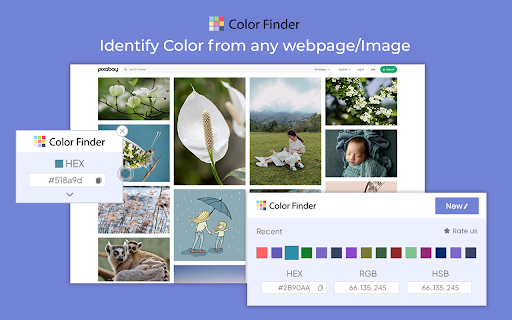
Hover to Detect Colors: Move your mouse over any color on the page to view its RGB color codes and HEX codes instantly in a pop-up window.

Copy the Color Code: Use the “Copy” button to save the color code to your clipboard and utilize it in your projects


Why Choose Color Finder?

Color Finder stands out as the best web color extraction tool, offering hassle-free color detection directly from your browser. Whether you're creating consistent branding, web design, or digital art, this HEX color finder and RGB color detector enhance productivity by delivering accurate results in seconds.

Choose Color Finder for its efficiency, ease of use, and reliability as a color picker for designers and developers. With this free Chrome color tool, you can ensure precise color codes for every project without any complexity.


FAQs

1. Can Color Finder detect colors in gradients or complex backgrounds?

Yes, Color Finder accurately detects color codes even in subtle gradients or complex backgrounds.

2. How do I copy a color code?

After activating Color Finder, hover over the desired color. A pop-up displays the color code, with a “Copy” button for easy copying to your clipboard.

3. Will Color Finder affect my browsing speed?

No, Color Finder is designed to be lightweight, so it won’t impact browsing performance or slow down your system.

4. Is Color Finder free to use?

Yes, Color Finder is entirely free and open-source, making it accessible to all users.
Technical
- Version
- 2.1
- Manifest
- V3
- Size
- 335KiB
- Min Chrome
- 88
- Languages
- 1
- Featured
- No
Metadata
- ID
- necmnahhpjieeknfddniaagcnhlglgoa
- Developer ID
- u88babc9a1c17b43b6e602d95b73df0a0
- Developer Email
- [email protected]
- Created
- Sep 11, 2022
- Last Updated (Store)
- Dec 26, 2025
- Last Scraped
- Jun 4, 2026
- Website
- —
- Support URL
- —
- Privacy Policy
- —
Similar extensions
Alternatives to Color Finder, ranked by description similarity.

Color Finder
Install Color Finder with eyedropper tool to activate color identifier online with RGB and HEX code finder from screen.
8.0K
★ 4.3

Color Picker Chrome Extension
Use Color Picker Chrome Extension to capture exact shades with the image color picker. Eyedropper tool inside your browser!
399
★ 5.0

Color Picker Chrome extension
Color Picker Chrome extension addon lets you to pick color from any webpage
70.0K
★ 4.1

Color Code Finder
Utilize Color Code Finder with RGB color finder as screen color picker to get HEX code from image and find HEX color code.
10.0K
★ 4.4

Color Finder From Image
Use Color Finder From Image to get color code from image instantly! Built-in picture color picker for Chrome!
398
★ 5.0

Color Picker for Chrome™
HEX, RGB Color picker, Advanched Eyedropper, Find color code on any page
700.0K
★ 4.0

Color Picker
A color picker extension
6
★ 5.0

Color Grabber
Quickly pick precise HEX, RGB & HLS colors from any webpage with Color Grabber — fast eyedropper, color history, and easy copy.
109
Data sourced from the Chrome Web Store · last verified Jun 4, 2026.