
dblp Search
Search academic publications on dblp from everywhere.
As of June 2026, dblp Search has 152 users and a 5.00/5 rating from 1 reviews in the Education category.
Usersup 1.3 percent+1.3%
152
152
Ratingno change0%
5.00
1 reviews
Reviewsno change0%
1
Version
3.8.2
Manifest V3
90-day change · In the last 90 days this extension 1 version update, changed permissions.
History
13 snapshotsTracking since Apr 1, 2026.
View as table
| Date | Users | Rating | Reviews | Version |
|---|---|---|---|---|
| Apr 1, 2026 | 150 | 5.00 | 1 | 3.7.6 |
| Apr 9, 2026 | 153 | 5.00 | 1 | 3.7.6 |
| Apr 20, 2026 | 156 | 5.00 | 1 | 3.7.6 |
| Apr 25, 2026 | 158 | 5.00 | 1 | 3.7.6 |
| Apr 29, 2026 | 156 | 5.00 | 1 | 3.7.6 |
| May 5, 2026 | 151 | 5.00 | 1 | 3.7.6 |
| May 9, 2026 | 149 | 5.00 | 1 | 3.7.6 |
| May 12, 2026 | 146 | 5.00 | 1 | 3.7.6 |
| May 16, 2026 | 147 | 5.00 | 1 | 3.7.6 |
| May 21, 2026 | 150 | 5.00 | 1 | 3.7.6 |
| May 30, 2026 | 155 | 5.00 | 1 | 3.7.6 |
| Jun 8, 2026 | 159 | 5.00 | 1 | 3.7.6 |
| Jun 14, 2026 | 153 | 5.00 | 1 | 3.8.2 |
| Now | 152 | 5.00 | 1 | 3.8.2 |
Changelog
- Jun 8, 2026description
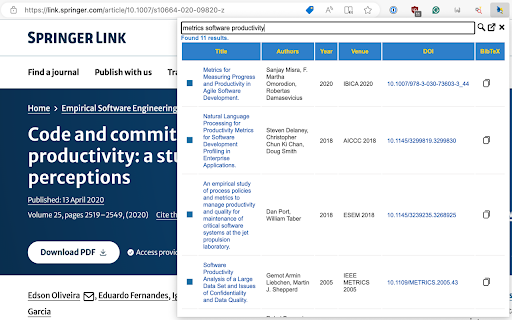
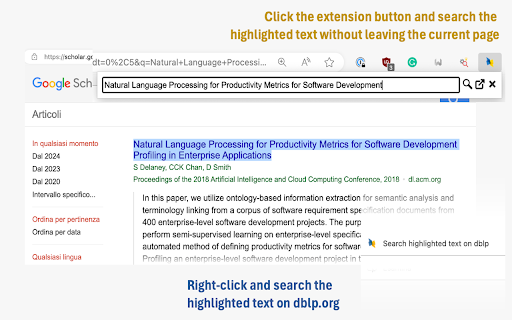
Highlight a text on any page, hit the button extension, see the matching publications, and copy the BibTeX entries to the clipboard.

# Features
- Search entries (either enter text in the search box or highlight text first).
- Search results are displayed in a table (title, authors, venue, year, DOI).
- Support for results pagination.
- The same DBLP.org color pattern is used to distinguish them by type (Proceedings, Books, Journals, etc.).
- The copy button copies the entry's BibTex reference to the keyboard.
- Filter out useless CoRR abs entries
- Ver 2+ are more efficient as they uses the official API released by dblp.org.
- Resolve DOIs from context menu

# Options
You can configure the following options:
- Limit results: You can limit the number of results returned by a query.
- Customizable BibTeX Citation Keys. Overrides the default citation key generated by DBLP.org with a user define scheme  (e.g., '<name><year><venue>')
- Remove timestamp, biburl, bibsource, and url fields from a BibTeX entry when copying it to the clipboard
Search academic publications on dblp.org from everywhere. Type a title in the search box or highlight any text on a web page, open the extension, and instantly see the matching publications — then copy or download their BibTeX entries.

# Features
- Search publications by typing a title or by highlighting text on any page first.
- Right-click selected text on any page to search it on dblp or resolve a DOI, without opening the popup.
- Results are shown in a sortable table (type, title, authors, year, venue, DOI, open/closed access): sort by authors, year, or venue, restore the default order via the title column, and filter by publication type.
- Entries are color-coded by type (proceedings, books, journals, etc.), matching the dblp.org scheme.
- Copy button: copy an entry's BibTeX reference to the clipboard.
- Download button: save an entry as a .bib file, named after its citation key.
- Keyboard navigation: move between results with the up/down arrows, then press C to copy BibTeX, D to download it, B to open the dblp page, or O to open the DOI.
- Customizable citation keys: replace dblp's default key with your own format using a drag-and-drop builder (Author, Year, Venue, Title, with dash or underscore separators); optionally capitalize the author name and uppercase the venue (e.g., Calefato2023ESEM, calefato_2023_esem).
- Clean up BibTeX: optionally remove the timestamp, biburl, bibsource, and url fields.
- Pagination with Previous/Next, current page, total pages, and result count.
- Search state (query and results) is saved locally, so you can leave and come back without losing them.
- Useless duplicate CoRR abs entries are filtered out automatically.
- Powered by the official dblp.org API for fast, reliable queries.

# Options
- Popup width: set the default popup width (500-800 px); narrower widths hide some table columns automatically.
- Maximum number of results: default 30, capped at 1000.
- BibTeX key renaming: enable and customize the citation key format with the drag-and-drop builder, plus author capitalization and venue uppercasing.
- Remove timestamp, biburl, and bibsource fields from copied/downloaded entries.
- Remove the URL field from copied/downloaded entries.

# Privacy
The extension sends search queries to dblp.org and fetches public BibTeX records from it. Copying writes the entry to your clipboard; downloading saves it as a .bib file on your device. Settings and recent search state are stored locally in your browser. No personal data is collected or sent to the developer.
- Jun 8, 2026permissions
activeTab, storage, contextMenus, scripting, clipboardWrite
activeTab, storage, contextMenus, scripting, clipboardWrite, downloads
Permissions & access
- Permissions
- activeTabstoragecontextMenusscriptingclipboardWritedownloads
- Host access
- https://dblp.org/*
Screenshots
About
Search academic publications on dblp.org from everywhere. Type a title in the search box or highlight any text on a web page, open the extension, and instantly see the matching publications — then copy or download their BibTeX entries.

# Features
- Search publications by typing a title or by highlighting text on any page first.
- Right-click selected text on any page to search it on dblp or resolve a DOI, without opening the popup.
- Results are shown in a sortable table (type, title, authors, year, venue, DOI, open/closed access): sort by authors, year, or venue, restore the default order via the title column, and filter by publication type.
- Entries are color-coded by type (proceedings, books, journals, etc.), matching the dblp.org scheme.
- Copy button: copy an entry's BibTeX reference to the clipboard.
- Download button: save an entry as a .bib file, named after its citation key.
- Keyboard navigation: move between results with the up/down arrows, then press C to copy BibTeX, D to download it, B to open the dblp page, or O to open the DOI.
- Customizable citation keys: replace dblp's default key with your own format using a drag-and-drop builder (Author, Year, Venue, Title, with dash or underscore separators); optionally capitalize the author name and uppercase the venue (e.g., Calefato2023ESEM, calefato_2023_esem).
- Clean up BibTeX: optionally remove the timestamp, biburl, bibsource, and url fields.
- Pagination with Previous/Next, current page, total pages, and result count.
- Search state (query and results) is saved locally, so you can leave and come back without losing them.
- Useless duplicate CoRR abs entries are filtered out automatically.
- Powered by the official dblp.org API for fast, reliable queries.

# Options
- Popup width: set the default popup width (500-800 px); narrower widths hide some table columns automatically.
- Maximum number of results: default 30, capped at 1000.
- BibTeX key renaming: enable and customize the citation key format with the drag-and-drop builder, plus author capitalization and venue uppercasing.
- Remove timestamp, biburl, and bibsource fields from copied/downloaded entries.
- Remove the URL field from copied/downloaded entries.

# Privacy
The extension sends search queries to dblp.org and fetches public BibTeX records from it. Copying writes the entry to your clipboard; downloading saves it as a .bib file on your device. Settings and recent search state are stored locally in your browser. No personal data is collected or sent to the developer.
Technical
- Version
- 3.8.2
- Manifest
- V3
- Size
- 889KiB
- Min Chrome
- 88
- Languages
- 1
- Featured
- Yes
Metadata
- ID
- onilpcgmnpikffebghpncnnapebndpaj
- Developer ID
- u3091e3a45ecb4c4139b5d2cf9fbde79b
- Developer Email
- [email protected]
- Created
- Feb 1, 2024
- Last Updated (Store)
- Jun 8, 2026
- Last Scraped
- Jun 14, 2026
- Website
- —
Similar extensions
Alternatives to dblp Search, ranked by description similarity.

Google Scholar Bib Helper
📚 Scholar BibTeX Helper
Tired of clicking through multiple dialogs just to get a BibTeX entry from Google Scholar?
This…
146
★ 5.0

Fast BibTeX
Grab BibTeX from Google Scholar for a paper title and copy it in one click.
—
Scholarly: Unified Research Search
A unified search engine that finds scholarly publications and provides direct open-access PDF links across multiple repositories.
22
★ 5.0

PDF Reference Helper
Extract references from academic PDFs and quickly access them on Google Scholar with one click.
23

QuickCite
One-click citation copying from academic paper pages
3

Quick Cite
Generate MLA 9, APA 7, and Chicago NB citations, build Works Cited lists, and copy or export in one click.
1

TransTex
Chrome extension for fast BibTeX <-> citation and style-to-style conversions powered by TransTex.
—

Highlight This: finds and marks words
Automatically finds and highlights words and phrases on the web page according to your list
100.0K
★ 3.8
Data sourced from the Chrome Web Store · last verified Jun 14, 2026.