
Freeze DOM
Freeze the DOM instantly
As of May 2026, Freeze DOM has 1,000 users and a 4.20/5 rating from 10 reviews in the Developer Tools category.
Usersno change0%
1.0K
1,000
Ratingno change0%
4.20
10 reviews
Reviewsno change0%
10
Version
1.0.1
Manifest V3
Permissions & access
- Permissions
- contextMenusscriptingactiveTab
- Host access
- None declared
Screenshots

About
How to use:
- Step 0: Open DevTools Panel (F12 or Right Click -> select 'Inspect')
- Step 1: Right Click -> select 'Freeze DOM'  or Press Cmd + Shift + Y (on Mac) / Cmd + Shift + Y (on Window, Ubuntu)

Source code for those who's curious: https://github.com/coolcorexix/freedom-on-demand

If you find this useful, please consider donating to support my work. It means a lot to me: https://www.buymeacoffee.com/coolcorexil

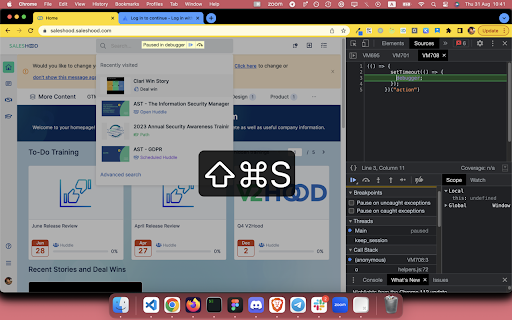
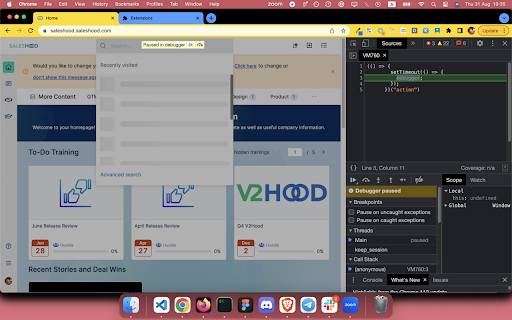
Right click on tab content and choose "Freeze DOM" (while devtool panel is open) to freeze the state of website on demand.

With a frozen DOM, you can:
- Inspect an UI part that only available while hovered / focused (for example: keeping the auto complete dropdown of a text input visible)
- Take a snapshot of an in-progress state (for example: loading state)


🔭 Explore more dev tools at: https://nemothecollector.dev/products

Note: The shortcut might be overridden by built-in settings of some browsers for example Arc and Microsoft Edge. To fix it:
- For Arc: go to arc://extensions/shortcuts and update the shortkeys
- For Microsoft Edge: follow this instruction https://www.webnots.com/how-to-assign-keyboard-shortcut-to-extension-in-microsoft-edge/
Technical
- Version
- 1.0.1
- Manifest
- V3
- Size
- 37.57KiB
- Min Chrome
- 88
- Languages
- 1
- Featured
- No
Metadata
- ID
- onekmnelbichmlnmkecckkjjljifhefg
- Developer ID
- u7fdb903d773f71d5648025632376c200
- Developer Email
- [email protected]
- Created
- Sep 1, 2023
- Last Updated (Store)
- Dec 31, 2024
- Last Scraped
- May 27, 2026
- Website
- nemothecollector.dev
- Support URL
- —
- Privacy Policy
- —
Similar extensions
Alternatives to Freeze DOM, ranked by description similarity.

DevKnife: Color Picker, Ruler, Font, CSS Tools & More - AUFOUNDATION
All-in-one dev toolkit: Color Picker, Font Finder, Page Ruler, CSS Outliner, Image Downloader & Source Grabber.
51
★ 5.0

Focus: The Elements - DOM Inspector & Editor
DOM Inspector & Editor, inspect and edit HTML element styles directly on any page.
63
★ 5.0

Pause page
Instantly pause the page when DevTools is open using a keyboard shortcut.
572
★ 3.0

DOM Lens
Grab any element on any website and give it to AI coding agents
—
★ 5.0

Quick Copy DOM
Visually select any element on the page and instantly copy its HTML to clipboard. Like DevTools element inspector, but faster.
127
★ 5.0

Pause Script Execution
Pause JavaScript execution to aid in debugging. Open DevTools and press the hotkey (default Ctrl+Shift+S) to pause script execution.
583
★ 2.6

ALT-DEV TOOLS
A powerful sidebar DevTools alternative — Elements, Console, Network, Sources & Application panels right in your browser sidebar
—
★ 5.0

Quick DOM
Instantly store hovered or right-clicked elements as global console variables.
5
★ 5.0
Data sourced from the Chrome Web Store · last verified May 27, 2026.