
AI Chat Prompt Navigator
Navigate, search, and export your prompts in AI chat applications (Claude, ChatGPT and Gemini)
As of June 2026, AI Chat Prompt Navigator has 7 users and a 5.00/5 rating from 1 reviews in the Productivity category.
Usersup 40.0 percent+40.0%
7
7
Ratingno change0%
5.00
1 reviews
Reviewsno change0%
1
Version
2.0.0
Manifest V3
History
5 snapshotsTracking since Apr 1, 2026.
View as table
| Date | Users | Rating | Reviews | Version |
|---|---|---|---|---|
| Apr 1, 2026 | 5 | 5.00 | 1 | 2.0.0 |
| Apr 28, 2026 | 4 | 5.00 | 1 | 2.0.0 |
| May 8, 2026 | 6 | 5.00 | 1 | 2.0.0 |
| May 15, 2026 | 7 | 5.00 | 1 | 2.0.0 |
| May 24, 2026 | 8 | 5.00 | 1 | 2.0.0 |
| Now | 7 | 5.00 | 1 | 2.0.0 |
Permissions & access
- Permissions
- activeTabstorageclipboardWrite
- Host access
- None declared
Screenshots



About
Scrolling through long AI conversations to find old prompts is frustrating. AI Chat Prompt Navigator helps you jump instantly to any message, search your conversation history, and export important threads—all in one simple, clean interface.

---------------------------------
🎯 KEY FEATURES:

📍 INSTANT NAVIGATION
• See all your prompts in one organized list
• Click any prompt to jump directly to it
• Smooth scrolling with visual highlighting
• Never lose track of important conversations

🔍 SMART SEARCH
• Search through all your prompts in real-time
• Filter conversations instantly
• Keyboard shortcut (/) for quick access
• Find what you need in seconds, not minutes

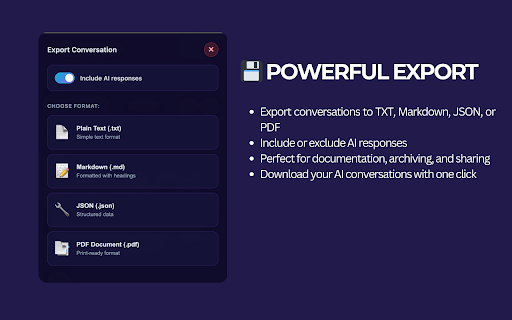
💾 POWERFUL EXPORT
• Export conversations to TXT, Markdown, JSON, or PDF
• Include or exclude AI responses
• Perfect for documentation, archiving, and sharing
• Download your AI conversations with one click

⭐ FAVORITES SYSTEM
• Star important prompts for quick access
• Build your personal prompt library
• Never lose critical information
• Organize conversations your way

⌨️ KEYBOARD SHORTCUTS
• ↑↓ Navigate through prompts
• Enter to jump to selected prompt
• / to focus search instantly
• Esc to close popup
• Ctrl+Shift+P (Cmd+Shift+P on Mac) to open navigator

🎨 BEAUTIFUL INTERFACE
• Modern purple gradient design
• Dark theme optimized for AI platforms
• Smooth animations and transitions
• Distraction-free, focused experience

---

🌐 PLATFORM SUPPORT:

✓ Claude.ai (Anthropic)
✓ ChatGPT
✓ Google Gemini

Works seamlessly across all major AI chat platforms. More platforms coming soon!

---

🎓 PERFECT FOR:

• Developers: Managing code conversations and debugging sessions
• Researchers: Organizing AI research and experiments
• Writers: Tracking creative prompts and story development
• Business Professionals: Documenting AI-assisted decision making
• Students: Organizing study materials and AI tutoring sessions
• Content Creators: Managing content ideas and AI brainstorming

---

🚀 HOW IT WORKS:

1. Open any supported AI chat platform
2. Click the extension icon or press Ctrl+Shift+P
3. See all your prompts in one organized view
4. Click any prompt to jump directly to it
5. Use search to filter or export to save

That's it! No configuration needed.

---

🆓 100% FREE

• No subscriptions
• No account required
• No data collection
• No hidden costs
• Optional support via donations

---

🔒 PRIVACY FIRST:

Your privacy is our priority:

✓ All processing happens locally in your browser
✓ No data sent to external servers
✓ No tracking or analytics
✓ No account creation required
✓ Your conversations stay 100% private

We only request permissions needed for core functionality:
• activeTab - To read prompts from the current page
• storage - To save your favorites locally
• clipboardWrite - To copy text when exporting

---

⚡ QUICK START:

1. Install the extension
2. Visit any supported AI chat platform
3. Start a conversation (or open an existing one)
4. Click the extension icon or press Ctrl+Shift+P
5. Enjoy organized, searchable prompts!

---

🐛 SUPPORT:

Having issues or want to suggest a feature?

• Check the extension's support page
• Leave a review with your feedback
• Contact us through the support link

We're actively improving this extension based on user feedback!

---

🎁 SUPPORT DEVELOPMENT:

This extension is free and always will be. If it helps you save time and stay organized, consider supporting its development through the built-in donation option.

Every contribution helps us:
• Keep the extension free for everyone
• Add new features and platforms
• Provide fast support and updates
• Maintain and improve performance

---

📈 UPCOMING FEATURES:

• Support for more AI platforms (Perplexity, Poe, etc.)
• Prompt templates library
• Advanced filtering and sorting
• Collaboration features
• Browser-wide prompt search

---

🏆 WHAT MAKES US DIFFERENT:

Designed to work across multiple AI chat environments with a privacy-first approach.

✓ Privacy-focused (no data collection)
✓ Beautiful, modern design
✓ Active development
✓ Free forever
Technical
- Version
- 2.0.0
- Manifest
- V3
- Size
- 89.55KiB
- Min Chrome
- 88
- Languages
- 1
- Featured
- No
Metadata
- ID
- omoiajpiplbgpaojhflbgjafngnndmdk
- Developer ID
- u5018b457956aa6c74308de368a5ce9cf
- Developer Email
- [email protected]
- Created
- Dec 4, 2025
- Last Updated (Store)
- Dec 4, 2025
- Last Scraped
- Jun 3, 2026
- Website
- —
- Support URL
- —
- Privacy Policy
- —
Similar extensions
Alternatives to AI Chat Prompt Navigator, ranked by description similarity.

Prompt Station - AI Prompt Manager & Automation for ChatGPT, Claude, Gemini
AI prompt manager with Side Panel chat, prompt chains, and API access. Works on ChatGPT, Claude, Gemini, Grok, Mistral, and more.
105
★ 5.0

PromptCase
Capture, store, and reuse your AI prompts from ChatGPT, Claude, and other AI chat services
3

AI Prompt Assistant
Save and insert custom AI prompts with // shortcuts and autocomplete in supported chat tools.
36
★ 5.0

AI Sidebar - My Prompts
Show all my Prompts in the popup for ChatGPT, Gemini, and Grok
15
★ 4.0

PromptEasy - AI Prompt Manager
Manage and use your AI prompts across ChatGPT, Claude, Gemini and more
13

AI Prompt Copilot — Better Prompts, Better AI
One-click prompt improvement for ChatGPT, Claude, Gemini & Grok. Deep optimization, 9 modes, prompt history.
3

Curator
Your ultimate AI toolkit: 200+ tools, 88+ prompts, custom prompts and more. Everything AI in one place.
10
★ 5.0

Prompt Enhancer
Enhance and craft AI prompts with Gemini Nano — chat, edit, and copy on ChatGPT, Gemini, Claude, and Perplexity
32
★ 5.0
Data sourced from the Chrome Web Store · last verified Jun 3, 2026.