
AI Sidebar - My Prompts
Show all my Prompts in the popup for ChatGPT, Gemini, and Grok
As of June 2026, AI Sidebar - My Prompts has 15 users and a 4.00/5 rating from 8 reviews in the Productivity category.
Usersdown 6.3 percent−6.3%
15
15
Ratingno change0%
4.00
8 reviews
Reviewsno change0%
8
Version
1.0
Manifest V3
History
2 snapshotsTracking since Apr 1, 2026.
View as table
| Date | Users | Rating | Reviews | Version |
|---|---|---|---|---|
| Apr 1, 2026 | 16 | 4.00 | 8 | 1.0 |
| May 18, 2026 | 17 | 4.00 | 8 | 1.0 |
| Now | 15 | 4.00 | 8 | 1.0 |
Permissions & access
- Permissions
- activeTabstorage
- Host access
- https://chatgpt.com/*, https://gemini.google.com/*, https://grok.com/*
Screenshots


About
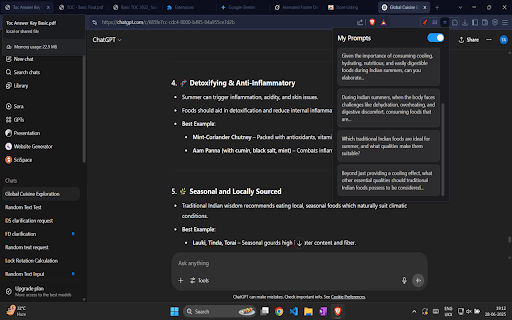
Tired of endlessly scrolling to find that one specific prompt in a long AI conversation? Your search is over!

AI Prompt Sidebar is a must-have productivity tool that creates a clean, clickable index of all your prompts. It seamlessly integrates with your favorite AI chat platforms, letting you navigate even the longest conversations with a single click. Boost your workflow and never lose your train of thought again!

Key Features:

🚀 Instant Navigation: No more scrolling! Just click a prompt in the sidebar to instantly jump to that exact spot in the chat.

📋 Clean Overview: Get an at-a-glance list of your entire conversation history, with a short preview of each prompt so you can quickly find what you're looking for.

🎨 Light & Dark Themes: Automatically syncs with your system theme or choose your preferred mode for maximum comfort during late-night work sessions.

🔒 Privacy First: Your prompts and data are processed locally on your computer. Nothing is ever stored, saved, or shared. Period.

⚙️ Simple & Efficient: A lightweight, no-fuss extension built on the latest Manifest V3 for better performance and security.

How It Works:

   -Navigate to a supported AI chat website.

   -Click the extension icon in your toolbar.

   -Your prompt history instantly appears in the sidebar, starting with the most recent. Click any prompt to navigate!

Supported Websites:

✓ ChatGPT

✓ Google Gemini

✓ Grok

Our commitment is to your privacy and productivity. Install AI Prompt Sidebar today and take control of your AI conversations!
Technical
- Version
- 1.0
- Manifest
- V3
- Size
- 37.0KiB
- Min Chrome
- 88
- Languages
- 1
- Featured
- No
Metadata
- ID
- jpopmplgannacijpekjngmlkkpjclgbb
- Developer ID
- uc358a26db328c5d2c5c546654e25655b
- Developer Email
- [email protected]
- Created
- Jun 30, 2025
- Last Updated (Store)
- Jul 1, 2025
- Last Scraped
- Jun 1, 2026
- Website
- —
- Support URL
- —
Similar extensions
Alternatives to AI Sidebar - My Prompts, ranked by description similarity.

Prompt Master - AI Prompt Generator
Generate precise AI prompts effortlessly with our Chrome extension. Refine ideas, save time, and enhance creativity.
67
★ 3.0

🤖 AI Chat Prompt Manager
AI Chat Prompt Manager helps you save, organize, and reuse prompts across AI chat applications like ChatGPT, Claude, and Perplexity.
1

PromptShelf
Save, organize, and quickly paste your favorite prompts into AI tools.
16
★ 5.0

AI Prompt Manager
Save, organize, and quickly access your frequently used AI prompts
1

AI Chat Prompt Navigator
Navigate, search, and export your prompts in AI chat applications (Claude, ChatGPT and Gemini)
7
★ 5.0

Prompt Bucket
Manage your AI Prompts and insert them with one click. Free, fast & local.
8
★ 5.0

AI Prompt Manager – PromptIn for ChatGPT, Claude, Gemini & More
AI Prompt Manager for ChatGPT, Claude, Gemini, Perplexity & Grok. Save, organize & reuse your best prompts in one place.
178
★ 5.0

Prompt Master
Prompt Master enables you to manage AI prompts for each AI tool (based on URL) separately and effectively
6
Data sourced from the Chrome Web Store · last verified Jun 1, 2026.