
ChatGPT Toolbar Companion
The Ultimate ChatGPT Toolbar Companion with Prompts, Text-to-Speech, Speech-to-Text, and Auto Continue.
As of May 2026, ChatGPT Toolbar Companion has 577 users and a 3.40/5 rating from 10 reviews in the Productivity category.
Usersup 8.3 percent+8.3%
577
577
Ratingno change0%
3.40
10 reviews
Reviewsno change0%
10
Version
4.0.0.1
Manifest V3
History
3 snapshotsTracking since Apr 1, 2026.
View as table
| Date | Users | Rating | Reviews | Version |
|---|---|---|---|---|
| Apr 1, 2026 | 533 | 3.40 | 10 | 4.0.0.1 |
| Apr 30, 2026 | 553 | 3.40 | 10 | 4.0.0.1 |
| May 27, 2026 | 582 | 3.40 | 10 | 4.0.0.1 |
| Now | 577 | 3.40 | 10 | 4.0.0.1 |
Permissions & access
- Permissions
- storage
- Host access
- None declared
Screenshots


About
Update: May 21, 2024

Today, we added more "Act As" options: "Content Creator," "Personal Trainer," and "Financial Advisor." We also included "Webpage," "Markdown," "HTML," and an option to fill in your own with "Other format" under the "Type" dropdown. Additionally, we added "1000 Words," "1500 Words," and "2000 Words" options under the "Length" dropdown, and made the descriptions for certain dropdowns more detailed.

-------
The Ultimate ChatGPT Toolbar Companion with Powerful Prompts, Text-to-Speech, Speech-to-Text, Auto Continue, and Much More!!

Make Sure to Look Through the Images!

Key Features:

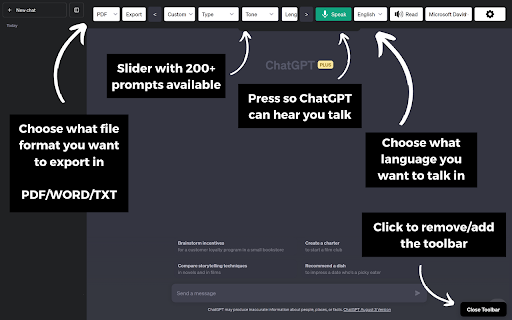
🚀 200+ Powerful Prompts: Unlock a vast array of prompts, including "Act As," "Tone," "Creativity," "Programming," and more, empowering you to have dynamic and engaging conversations.

🗨️ Two-Way Conversations: Engage in real dialogues with ChatGPT as it talks back to you, creating a lifelike interaction that feels genuinely conversational.

🛠️ Deep Customization: Tailor your chat experience with advanced customization features, making it uniquely yours.

🔊 Realistic AI Voices: Immerse yourself in the conversation with realistic AI voices that enhance the authenticity of your interactions.

⬇️ Export ChatGPT: Download your ChatGPT chats in different formats.

Additional Features:

💻 Instantaneous Access: Quickly access ChatGPT prompts via a dedicated toolbar for seamless chatting.

✍️ Custom Prompt Creation: Craft and save custom prompts to suit your specific needs and preferences.

🎙️ Advanced Speech-to-Text: Engage with ChatGPT effortlessly through advanced speech-to-text functionality.

🎧 Text-to-Speech: Listen to ChatGPT's insightful responses with the text-to-speech function, enhancing your communication experience.

➡️ Auto-Continuation: Enjoy uninterrupted chat flow with auto-continuation, making conversations smoother.

⚙️ Toolbar Modification: Personalize the toolbar to match your preferences and workflow.

Why Choose the ChatGPT Toolbar Companion?

⚡ Peak Efficiency: Streamline your online engagements for maximum efficiency, helping you get more done in less time.

🌍 Universal Accessibility: Access ChatGPT via both voice and text options, ensuring usability for all.

🚀 Master Multitasking: Engage in chats without sacrificing your ability to focus on other tasks, making multitasking a breeze.

📚 Immersive Learning: Utilize ChatGPT as an unparalleled tool for immersive research and learning experiences.

💡 Sparking Creativity: Enhance your conversations, spark creativity, and foster innovation with ChatGPT's capabilities.

🌟 Future of Communication: Step into the future of communication with the ChatGPT Toolbar Companion, revolutionizing the way you interact online.

Getting Started:

🖥️ Compatibility: Ensure compatibility by using a supported browser on a desktop or PC.

⬇️ Download: Download the ChatGPT Toolbar Companion to begin your enhanced chat journey.

🚀 Launch: Start engaging with ChatGPT.

🔄 Toolbar Troubleshooting: If the toolbar doesn't appear, simply refresh your browser page.

📌 Note: We are committed to expanding our linguistic capabilities, so anticipate even more language support in upcoming updates.

📌 Note: Realistic AI Voices are only compatible in certain browsers. All browsers will have the basic voices.
Technical
- Version
- 4.0.0.1
- Manifest
- V3
- Size
- 132KiB
- Min Chrome
- 88
- Languages
- 1
- Featured
- No
Metadata
- ID
- omiclgjkefjdmmmnonhgdgobdldkggdo
- Developer ID
- u110a6fc75ccd988d59d59c56aea1c9fb
- Developer Email
- [email protected]
- Created
- Sep 12, 2023
- Last Updated (Store)
- May 22, 2024
- Last Scraped
- May 27, 2026
- Website
- —
- Support URL
- —
Similar extensions
Alternatives to ChatGPT Toolbar Companion, ranked by description similarity.

ChatGPT Voice Master
Supports English voice engine for chatgpt.com, making conversations more natural and interactions smoother.
4.0K
★ 4.1

AI Toolbar - Reclaim Your Time Now
Simplify your life. Generate, Respond, Voice activation, combine prompts, Summarize text anywhere in the Web at no charge!
40.0K
★ 4.0

Superpower Chat
Folders & Subfolders, Search, Export/Delete, Prompts, Minimap, Gallery, Highlights, Tree Map, Queue, Notes & References for ChatGPT
100.0K
★ 4.5

WebChatGPT: Prompt library with web access
Augment your ChatGPT prompts with relevant web search results through web browsing.
1.0M
★ 4.3

AI Toolbox: Folders, Prompts, Advanced Search & Export for AI Chats
Organize AI chats with folders, prompt library, full-text search, bookmarks, bulk delete, one-click export, and prompt chaining.
20.0K
★ 4.4

ChatGPT Pro Desk AI
Professional toolkit with intelligent context-aware prompt enhancement, quick prompts, and productivity tools.
9
★ 5.0

GPT Quicker
Excellence GPT assistant with useful extensions and powerful prompts. Use ChatGPT, Claude, Bard, Bing anywhere online.
152
★ 3.7

Immersive AI: ChatGPT Immersive translate summary rewrite language learning
Immersive AI: ChatGPT Immersive translate summary rewrite language learning
84
Data sourced from the Chrome Web Store · last verified May 27, 2026.