
GummyGrab
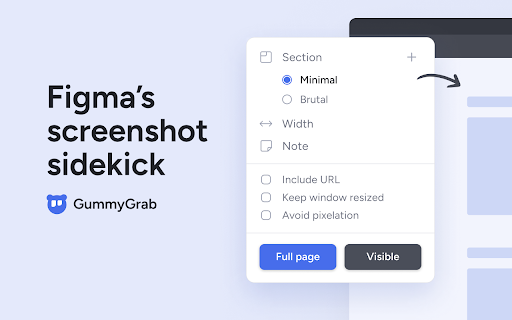
Figma’s screenshot sidekick. Capture screenshots in Chrome and bring them into Figma without pushing a single pixel.
As of May 2026, GummyGrab has 399 users and a 5.00/5 rating from 3 reviews in the Productivity category.
Usersup 2.8 percent+2.8%
399
399
Ratingno change0%
5.00
3 reviews
Reviewsno change0%
3
Version
1.2
Manifest V3
History
3 snapshotsTracking since Apr 1, 2026.
View as table
| Date | Users | Rating | Reviews | Version |
|---|---|---|---|---|
| Apr 1, 2026 | 388 | 5.00 | 3 | 1.2 |
| Apr 30, 2026 | 387 | 5.00 | 3 | 1.2 |
| May 27, 2026 | 401 | 5.00 | 3 | 1.2 |
| Now | 399 | 5.00 | 3 | 1.2 |
Permissions & access
- Permissions
- activeTabstoragedownloads
- Host access
- <all_urls>
Screenshots
About
You can:
• Take screenshots at any breakpoint size.
• Bring full page shots into Figma without downsizing and pixelation issues.
• Organize them into boards with notes and URLs.

How it Works
1. Capture from the Chrome Extension.
2. Drop your files into Figma.
3. Select files and run the GummyGrab Figma plugin.

Link to install the GummyGrab Figma plugin:
https://www.figma.com/community/plugin/1268974573188158702/gummygrab-beta

Great for:
Ad hoc screenshots • Product audits • Competitor evaluations • Expert reviews • Mood boards • QA reviews • Marketing mockups • Portfolio displays • Help center shots

While in beta, everything is free! 🧸
A paid version is on its way – consider it my peace offering to my lovely wife for all the time GummyGrab stole from our post-toddler bedtime hours.

And don't worry, GummyGrab will always offer a free version.

Features:
Chrome extension —
• Size shots
• Create boards
• Add notes
• Save URLs
• Avoid pixelation
• Keyboard accessible

Figma plugin —
• Resizes shots from 2x → 1x
• Arranges shots
• Attaches notes and URLs
• Stitches split shots

Link to install the GummyGrab Figma plugin:
https://www.figma.com/community/plugin/1268974573188158702/gummygrab-beta

Why GummyGrab?
• Way less clicks and maybe… a little less wrist pain 😉.
• Super fast, local processing – no delayed imports.
• No manual adjustments or time consuming sorts.
• Keeps references alongside the designs they inspire, no extra tools needed.

FAQ’s
1. Are there keyboard shortcuts?
    Chrome extension:
    • Open the extension using Ctrl + 9 (Mac) or Ctrl+Shift+9 (Windows).
    • Use tab, up/down, and enter keys to navigate the extension.
    Figma plugin:
    • Run the plugin with an App shortcut. For the Mac desktop app, set it up by navigating to: System Settings > Keyboard > Keyboard Shortcuts > App Shortcuts > Plus icon > Select Figma for Application > Input the following into Menu Title: Plugins->GummyGrab (beta) > Assign shortcut keys.

2. Why does GummyGrab use local file downloads?
    • Speed: Fast integration into Figma, as it cuts out server imports.
    • Convenience: You don’t need to operate another UI in Figma, just simply run the plug-in.
    • Cost-effective: No extra charges for you due to server storage.

3. What are the available breakpoint sizes?
    • Set custom widths from 320px to 3024px. Wider sizes can vary based on the size of your computer screen.
    • Alternatively, capture at your browser's current width without setting a size.

4. What does the “Avoid pixelation” feature do?
    • It splits long screenshots into smaller ones to prevent them from being downsized by Figma. The Figma plugin automatically stitches the shots back together, resulting in high-quality images. Note that wider widths of 2048px and over may still experience some pixelation.

5. How do I get the best from GummyGrab?
    • For wider screenshots, keep your browser window to the left side of your screen.
    • When capturing screens of 500px to 768px wide, try to have fewer tabs open.

6. Why does the extension ask me to reload the page after installation?
    • Full page and mobile-sized shots require URLs to be loaded after extension installation or updates. If they we're loaded before installation, then they will need to be reloaded so that the extension can read the URL's.

7. Does GummyGrab store user data?
    • GummyGrab processes all data locally and doesn't collect, store, or sell any user data.

8. Why does the GummyGrab Chrome Extension request permissions during installation?**
    • GummyGrab requires access to your downloads to transfer files to your computer. It also needs access to your URLs to capture mobile-sized screenshots. Rest assured, it only uses these permissions for your screenshots - no 🧢.

Get started, by installing the Chrome extension and running the GummyGrab Figma Plugin:
https://www.figma.com/community/plugin/1268974573188158702/gummygrab-beta
Technical
- Version
- 1.2
- Manifest
- V3
- Size
- 82.12KiB
- Min Chrome
- 88
- Languages
- 1
- Featured
- Yes
Metadata
- ID
- olpfckigcpdaamojgmndbfcnbmkjlohg
- Developer ID
- ueba5bf365b39dc7cb60587aaec9e5068
- Developer Email
- [email protected]
- Created
- Jan 25, 2024
- Last Updated (Store)
- Mar 30, 2024
- Last Scraped
- May 27, 2026
- Website
- —
Similar extensions
Alternatives to GummyGrab, ranked by description similarity.

Video Screenshot
Capture high quality video screenshots for free in multiple formats on YouTube, Netflix, Tiktok, Instagram, Facebook and others.
1.0K
★ 4.9

ScreenGrab – Screenshot Capture & Editor
ScreenGrab is an awesome Chrome extension for webpage screenshots, includes a fullshot editor and lightshot fast gofullpage capture.
217

Chrome Capture - Screenshot & GIF
All-in-one screenshot + GIF capture! Take screenshots (area, full page), record screen & edit instantly.
300.0K
★ 4.7

ScreenSnapShot
Full-page scrolling screenshots saved as PNG.
9

PixelGrab - Screenshot & Screen Capture Tool
Capture full-page, visible area, and element screenshots. Edit, download, and manage your screenshots with ease.
8

Image Editor Pro
A beautiful and powerful image editor for Chrome with advanced editing capabilities including filters, cropping, and more
216
★ 5.0
Screen GIF Maker: Google Animation Creator
Create GIFs Easily
137
★ 2.0

Chrome Screenshot
Use Chrome Screenshot: smart screenshot chrome extension! Capture, edit, save any page. Explore how to screenshot on chrome browser
2.0K
★ 4.6
Data sourced from the Chrome Web Store · last verified May 27, 2026.