
MYO Studio
Enhancing the process of creating Yoto Make Your Own cards.
As of June 2026, MYO Studio has 10,000 users and a 4.93/5 rating from 41 reviews in the Workflow & Planning category.
Usersno change0%
10.0K
10,000
Ratingno change0%
4.93
41 reviews
Reviewsno change0%
41
Version
1.34.0
Manifest V3
90-day change · In the last 90 days this extension 2 version updates, changed permissions.
History
4 snapshotsTracking since Apr 16, 2026.
View as table
| Date | Users | Rating | Reviews | Version |
|---|---|---|---|---|
| Apr 16, 2026 | 10.0K | 4.93 | 41 | 1.32.0 |
| Apr 26, 2026 | 10.0K | 4.93 | 41 | 1.32.0 |
| May 23, 2026 | 10.0K | 4.93 | 41 | 1.32.0 |
| Jun 6, 2026 | 10.0K | 4.93 | 41 | 1.33.0 |
| Now | 10.0K | 4.93 | 41 | 1.34.0 |
Changelog
- May 23, 2026host_permissions
*://*.yotoicons.com/*, *://*.goodreads.com/*, *://api.myostudio.co.uk/*
*://*.yotoicons.com/*, *://api.myostudio.co.uk/*
Permissions & access
- Permissions
- storage
- Host access
- *://*.yotoicons.com/*, *://api.myostudio.co.uk/*
Screenshots
About
MYO Studio: Supercharge Your Yoto Make Your Own Experience! 🎧✨

MYO Studio makes it easier, faster, and more fun to create playlists with powerful features and smart tools! 🚀

💡 NEW TO MYO STUDIO? Check out our help page for guides & FAQs: https://help.myostudio.co.uk

🌟 KEY FEATURES 🌟

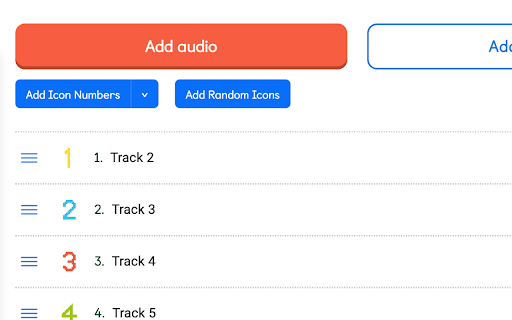
🔢 Auto-number your tracks for perfect order
🎲 Assign random icons in a click
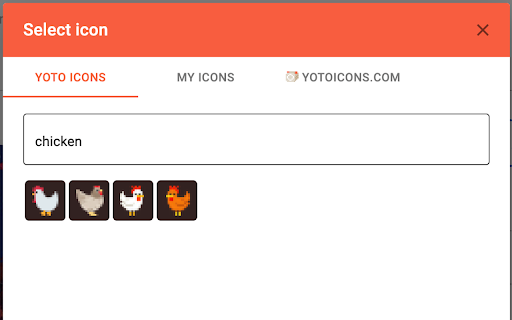
🎨 AI-powered icon suggestions for a creative boost
🔎 Smart filtering & sorting to organize like a pro
📥 Download MYO tracks & playlists for backups
🔀 Mix & match tracks from different playlists
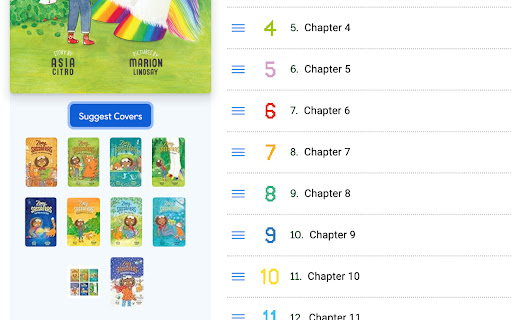
🖼️ Cover art suggester & print helper for beautifully organized cards
🛍️ Yoto Store & Club collection print helper
🛠️ Auto-save, auto-number & auto-random icons after uploading audio
✅ Multi-track icon select & move for quick edits
🔗 Seamless YotoIcons.com integration
🔀 Toggle between filenames and metadata title's
⬆️ Import MYO Studio archives with one click!
📚 Import ZIP archives with one click!
🖌️ Design your own icons
📚 Get Book suggestions based on your library

📌 HOW TO INSTALL 📌

1️⃣ Click "Add to Chrome" and install the extension.
2️⃣ Open https://my.yotoplay.com
3️⃣ You will now see extra buttons on the interface
4️⃣ Enjoy the smartest MYO experience ever! 🎉
Technical
- Version
- 1.34.0
- Manifest
- V3
- Size
- 4.34MiB
- Min Chrome
- 88
- Languages
- 1
- Featured
- No
Metadata
- ID
- olloopaapdodegpcacjmgdjaphggfgoj
- Developer ID
- u813d5596c20db0fd0c9fbe349e03abc9
- Developer Email
- [email protected]
- Created
- Apr 24, 2024
- Last Updated (Store)
- Jun 3, 2026
- Last Scraped
- Jun 21, 2026
- Website
- —
- Support URL
- —
- Privacy Policy
- —
Similar extensions
Alternatives to MYO Studio, ranked by description similarity.

Sticko Quick Note
A professional note taking extension that boosts your productivity.
14
★ 5.0

Dracon New Tab
A customizable new tab page with your favorite links
1

YouTube Bookmarker
Save and organize YouTube video bookmarks with timestamps, categories, and search. Export your bookmarks to CSV/JSON formats.
11

YouTube Studio Assistant
AI-powered YouTube Studio Assistant: Generate titles, descriptions, tags & auto-translate to 110+ languages.
109
★ 5.0

Mynotes - Simple & Stylish Notepad Extension
Mynotes is a sleek and user-friendly notepad extension.
66
★ 5.0

Yoyo Shortcut
The official Yoyo Shortcut extension
Quickly save and organize bookmarks, navigate websites using memorable keywords, and manage…
85
★ 4.3

Boostrix - Smart Sound Booster - Volume Amplifier & Equalizer (1000% Boost)
🔊 Boost beyond 900%, fine-tune with EQ presetes, and switch themes in a click total audio control in your browser!
244
★ 3.3

YTControl+
Get ready to experience the best of youtube with YTControl+.
37
★ 5.0
Data sourced from the Chrome Web Store · last verified Jun 21, 2026.