
Sticko Quick Note
A professional note taking extension that boosts your productivity.
As of June 2026, Sticko Quick Note has 14 users and a 5.00/5 rating from 4 reviews in the Workflow & Planning category.
Usersdown 22.2 percent−22.2%
14
14
Ratingno change0%
5.00
4 reviews
Reviewsno change0%
4
Version
1.0.1
Manifest V3
History
6 snapshotsTracking since Apr 1, 2026.
View as table
| Date | Users | Rating | Reviews | Version |
|---|---|---|---|---|
| Apr 1, 2026 | 18 | 5.00 | 4 | 1.0.1 |
| Apr 18, 2026 | 22 | 5.00 | 4 | 1.0.1 |
| Apr 28, 2026 | 20 | 5.00 | 4 | 1.0.1 |
| May 15, 2026 | 16 | 5.00 | 4 | 1.0.1 |
| May 24, 2026 | 15 | 5.00 | 4 | 1.0.1 |
| Jun 3, 2026 | 17 | 5.00 | 4 | 1.0.1 |
| Now | 14 | 5.00 | 4 | 1.0.1 |
Permissions & access
- Permissions
- storageidentityactiveTabscriptingalarmscookies
- Host access
- <all_urls>
Screenshots


About
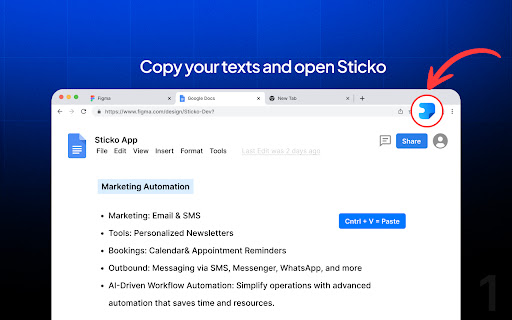
🧠 Sticko - Keep Your Ideas at Hand | Boost Productivity Capture ideas instantly, stay organized, and never lose a note again! Sticko is a modern note-taking browser extension that lets you save, organize, and sync your ideas seamlessly right inside Chrome. Whether you're jotting down tasks, research snippets, or creative thoughts, Sticko keeps everything in one accessible place so you can focus on what matters most: your productivity. ✨ Why Choose Sticko? Sticko combines simplicity, speed, and smart design — perfect for students, developers, writers, and busy professionals who need a distraction-free way to manage notes in the browser. 🚀 Key Features 📝 Smart Note-Taking Drag & Drop Anywhere – Move your note window freely across any webpage Use Outside the Browser – Open Sticko in a standalone window for desktop-like experience Flexible Block System – Create 1, 2, or 3-column layouts for structured note-taking Rich Text Formatting – Highlight, create lists, and style your notes beautifully ⚡ Text Snippets (Pro) Type Less, Do More – Create custom shortcuts like /email or /address Works Everywhere – Expand snippets on ANY website (Gmail, Twitter, WhatsApp, etc.) Grammarly-Like Experience – Just type /shortcut + space to expand instantly Boost Productivity – Save time on repetitive typing 🎨 Personalization Custom Themes & Dark Mode 🌙 – Choose from beautiful color themes or create your own Font & Canvas Customization – Adjust size and style to match your workflow Minimal, Clean Interface – Designed for clarity and focus ☁️ Backup & Sync Google Drive Integration – Keep your notes safe and accessible Cross-Device Sync – Access your notes anywhere, anytime Secure & Private – Your data stays yours 🤖 AI-Powered (Pro) AI Rewrite – Improve your writing with Gemini or chatGPT AI Smart Suggestions – Get help crafting better notes 💡 Why We Built Sticko We've all been there — browsing, researching, or coding when inspiration hits… You copy something important or get a great idea, but by the time you open Notepad or another app, the thought's gone. That's why Oritop built Sticko: a simple, elegant note extension that keeps your ideas within reach — no switching tabs, no clutter, just smooth, productive vibes. 🚀 🪄 Perfect For Students – Taking quick notes while studying or researching Developers – Saving code snippets, ideas, and documentation Designers – Organizing inspirations, sketches, and creative thoughts Professionals – Managing meeting notes, tasks, and research Writers – Capturing ideas and drafting content on the go 🔒 Safe & Synced Sticko integrates with Google Drive for secure backup and synchronization, so your notes are always available — anywhere, anytime. Your privacy matters: we don't sell your data, track your activity, or use your notes for any purpose other than providing you with the best note-taking experience. ⚡ Text snippets (expand anywhere!) 🎨 Custom themes ☁️ Google Drive backup & sync 🤖 AI-powered rewriting 🚀 Priority support 🌟 Outstanding Support Built and maintained with care by the Oritop team. We're committed to making Sticko the best note-taking extension for Chrome. Have feedback or need help? We're here for you! 💁♂️ Made with ❤️ by Oritop
Technical
- Version
- 1.0.1
- Manifest
- V3
- Size
- 129KiB
- Min Chrome
- 88
- Languages
- 1
- Featured
- No
Metadata
- ID
- olpjgjnminnjkoggakagegphpllnkmjg
- Developer ID
- u96b5f798ffc6504767bb77d0000d80fb
- Developer Email
- [email protected]
- Created
- Jan 22, 2025
- Last Updated (Store)
- Dec 28, 2025
- Last Scraped
- Jun 3, 2026
- Website
- https://stickoapp.com/
- Support URL
- —
- Privacy Policy
- https://stickoapp.com/privacy
Similar extensions
Alternatives to Sticko Quick Note, ranked by description similarity.
Sticky Notes
Extension sticky notes is an online notes for Chrome. Use this notes board to jot down your sticky ideas and tasks in the browser.
1.0K
★ 5.0

Smart Sticky Notes
Enhance productivity with smart sticky notes! Save quick notes, access references effortlessly while you work.
34
★ 5.0

Sticky Notes
A simple sticky notes extension with download and clear options
507

Simple Sticky Notes
Boost your productivity with simple sticky notes app. Make handy floating notes! Online sticky notes in Chrome on Mac & Windows
8.0K
★ 4.8

Sticky Notes - Capture thoughts anywhere on any web page
Add sticky notes to any webpage, saved per URL.
24
★ 5.0

Notes Online
The in-page notepad for taking notes online directly on any web page. No login, autosave, 1-click install, and full privacy
5.0K
★ 4.3

Sticky Notes Pro
📒Effortlessly create, manage, and organize sticky notes📝, ensuring that you never miss important information
—

Sticky Notes
Notes for your browser
109
★ 5.0
Data sourced from the Chrome Web Store · last verified Jun 3, 2026.