
Snapchat Pixel Helper 🚀
Snapchat Pixel Helper 🛠️ designed to assist advertisers in validating, debugging, and resolving issues. 🌐
As of May 2026, Snapchat Pixel Helper 🚀 has 960 users in the Productivity category.
Usersup 3.4 percent+3.4%
960
960
Ratingno change0%
—
— reviews
Reviewsno change0%
—
Version
1.0
Manifest V3
History
3 snapshotsTracking since Apr 1, 2026.
View as table
| Date | Users | Rating | Reviews | Version |
|---|---|---|---|---|
| Apr 1, 2026 | 928 | — | — | 1.0 |
| Apr 30, 2026 | 960 | — | — | 1.0 |
| May 27, 2026 | 981 | — | — | 1.0 |
| Now | 960 | — | — | 1.0 |
Permissions & access
- Permissions
- notificationsgcmscripting
- Host access
- <all_urls>
Screenshots
About
Running Snapchat Ads? Struggling with that pesky Pixel? Introducing the Snapchat Pixel Helper chrome extension that will help you to verify, debug, fix Snapchat Pixel implementations effortlessly and take control of your advertising journey on Snapchat. 🚀✨
Key features of Snapchat pixel helper chrome extension

Effortless Installation 🚀:
Our Chrome Extension makes the installation process more convenient. Set up your Snapchat Pixel in no time.

Real-time Validation ⏰:
Real-time validation of Snapchat Pixel allows for instant feedback. Instantly know if your pixel is correctly installed and will deliver useful data.

Comprehensive Debugging 🛠️:
Address any problems directly with our complete debugging functionality. The Snapchat Pixel Assistant resolves common issues to ensure a flawless pixel implementation.

Transparent Pixel Insights 📊:
Focus on the intricacies of your Snapchat Pixel setup. Get information about configuration, events and potential problems to make informed decisions for your marketing strategy.

User-Friendly Interface 🌐:
Our user-friendly interface allows for easy navigation. No matter your level of advertising experience, the Snapchat Pixel Assistant guarantees a smooth process for all.

Optimize Ad Campaigns 🎯:
Use the optimization insights provided by Snapchat Pixel Assistant to make your ad campaigns on Snapchat more efficient. Track conversions, perfect your strategy and get better results.
How to use:
Visit the Chrome Web Store and search for "Snapchat Pixel Helper".
Click "Add to Chrome" to install the extension.
Locate the blue square icon in your Chrome toolbar and click it to activate.
Navigate to the webpage with your Snapchat Pixel installed.
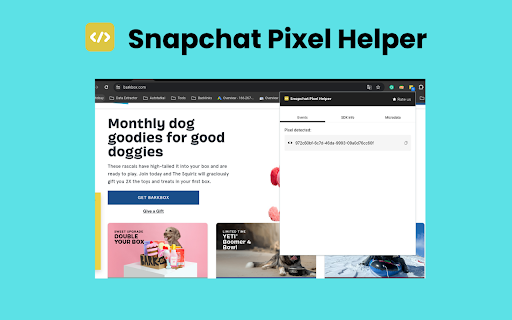
The extension will display your Pixel ID and status and ensure the pixel is active and firing correctly.
Use the extension's troubleshooting features to identify and fix problems, common issues include Pixel ID and event misconfigurations and metadata.
Then review the events detected by the extension and Track conversions and refine your ad campaigns based on insights from the extension. This helps maximize the impact of your Snapchat Pixel.
Technical
- Version
- 1.0
- Manifest
- V3
- Size
- 267KiB
- Min Chrome
- 88
- Languages
- 1
- Featured
- No
Metadata
- ID
- olakfefloafmhpomlnkipbfikbhafeml
- Developer ID
- u68d337da5a45ed7efac1f8b2a371b6fa
- Developer Email
- [email protected]
- Created
- Jan 27, 2024
- Last Updated (Store)
- Jan 27, 2024
- Last Scraped
- May 27, 2026
- Website
- —
- Support URL
- —
Similar extensions
Alternatives to Snapchat Pixel Helper 🚀, ranked by description similarity.

Tiktok PIxel Helper
Install Tiktok Pixel Helper Chrome extension to verify and troubleshoot pixel installation of your website
7.0K
★ 4.0

Twitter Pixel Helper
Install Twitter Pixel Helper to showcase an icon whenever a Twitter website tag is present on a specified page.
372
★ 2.0

Pixel helper for Linkedin
Install Linked pixel helper,to see if they have LinkedIn Insight Tags installed.
3.0K
★ 5.0

Xiaomi Ads Pixel Helper
The Xiaomi Ads Pixel Helper is a plug-in that monitors whether your Xiaomi Ads Pixel is functioning properly.
18

Outbrain Pixel Tracker
Install Outbrain Pixel Tracker for testing and troubleshooting Outbrain pixel implementation on your website.
698

Taboola Pixel Tracker
Enable this extension for testing and troubleshooting Taboola ID pixels implementation on any website.
106

📌 Pinterest Pixel Helper 🛠️
🚀 Install this chrome extension to assist you in constructing, troubleshooting, and testing your Pinterest Tags. 🧰
1.0K

Bing Pixel Helper
Bing PIxel Helper detects and resolve Microsoft Advertising problems with UET tag! 🛠️ Perfect for developers and marketers.
3.0K
★ 5.0
Data sourced from the Chrome Web Store · last verified May 27, 2026.