
Taboola Pixel Tracker
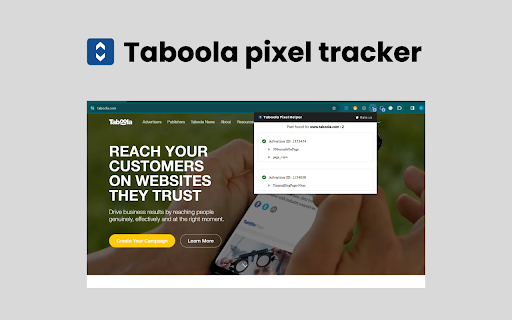
Enable this extension for testing and troubleshooting Taboola ID pixels implementation on any website.
As of June 2026, Taboola Pixel Tracker has 106 users in the Productivity category.
Usersdown 6.2 percent−6.2%
106
106
Ratingno change0%
—
— reviews
Reviewsno change0%
—
Version
1.0.0
Manifest V3
History
3 snapshotsTracking since Apr 1, 2026.
View as table
| Date | Users | Rating | Reviews | Version |
|---|---|---|---|---|
| Apr 1, 2026 | 113 | — | — | 1.0.0 |
| May 3, 2026 | 114 | — | — | 1.0.0 |
| Jun 2, 2026 | 113 | — | — | 1.0.0 |
| Now | 106 | — | — | 1.0.0 |
Permissions & access
- Permissions
- storagetabswebRequestwebNavigationnotifications
- Host access
- <all_urls>
Screenshots
About
Are you facing challenges in Taboola pixel optimization? Struggling with low conversion rates on your clicks? Fear not! Install our Taboola Pixel Tracker Chrome extension, your ultimate solution for resolving any pixel issues. This free tool is your website's savior, designed for seamless testing and troubleshooting. 🚀

Key features of Taboola Pixel Tracker Chrome extension 🌐

Effortless Pixel Tracking: No coding required! Add pixels from any platform with a few clicks. 🖱️
Real-time Conversion Insights: See how your marketing efforts are performing within seconds. 📊
Multi-platform Tracking: Track conversions across websites, mobile apps, and more. 📱
Detailed Reporting: Gain valuable insights into user behavior and campaign performance. 📈
Easy Data Export: Share your data with other tools and platforms for further analysis. 📤
Privacy-Focused: Ensures user data is protected and compliant with regulations. 🔒
Lightweight and Efficient: No impact on browsing speed or resource usage. ⚡
Free to Use: Get started with basic features for free, upgrade for advanced. 🆓

How to use: 🚀

1. Go to Chrome Web Store and look for “Taboola Pixel Tracker.”
2. To install the extension, click “Add to Chrome.” 🛒
3. After installation, the extension icon will appear in your toolbar (often next to the address bar). 🌐
4. Click on the icon to open its options. ⚙️
5. Go to any website (e.g., Taboola.com) where you have the Taboola ID pixels.
6. To view the ID pixels detected and their status, click on the Taboola Pixel Tracker icon.
7. Verify successful firing, and any errors or warnings. ✅⚠️
Technical
- Version
- 1.0.0
- Manifest
- V3
- Size
- 77.61KiB
- Min Chrome
- 88
- Languages
- 1
- Featured
- No
Metadata
- ID
- afjnpaegchagempmhenhnbkhbjmoeahm
- Developer ID
- u1e7cbe493c3727a45f3e849cb7f1d21f
- Developer Email
- [email protected]
- Created
- Jan 25, 2024
- Last Updated (Store)
- Jan 25, 2024
- Last Scraped
- Jun 2, 2026
- Website
- —
- Support URL
- —
Similar extensions
Alternatives to Taboola Pixel Tracker, ranked by description similarity.

Outbrain Pixel Tracker
Install Outbrain Pixel Tracker for testing and troubleshooting Outbrain pixel implementation on your website.
698

Tiktok PIxel Helper
Install Tiktok Pixel Helper Chrome extension to verify and troubleshoot pixel installation of your website
7.0K
★ 4.0

Twitter Pixel Helper
Install Twitter Pixel Helper to showcase an icon whenever a Twitter website tag is present on a specified page.
372
★ 2.0

📌 Pinterest Pixel Helper 🛠️
🚀 Install this chrome extension to assist you in constructing, troubleshooting, and testing your Pinterest Tags. 🧰
1.0K

Pixel helper for Linkedin
Install Linked pixel helper,to see if they have LinkedIn Insight Tags installed.
3.0K
★ 5.0

Snapchat Pixel Helper 🚀
Snapchat Pixel Helper 🛠️ designed to assist advertisers in validating, debugging, and resolving issues. 🌐
960

Bing Pixel Helper
Bing PIxel Helper detects and resolve Microsoft Advertising problems with UET tag! 🛠️ Perfect for developers and marketers.
3.0K
★ 5.0

Tracking Pixel Detector
Detects and displays tracking pixels and their IDs.
366
★ 5.0
Data sourced from the Chrome Web Store · last verified Jun 2, 2026.