
MarkZen
Visual bookmark management reimagined: Kanban boards, smart search, and serene new tabs
As of June 2026, MarkZen has 1 users in the Workflow & Planning category.
Usersno change0%
1
1
Ratingno change0%
—
— reviews
Reviewsno change0%
—
Version
1.0.1
Manifest V3
History
3 snapshotsTracking since Apr 1, 2026.
View as table
| Date | Users | Rating | Reviews | Version |
|---|---|---|---|---|
| Apr 1, 2026 | 1 | — | — | 1.0.1 |
| May 6, 2026 | 2 | — | — | 1.0.1 |
| Jun 4, 2026 | 3 | — | — | 1.0.1 |
| Now | 1 | — | — | 1.0.1 |
Permissions & access
- Permissions
- storagetabsbookmarksscriptingomniboxnotificationsactiveTab
- Host access
- None declared
Screenshots


About
# MarkZen: Visually Organize Your Digital Life

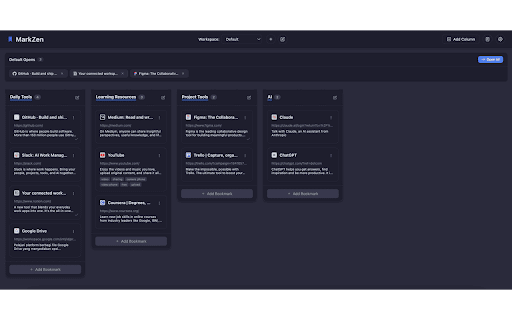
MarkZen transforms browser bookmarks from a cluttered list into a visually organized workspace, bringing clarity and calm to your digital life while respecting your privacy.

## Key Features

- **Kanban-style Bookmark Management**: Visual drag-and-drop organization across customizable columns
- **Multiple Workspaces**: Create separate spaces for work, personal, and projects
- **Beautiful New Tab Page**: Enjoy stunning backgrounds, clock, and quick access to frequently used bookmarks
- **Intelligent Search**: Find bookmarks instantly with smart matching technology
- **Omnibox Integration**: Type "mz" in address bar + Tab to search bookmarks from anywhere
- **Quick Notes**: Capture thoughts with built-in Markdown-supported notepad
- **Default Opens Feature**: Launch multiple related bookmarks with a single click
- **Bookmark Expiration**: Automatically flags unused bookmarks to keep collections tidy
- **100% Privacy-Focused**: All data stored locally with no login required

## How MarkZen Helps You

- **Reduce Bookmark Clutter**: Visually organize links instead of hiding them in nested folders
- **Save Time**: Find exactly what you need with powerful search and workspace organization
- **Stay Focused**: Group relevant bookmarks by projects or contexts
- **Enhance Productivity**: Access frequently used resources faster with analytics and default opens
- **Enjoy Peace of Mind**: Your data stays on your device with optional Chrome sync

## Perfect For

- Knowledge workers juggling multiple projects and resources
- Researchers managing extensive reference materials
- Anyone who wants a more visual, intuitive way to organize their online world
Technical
- Version
- 1.0.1
- Manifest
- V3
- Size
- 81.46KiB
- Min Chrome
- 88
- Languages
- 1
- Featured
- No
Metadata
- ID
- ojnjdekgikagelbejoccfkanbdkjoaka
- Developer ID
- uf365591e29acb02141a0d807b10ae652
- Developer Email
- [email protected]
- Created
- Apr 30, 2025
- Last Updated (Store)
- Apr 30, 2025
- Last Scraped
- Jun 4, 2026
- Website
- —
- Support URL
- https://github.com/arrlancore/markzen
Similar extensions
Alternatives to MarkZen, ranked by description similarity.

ZenStack - New Tab & Bookmark Manager
Powerful new tab bookmark manager with Kanban boards, quick links, native Chrome bookmark sync, search and beautiful live wallpapers
79
★ 5.0

Markly
Manage Bookmarks Smartly
9

Mark it - Memory Manager
Boost your productivity with Mark It, a modern memory manager for Chrome. Save and organize your bookmarks easily
71
★ 5.0

SideMark - Manage Apps, Bookmarks in Sidebar
Manage apps and bookmarks directly from your sidebar for faster, organized browsing.
5
★ 1.0

New Tab
Organize bookmark cards in a kanban style
11
★ 5.0

Zen Task
A calm, focused new tab page.
—
★ 5.0

Bookmark Enhancer
Enhance your bookmarks with notes, tags, search, and reminders
4
★ 5.0

Kan-Opener
A privacy-focused Kanban board for the browser's new tab page.
8
★ 5.0
Data sourced from the Chrome Web Store · last verified Jun 4, 2026.