
Kan-Opener
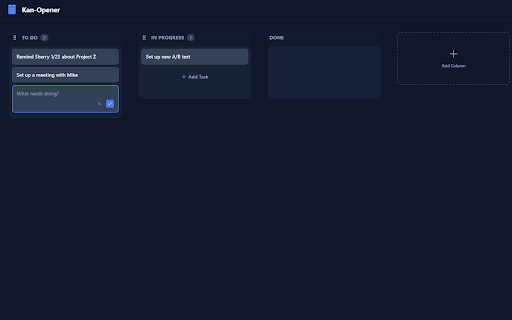
A privacy-focused Kanban board for the browser's new tab page.
As of June 2026, Kan-Opener has 8 users and a 5.00/5 rating from 1 reviews in the Workflow & Planning category.
Usersdown 20.0 percent−20.0%
8
8
Ratingno change0%
5.00
1 reviews
Reviewsno change0%
1
Version
1.0.3
Manifest V3
History
6 snapshotsTracking since Apr 1, 2026.
View as table
| Date | Users | Rating | Reviews | Version |
|---|---|---|---|---|
| Apr 1, 2026 | 10 | 5.00 | 1 | 1.0.3 |
| Apr 10, 2026 | 11 | 5.00 | 1 | 1.0.3 |
| Apr 26, 2026 | 12 | 5.00 | 1 | 1.0.3 |
| May 4, 2026 | 11 | 5.00 | 1 | 1.0.3 |
| May 21, 2026 | 10 | 5.00 | 1 | 1.0.3 |
| May 30, 2026 | 9 | 5.00 | 1 | 1.0.3 |
| Now | 8 | 5.00 | 1 | 1.0.3 |
Permissions & access
- Permissions
- storagesearch
- Host access
- None declared
Screenshots


About
Turn your new tab into a focused, private workspace. Kan-Opener is the lightweight Kanban board designed for professionals who share their screens.

Most new tab extensions are either too complex (slow loading) or too public (showing your personal to-do list to everyone on a Zoom call). Kan-Opener hits the sweet spot: strict privacy, zero clutter, and satisfying productivity.

Why you’ll love it:

🔒 The "Zoom-Safe" Privacy Curtain: Never accidentally broadcast your to-do list again. Your board is hidden behind a blurred "Lock Screen" by default. Present your screen without fear—your tasks stay private until you click "Open Kan."

🎉 The "Shredder" (Done = Gone): Stop hoarding completed tasks. When you drag a card to "Done," it doesn't just sit there—it explodes into confetti and vanishes forever. No backlog guilt. No history. Just satisfaction.

☁️ Seamless Sync: Your board syncs automatically across all your Chrome devices. Switch from your work laptop to your home desktop without missing a beat.

🔖 Bookmarks: Don't lose access to your quick navigation; these have been preserved so that you can get the best of both worlds.

⚡ Zero Friction

No accounts to create.

No login required.

No bloatware or widgets.

No hoarding and/or selling your data.

Dark mode included.

Take "Kan-trol" of your day. Install Kan-Opener to clear the clutter and focus on what matters now.
Technical
- Version
- 1.0.3
- Manifest
- V3
- Size
- 467KiB
- Min Chrome
- 88
- Languages
- 1
- Featured
- No
Metadata
- ID
- fahliiafnmblgfgfgnkiidbefjikggdi
- Developer ID
- ua1dbe19f152d297197a120f065745b4c
- Developer Email
- [email protected]
- Created
- Jan 27, 2026
- Last Updated (Store)
- Feb 17, 2026
- Last Scraped
- Jun 8, 2026
- Website
- —
- Support URL
- —
- Privacy Policy
- —
Similar extensions
Alternatives to Kan-Opener, ranked by description similarity.

BoardTab – Visual Kanban Tab Manager with Tab Analytics
Visual Order for Tab Hoarders
81
★ 5.0

KanbanTab — New Tab To-Do List
Turn your New Tab into a fast & private Kanban board
1.0K
★ 4.9

New Tab
Organize bookmark cards in a kanban style
11
★ 5.0

MarkZen
Visual bookmark management reimagined: Kanban boards, smart search, and serene new tabs
1

Zen Task
A calm, focused new tab page.
—
★ 5.0

Focus Board - Professional Productivity Tab
An aesthetic focus dashboard with draggable notes and quick shortcuts to transform your productivity every time you open a new tab.
4

Floez – Productive New Tab
Minimal new-tab dashboard with to-dos, site blocking, Pomodoro timer and browsing analytics.
11
★ 5.0

ZenStack - New Tab & Bookmark Manager
Powerful new tab bookmark manager with Kanban boards, quick links, native Chrome bookmark sync, search and beautiful live wallpapers
79
★ 5.0
Data sourced from the Chrome Web Store · last verified Jun 8, 2026.