
Zight Screen Recorder, Screenshot App
The best screen recorder for Chrome. Capture your screen, webcam, and instantly share videos and screenshots in seconds.
As of June 2026, Zight Screen Recorder, Screenshot App has 80,000 users and a 4.51/5 rating from 520 reviews in the Communication category.
Usersno change0%
80.0K
80,000
Ratingup 0.2 percent+0.2%
4.51
520 reviews
Reviewsup 2.0 percent+2.0%
520
Version
8.5.0
Manifest V3
History
7 snapshotsTracking since Apr 1, 2026.
View as table
| Date | Users | Rating | Reviews | Version |
|---|---|---|---|---|
| Apr 1, 2026 | 80.0K | 4.50 | 510 | 8.5.0 |
| Apr 18, 2026 | 80.0K | 4.50 | 509 | 8.5.0 |
| Apr 28, 2026 | 80.0K | 4.50 | 509 | 8.5.0 |
| May 8, 2026 | 80.0K | 4.50 | 510 | 8.5.0 |
| May 15, 2026 | 80.0K | 4.51 | 514 | 8.5.0 |
| May 24, 2026 | 80.0K | 4.51 | 516 | 8.5.0 |
| Jun 5, 2026 | 80.0K | 4.51 | 517 | 8.5.0 |
| Now | 80.0K | 4.51 | 520 | 8.5.0 |
Permissions & access
- Permissions
- activeTabclipboardWritecontextMenusnotificationsoffscreenscriptingstorageunlimitedStorage
- Host access
- <all_urls>
Screenshots



About
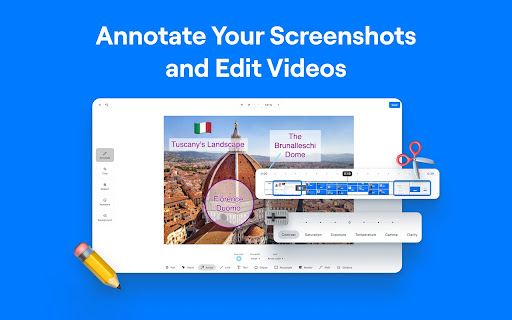
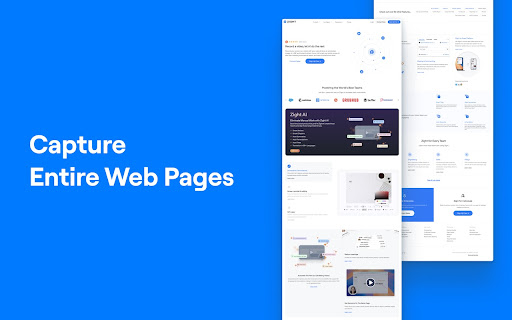
The Ultimate Screen Recorder, Screenshot Tool, and GIF Maker for Chrome Capture your screen, webcam, annotate, and instantly share videos and screenshots in seconds. 🚀 Top 10 Reasons to Choose Zight: 1️⃣ Trusted by Over 5 Million Users Worldwide 🌍 2️⃣ Screen Recording and Screenshot Capture All-in-One 📷🎥 3️⃣ Instant Sharing with Shortlink URLs 🔗 4️⃣ Annotate Screenshots and Recordings Easily ✏️ 5️⃣ Capture Screen, Voice, and Webcam Together 🎤📹 6️⃣ Integrates Seamlessly with Your Favorite Apps 🤝 7️⃣ High-Quality HD Video Recording 🖥️ 8️⃣ Secure Sharing with Public or Private Links 🔒 9️⃣ Boost Productivity with Visual Communication ⚡ 🔟 Fast, Easy to Use, and No Ads 😊 Features: 🎥 Screen Recording • Capture your screen, webcam, and microphone at the same time • Record your desktop, a specific window, or just your webcam • Automatically upload and generate a shareable link when done • Share directly into Slack, Gmail, Jira, Asana, and other tools • Trim and edit recordings as needed 📸 Screenshot Capture • Capture Screenshots • Capture your entire screen or select specific areas. • Annotate Screenshots • Add text, arrows, lines, shapes, and emojis. • Highlight important parts or blur sensitive information. • Resize or crop screenshots as needed. • Save & Share • Instantly share with a shortlink URL. • Copy screenshots directly for quick pasting. ✏️ Annotation Tools • Add markups to screenshots and recordings • Use arrows, lines, shapes, text, or freehand drawing • Customize colors and callouts to communicate clearly and quickly ✨ Request Video • Generate a unique Request Video link • Anyone can record a video for you without installing anything or creating an account • You can reuse or expire the link at any time • Request Logs mode automatically captures browser console logs, network requests, and device info • Ideal for bug reporting, QA, customer support, and product feedback • Every submission is delivered as a video plus technical logs for complete developer-ready context 🌐 Instant Sharing • Share with a simple URL • Paste links into Slack, Gmail, Jira, Notion, and countless tools • Control privacy with public, private, and password-protected settings • Rich previews in email and collaboration apps, like Gmail • Embed files in blogs, docs, help centers, and more 🏃♂️Helpful Shortcuts • Alt + Shift + V: Capture visible area • Alt + Shift + F: Capture full page • Alt + Shift + L: Start video recording ✨ Zight AI • Smart Actions convert videos into step-by-step guides, SOPs, FAQs, or bug reports • Automatic transcription and captioning • Smart Titles created instantly for every video • Smart Summaries to help viewers consume content quickly • Full-text search across your video library • Transcribe in 50-plus languages • Smart Chapters for structured navigation and fast insight extraction Get Started for Free Sign up with no credit card required. Free and paid plans available. Zight for Teams, Business, and Enterprise • Single Sign-On • Custom branding on all download and share pages • Use your own custom domain • Advanced security controls • Embed anywhere across your knowledge base, docs, or product Learn more at: https://www.zight.com/enterprise/ Connect With Us: • X: @zightapp • LinkedIn: Zight • Website: zight.com
Technical
- Version
- 8.5.0
- Manifest
- V3
- Size
- 2.07MiB
- Min Chrome
- 116
- Languages
- 1
- Featured
- Yes
Metadata
- ID
- ojnikmlgjpfiogeijjkpeakbedjhjcch
- Developer ID
- uc356133dd56ce3cb2f0fea921ad3e298
- Developer Email
- [email protected]
- Created
- Apr 30, 2018
- Last Updated (Store)
- Nov 22, 2025
- Last Scraped
- Jun 5, 2026
- Website
- zight.com
- Support URL
- https://support.zight.com/
- Privacy Policy
- https://zight.com/legal/privacy-policy/
Similar extensions
Alternatives to Zight Screen Recorder, Screenshot App, ranked by description similarity.

Easy Screen Record
Screen Recorder Extension for Chrome
575
★ 5.0

Zipshot
Takes Easy and secure screenshots
60
★ 3.8

Captist - Screen Recorder & Auto Zoom
Captist — Create beautiful screen recordings with automatic zooms and professional mockups
1.0K
★ 5.0

Screenra : Record screen with Auto zoom
Create professional demos with Auto Zoom. Note: Not compatible with YouTube videos due to policies.
13
★ 5.0

Zoomflow – Auto Zoom Screen Recorder & Editor
Record professional screen videos with auto zoom, cursor focus, webcam, and smooth animations. Perfect for demos & tutorials.
273
★ 5.0
ScreenPal - Screen Recorder & Video Editor
Record your screen & webcam, take screenshots, edit videos & images - easy & free!
100.0K
★ 4.3

Screen Capture Pro
Capture full-page screenshots, annotate them, and save instantly.
26
★ 5.0

Screenzy
Record beautiful screen recordings with automatic zoom and pan
—
Data sourced from the Chrome Web Store · last verified Jun 5, 2026.