
Screenzy
Record beautiful screen recordings with automatic zoom and pan
As of June 2026, Screenzy has — users in the Communication category.
Usersno change0%
—
—
Ratingno change0%
—
— reviews
Reviewsno change0%
—
Version
0.1.0
Manifest V3
History
5 snapshotsTracking since Apr 7, 2026.
View as table
| Date | Users | Rating | Reviews | Version |
|---|---|---|---|---|
| Apr 7, 2026 | 3 | — | — | 0.1.0 |
| Apr 22, 2026 | 4 | — | — | 0.1.0 |
| May 10, 2026 | 2 | — | — | 0.1.0 |
| May 18, 2026 | 4 | — | — | 0.1.0 |
| Jun 1, 2026 | 7 | — | — | 0.1.0 |
| Now | — | — | — | 0.1.0 |
Permissions & access
- Permissions
- activeTabtabsstorageoffscreenscriptingcookies
- Host access
- <all_urls>, http://localhost:5173/*, https://screenzy.in/*, https://*.clerk.accounts.dev/*
Screenshots



About
Record beautiful screen recordings with automatic zoom and pan

Create professional screen recordings effortlessly with Screenzy. Our Chrome extension makes it easy to capture your screen with advanced features like automatic zoom to clicks, webcam overlay, browser frame styling, and more.

Key Features:
- High-Quality Screen Recording- Record your screen, browser tabs, or entire windows in up to 4K resolution
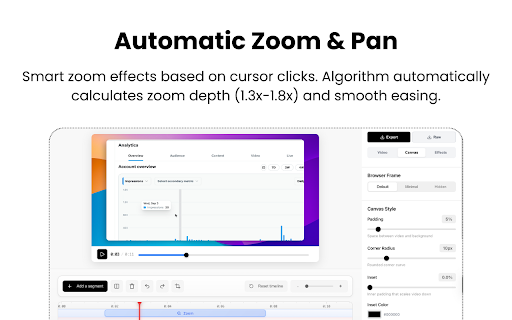
- Automatic Zoom & Pan- Automatically zooms to clicks and cursor movements for engaging videos
- Webcam Overlay - Add your webcam feed with customizable shapes (circle, rounded square, square)
- Professional Editing - Built-in editor with backgrounds, click animations, browser frames, and aspect ratio controls
- Local Storage - All recordings stored locally in your browser for privacy
- Fast Processing - Real-time recording with efficient video encoding

Perfect for creating tutorials, product demos, bug reports, and engaging content. Screenzy helps you create professional-looking screen recordings without any video editing experience.
Technical
- Version
- 0.1.0
- Manifest
- V3
- Size
- 11.31MiB
- Min Chrome
- 88
- Languages
- 1
- Featured
- No
Metadata
- ID
- fcpoagegdapbgfmmopkjgccdboilakoj
- Developer ID
- u2a07aeef0225e1be564a6f23d1d765b5
- Developer Email
- [email protected]
- Created
- Nov 15, 2025
- Last Updated (Store)
- Nov 15, 2025
- Last Scraped
- Jun 1, 2026
- Website
- screenzy.in
- Support URL
- https://www.screenzy.in/terms
- Privacy Policy
- https://www.screenzy.in/privacy
Similar extensions
Alternatives to Screenzy, ranked by description similarity.

Screenra : Record screen with Auto zoom
Create professional demos with Auto Zoom. Note: Not compatible with YouTube videos due to policies.
13
★ 5.0

Zoomflow – Auto Zoom Screen Recorder & Editor
Record professional screen videos with auto zoom, cursor focus, webcam, and smooth animations. Perfect for demos & tutorials.
273
★ 5.0

Zoomshot Pro - Screen Recorder with Auto Zoom
Screen recording with smart auto-zoom on clicks. Beautiful backgrounds, smooth motion. Export to MP4, WebM, GIF.
11
★ 5.0

RecordMate - Smart Screen Recorder
Record your screen with automatic cursor-following zoom effects. Create engaging demos and tutorials.
35

Recora: Screen Recorder with Auto Zoom
Turn screen recordings into engaging product demos and presentations with auto zoom, smooth panning and precise editing
96
★ 4.0

Easy Screen Record
Screen Recorder Extension for Chrome
575
★ 5.0

Video Pod Recorder
Records your screen with optional microphone narration.
13
★ 5.0

Zight Screen Recorder, Screenshot App
The best screen recorder for Chrome. Capture your screen, webcam, and instantly share videos and screenshots in seconds.
80.0K
★ 4.5
Data sourced from the Chrome Web Store · last verified Jun 1, 2026.