
Chrome Step Recorder
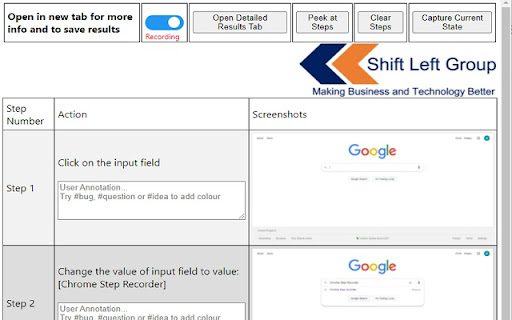
Record user actions into manual steps with screenshots and page performance timings
As of May 2026, Chrome Step Recorder has 4,000 users and a 4.33/5 rating from 6 reviews in the Developer Tools category.
Usersno change0%
4.0K
4,000
Ratingno change0%
4.33
6 reviews
Reviewsno change0%
6
Version
0.45.28
Manifest V3
History
1 snapshotsTracking since Apr 29, 2026.
View as table
| Date | Users | Rating | Reviews | Version |
|---|---|---|---|---|
| Apr 29, 2026 | 4.0K | 4.33 | 6 | 0.45.28 |
| Now | 4.0K | 4.33 | 6 | 0.45.28 |
Permissions & access
- Permissions
- storagetabsunlimitedStorage
- Host access
- <all_urls>
Screenshots


About
**What's new**
-> Added keyboard shortcut to capture current state - Default is Ctrl+Shift+1 to snap the screen but Chrome let's you manages these shortcuts here: chrome://extensions/shortcuts
-> Manifest v3 - behind the scenes google extension stuff
-> Few other bugs squashed
-> Export steps now write annotations too

Key Features:
 - Automatically record detailed user actions and screenshots from manual interaction with web pages.
 - Captures events, object identifiers, URLs, titles, detailed page timings and screenshots.
 - Once ready, view the detailed results, press ctrl+s and create a single, detailed flat file of test evidence of every action undertaken in the browser.
 - Annotate your steps to add further detail and track questions, bugs or ideas

Why?
As a tester, I'm forever capturing test evidence for steps that are undertaken. This is especially tricky when doing exploratory testing and trying to recreate any issues.
This extension is the solution to creating highly detailed test evidence files with no effort.
Do your test, save the results web page and upload it to whichever management tool is used.


Use cases:
** Manual test execution evidence capture
** Exploratory test tracking
** SME/Business process/data capture - they do it, you can harvest their knowledge
** Story-booking the execution of automation (have the extension turned on while automation runs)
** Encourage non-testers to capture the best level of detail possible


Instructions:
1. Install the extension
2. Click the extension and open the popup  (strongly recommend pinning the extension!)
3. Click the slider to turn on recording - the icon adds a red dot.
4. Create a new tab and do your test actions!
5. At any point, open the extension and press "Peek Steps" to see a subset of has been recorded.
6. For any checkpoints, open the popup and press "Capture Current State" to snap a pic of the application or press Ctrl+Shift+1 (shortcut changeable at chrome://extensions/shortcuts).  This is especially useful for the final state of the application.
7. When complete, click the slider to stop recording  (you can turn it on and off as many time as required) and click "Open Detailed Results Tab". On the detailed results tag you can annotate your steps. Type #bug, #question or #idea to add colour to field.
8. Review the steps, press ctrl+s and save the detailed results web page Or press ctrl+p to print to a PDF
9. Ready for the next test?  - Open the popup and press Clear Steps and start recording again!

*The extension should not record password entries by filtering element 'type=password'  - but please validate result files before saving.


Accessibility – we have used the Chrome Lighthouse accessibility tool to assess this extension and have achieved a score of 100/100. We are always considering accessibility as part of our digital experience. If you have any accessibility concerns please contact us via https://shiftleft.today/accessibility-statement
Technical
- Version
- 0.45.28
- Manifest
- V3
- Size
- 107KiB
- Min Chrome
- 88
- Languages
- 1
- Featured
- Yes
Metadata
- ID
- ojhcleddagaoaplflbafhpekcciikdop
- Developer ID
- u3fe5343a2a0ea806c00077210ee7ea10
- Developer Email
- [email protected]
- Created
- Dec 18, 2020
- Last Updated (Store)
- May 11, 2023
- Last Scraped
- May 26, 2026
- Website
- —
- Support URL
- —
- Privacy Policy
- —
Similar extensions
Alternatives to Chrome Step Recorder, ranked by description similarity.

Flowmint Test Evidence
Record user actions with screenshots and export test evidence as PDF, HTML, or JSON. Built for QA and documentation.
—

Bug Recorder
Capture user interactions and generate bug recreation reports
5

BugRepro
Capture bugs with screenshots, recordings, console logs, and network data. Works on any site to help teams debug faster.
13
★ 5.0

AutoEvidence – UAT Testing Screenshot Capture
Streamlines UAT testing by capturing screenshots into PDF reports.
55

TestSnapper
Record UI test sessions with smart field detection, locator extraction, and export to DOCX, PDF, and JSON.
6

Exploratory Testing Extension
Chrome extension for exploratory testing
7.0K
★ 4.3

Auto Bug Steps Reproducer
Tracks user interactions on websites and generates reproducible bug steps for QA engineers.
7

TestBot Recorder
Record browser interactions and capture web elements with auto-generated locators for test automation.
51
★ 5.0
Data sourced from the Chrome Web Store · last verified May 26, 2026.