
Fill PDF from Google Sheets, Excel & CSV
Bulk fill PDF forms from Google Sheets, Excel, or CSV. Map columns to PDF fields and export filled PDFs locally.
As of June 2026, Fill PDF from Google Sheets, Excel & CSV has 52 users and a 5.00/5 rating from 1 reviews in the Workflow & Planning category.
Usersup 333.3 percent+333.3%
52
52
Ratingno change0%
5.00
1 reviews
Reviewsno change0%
1
Version
1.0.9
Manifest V3
90-day change · In the last 90 days this extension 1 version update.
History
9 snapshotsTracking since Apr 7, 2026.
View as table
| Date | Users | Rating | Reviews | Version |
|---|---|---|---|---|
| Apr 7, 2026 | 12 | 5.00 | 1 | 1.0.7 |
| Apr 19, 2026 | 19 | 5.00 | 1 | 1.0.9 |
| Apr 26, 2026 | 26 | 5.00 | 1 | 1.0.9 |
| May 9, 2026 | 28 | 5.00 | 1 | 1.0.9 |
| May 14, 2026 | 42 | 5.00 | 1 | 1.0.9 |
| May 20, 2026 | 41 | 5.00 | 1 | 1.0.9 |
| May 27, 2026 | 38 | 5.00 | 1 | 1.0.9 |
| Jun 3, 2026 | 45 | 5.00 | 1 | 1.0.9 |
| Jun 8, 2026 | 49 | 5.00 | 1 | 1.0.9 |
| Now | 52 | 5.00 | 1 | 1.0.9 |
Changelog
- Apr 7, 2026description
The ultimate PDF Mail Merge & Form Filler extension for your browser. Quickly and easily bulk fill PDF forms using data from Google Sheets, Microsoft Excel (.xlsx), or CSV files, and batch export personalized PDF documents.

Whether you need to generate hundreds of invoices, certificates, shipping labels, personalized letters, or tax forms, this tool automates the repetitive data entry process, saving you hours of manual work.

🚀 KEY FEATURES:
- Bulk Fill PDF Forms: Map your spreadsheet columns to fillable PDF document fields instantly.
- Support Multiple Data Sources: Works seamlessly with CSV files, Excel spreadsheets (.xlsx), and Google Sheets data.
- Batch Export: Generate multiple customized PDF files in one go and download them as a convenient ZIP archive.
- 100% Local & Secure Built-in Privacy: All file processing and document generation happen entirely within your browser (offline). No document or spreadsheet data is ever uploaded to our servers. Your sensitive information remains strictly on your local machine.

💡 HOW IT WORKS:
1. Upload your fillable PDF template.
2. Load your data source (CSV, Excel, or Google Sheets).
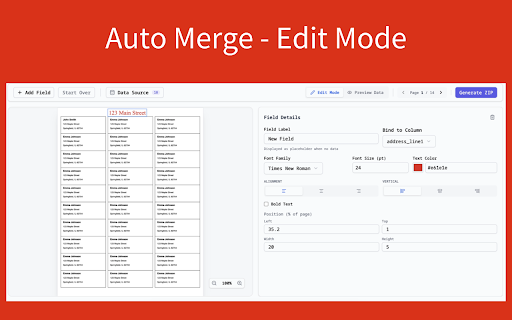
3. Visually map your spreadsheet columns to the corresponding fields in your PDF form.
4. Click generate to bulk fill and download all your customized PDFs instantly!

Stop typing data manually. Automate your document generation workflow today with the most secure, fast, and reliable PDF Mail Merge extension available.
The ultimate PDF Mail Merge & Form Filler extension for your browser. Quickly and easily bulk fill PDF forms using data from Google Sheets, Microsoft Excel (.xlsx), or CSV files, and batch export personalized PDF documents.

Whether you need to generate hundreds of invoices, certificates, shipping labels, personalized letters, or tax forms, this tool automates the repetitive data entry process, saving you hours of manual work.

🚀 KEY FEATURES:
- Bulk Fill PDF Forms: Map your spreadsheet columns to fillable PDF document fields instantly.
- Support Multiple Data Sources: Works seamlessly with CSV files, Excel spreadsheets (.xlsx), and Google Sheets data.
- Batch Export: Generate multiple customized PDF files in one go and download them as a convenient ZIP archive.
- 100% Local & Secure Built-in Privacy: All file processing and document generation happen entirely within your browser (offline). No document or spreadsheet data is ever uploaded to our servers. Your sensitive information remains strictly on your local machine.

💡 HOW IT WORKS:
1. Upload your fillable PDF template.
2. Load your data source (CSV, Excel, or Google Sheets).
3. Visually map your spreadsheet columns to the corresponding fields in your PDF form.
4. Click generate to bulk fill and download all your customized PDFs instantly!

Stop typing data manually. Automate your document generation workflow today with the most secure, fast, and reliable PDF Mail Merge extension available.

Google Sheets is a trademark of Google LLC. This extension is not endorsed by or affiliated with Google
- Apr 7, 2026short_description
Bulk fill PDF forms using Google Sheets, Excel & CSV. The ultimate PDF mail merge tool to batch export documents 100% locally.
Bulk fill PDF forms from Google Sheets, Excel, or CSV. Map columns to PDF fields and export filled PDFs locally.
- Apr 7, 2026name
PDF Mail Merge: Fill Forms from Sheets & CSV
Fill PDF from Google Sheets, Excel & CSV
Permissions & access
- Permissions
- storage
- Host access
- https://sheetstolabels.com/*
Screenshots



About
The ultimate PDF Mail Merge & Form Filler extension for your browser. Quickly and easily bulk fill PDF forms using data from Google Sheets, Microsoft Excel (.xlsx), or CSV files, and batch export personalized PDF documents.

Whether you need to generate hundreds of invoices, certificates, shipping labels, personalized letters, or tax forms, this tool automates the repetitive data entry process, saving you hours of manual work.

🚀 KEY FEATURES:
- Bulk Fill PDF Forms: Map your spreadsheet columns to fillable PDF document fields instantly.
- Support Multiple Data Sources: Works seamlessly with CSV files, Excel spreadsheets (.xlsx), and Google Sheets data.
- Batch Export: Generate multiple customized PDF files in one go and download them as a convenient ZIP archive.
- 100% Local & Secure Built-in Privacy: All file processing and document generation happen entirely within your browser (offline). No document or spreadsheet data is ever uploaded to our servers. Your sensitive information remains strictly on your local machine.

💡 HOW IT WORKS:
1. Upload your fillable PDF template.
2. Load your data source (CSV, Excel, or Google Sheets).
3. Visually map your spreadsheet columns to the corresponding fields in your PDF form.
4. Click generate to bulk fill and download all your customized PDFs instantly!

Stop typing data manually. Automate your document generation workflow today with the most secure, fast, and reliable PDF Mail Merge extension available.

Google Sheets is a trademark of Google LLC. This extension is not endorsed by or affiliated with Google
Technical
- Version
- 1.0.9
- Manifest
- V3
- Size
- 1.68MiB
- Min Chrome
- 88
- Languages
- 1
- Featured
- No
Metadata
- ID
- oilohbffbpbcjdicdfcmpiedbhlghohk
- Developer ID
- u1f17dbb673e75ea5efb6eb96c58b5a80
- Developer Email
- [email protected]
- Created
- Mar 5, 2026
- Last Updated (Store)
- Apr 6, 2026
- Last Scraped
- Jun 8, 2026
- Website
- sheetstolabels.com
- Privacy Policy
- https://sheetstolabels.com/privacy-policy
Similar extensions
Alternatives to Fill PDF from Google Sheets, Excel & CSV, ranked by description similarity.

PDF Mail Merge
Quickly use PDF Mail Merge to fill in pdfs from spreadsheets. Create bulk pdf files efficiently for daily business needs.
278
★ 4.9

Excellent Data Filler
Fill Online Form and Scraper Data, Input, Checkbox, Select Fields, Click Button, Execute JS Script, Run Predefine Functions
20.0K
★ 4.8

Save Emails from Gmail as PDF
Convert and save Gmail emails as PDF files with one click. Download your emails locally for secure and private message backup.
7.0K
★ 4.6

Form Auto Filler
Select your input fields, save your answers, and click 'Auto-Fill Form; to instantly fill Forms with your custom data.
70
★ 5.0

QuickFill - AutoFill your any Web Details/Forms in one click
👋 Welcome to QuickFill!
Okay hear me out — I made a Chrome extension because I'm sick of typing the same stuff on every form ever…
305
★ 4.5

Auto Fill From Excel
Automatically fill web forms using Excel data
1.0K
★ 4.8

Bulk Gmail to PDF Exporter
Export single or multiple Gmail conversations to PDF
292
★ 4.2

Web Guide
Prefill common form fields with data you've entered elsewhere and save time online.
3
Data sourced from the Chrome Web Store · last verified Jun 8, 2026.