
Google Docs Tab Collapser
Natively integrates Collapse/Expand all buttons into the Google Docs tab sidebar.
As of June 2026, Google Docs Tab Collapser has 195 users and a 5.00/5 rating from 5 reviews in the Workflow & Planning category.
Usersup 1118.8 percent+1118.8%
195
195
Ratingno change0%
5.00
5 reviews
Reviewsno change0%
5
Version
2.1.0
Manifest V3
90-day change · In the last 90 days this extension 1 version update, changed permissions.
History
10 snapshotsTracking since Apr 7, 2026.
View as table
| Date | Users | Rating | Reviews | Version |
|---|---|---|---|---|
| Apr 7, 2026 | 16 | — | — | 1.3.2 |
| Apr 19, 2026 | 23 | — | — | 1.3.2 |
| Apr 26, 2026 | 48 | — | — | 1.3.2 |
| May 3, 2026 | 59 | — | — | 1.3.2 |
| May 9, 2026 | 66 | — | — | 1.3.2 |
| May 14, 2026 | 97 | 5.00 | 1 | 1.3.2 |
| May 20, 2026 | 107 | 5.00 | 1 | 1.3.2 |
| May 27, 2026 | 116 | 5.00 | 1 | 1.3.2 |
| Jun 3, 2026 | 137 | 5.00 | 3 | 1.3.2 |
| Jun 8, 2026 | 170 | 5.00 | 3 | 1.3.2 |
| Now | 195 | 5.00 | 5 | 2.1.0 |
Changelog
- Jun 8, 2026description
Google Docs Tab Collapser adds native "Collapse All" and "Expand All" buttons directly into the Document Tabs sidebar of Google Docs.

It lets you instantly collapse or expand all tabs and subtabs with one click.
The extension also saves the collapse/expand state of each tab, so your layout persists even after you reload or reopen the document.

Lightweight, fast, and designed to feel like a native part of Google Docs.
Google Docs Tab Collapser adds native "Collapse All" and "Expand All" buttons directly into the Document Tabs sidebar of Google Docs.

It lets you instantly collapse or expand all tabs and subtabs with one click.

Lightweight, fast, and designed to feel like a native part of Google Docs.

✨ FREE FEATURES:
• Collapse and expand the tabs via the native sidebar buttons.

🚀 PRO FEATURES:
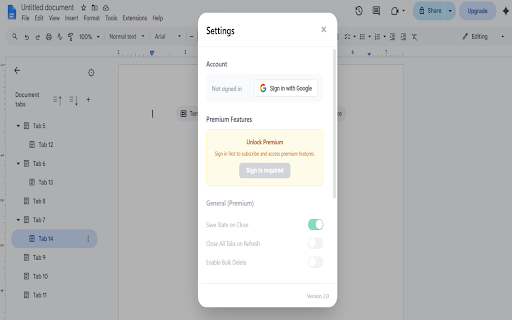
• Save state: The extension saves the collapse/expand state of each tab, so your layout persists even after you reload or reopen the document.
• Close tabs on refresh.
• Bulk delete: A utility that lets you clear and delete multiple tabs or subtabs in just one click.
- Jun 8, 2026permissions
storage
storage, identity
Permissions & access
- Permissions
- storageidentity
- Host access
- None declared
Screenshots



About
Google Docs Tab Collapser adds native "Collapse All" and "Expand All" buttons directly into the Document Tabs sidebar of Google Docs.

It lets you instantly collapse or expand all tabs and subtabs with one click.

Lightweight, fast, and designed to feel like a native part of Google Docs.

✨ FREE FEATURES:
• Collapse and expand the tabs via the native sidebar buttons.

🚀 PRO FEATURES:
• Save state: The extension saves the collapse/expand state of each tab, so your layout persists even after you reload or reopen the document.
• Close tabs on refresh.
• Bulk delete: A utility that lets you clear and delete multiple tabs or subtabs in just one click.
Technical
- Version
- 2.1.0
- Manifest
- V3
- Size
- 39.26KiB
- Min Chrome
- 88
- Languages
- 1
- Featured
- No
Metadata
- ID
- oiakpdllemgjfokbifijbhgkicojnnpp
- Developer ID
- ua5f9e68e9c7812477ee0401c9080410e
- Developer Email
- [email protected]
- Created
- Feb 10, 2026
- Last Updated (Store)
- Jun 5, 2026
- Last Scraped
- Jun 8, 2026
- Website
- —
- Support URL
- —
- Privacy Policy
- —
Similar extensions
Alternatives to Google Docs Tab Collapser, ranked by description similarity.

Dedicated Window For Google Docs
Open Google Docs, Sheets and Slides docs in separated and dedicated window automatically, without an address bar or browser buttons.
2.0K
★ 4.7

Folder Manager for Google Docs - Smart Document Organizer & Workspace
Organize Google Docs with custom folders. Create, manage, and sort documents effortlessly with our folder management system
791
★ 4.6

SideFlow
Open any site in Chrome’s Side Panel. Choose per‑tab or global. Favorites & filter. Close all panels.
4
★ 5.0

Entire screen scihub document viewer
Expand document view section to 100%
1.0K
★ 5.0

Notion Sidebar Expander
Expands Notion Sidebar items to reveal the current page
234
★ 3.2

Goodocs New Tab
A curated gallery of Google Docs templates on your new tab page.
14

Tabpeek
Hover-to-preview for Chrome tab groups. Instantly preview and switch tabs in a group.
—

Open the link in Google™ Docs
Open the link (PDF, DOC, Image) in Google Docs in the context menu
4.0K
★ 5.0
Data sourced from the Chrome Web Store · last verified Jun 8, 2026.