
JobLense: LinkedIn Jobs Words Highlighter
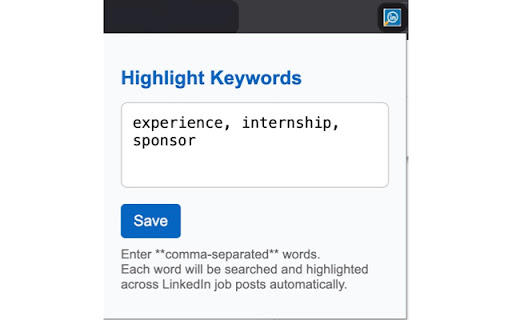
Highlights specific words instantly on LinkedIn Jobs.
As of June 2026, JobLense: LinkedIn Jobs Words Highlighter has 50 users and a 5.00/5 rating from 1 reviews in the Productivity category.
Usersup 455.6 percent+455.6%
50
50
Ratingno change0%
5.00
1 reviews
Reviewsno change0%
1
Version
1.0.1
Manifest V3
History
6 snapshotsTracking since Apr 20, 2026.
View as table
| Date | Users | Rating | Reviews | Version |
|---|---|---|---|---|
| Apr 20, 2026 | 9 | 5.00 | 1 | 1.0.1 |
| May 5, 2026 | 6 | 5.00 | 1 | 1.0.1 |
| May 15, 2026 | 4 | 5.00 | 1 | 1.0.1 |
| May 21, 2026 | 6 | 5.00 | 1 | 1.0.1 |
| May 28, 2026 | 8 | 5.00 | 1 | 1.0.1 |
| Jun 10, 2026 | 7 | 5.00 | 1 | 1.0.1 |
| Now | 50 | 5.00 | 1 | 1.0.1 |
Permissions & access
- Permissions
- storagetabs
- Host access
- https://www.linkedin.com/jobs/*
Screenshots


About
Stop wasting time scanning endless job descriptions – find your perfect fit faster!

JobLense: LinkedIn Jobs Word Highlighter revolutionizes your job search by making crucial information immediately visible. No more squinting or endless scrolling through job posts!

Why JobLense Beats CTRL+F:

Unlike repeatedly pressing CTRL + F for each individual word, JobLense is your intelligent, always-on assistant. It automatically highlights all your pre-defined keywords across an entire page, continuously scanning new content as you scroll or click. This means you instantly see everything that matters, without manual, repetitive searching.

Here's why JobLense is essential for every job seeker:

Total Customization: Your job search is unique, and so is our highlighter. Easily add any custom words or phrases that matter most to you – be it specific skills, desired company values, or crucial visa requirements. You control what stands out!

Effortless Navigation: Say goodbye to manual searching. Our intelligent auto-scroll feature guides you directly to the next instance of your highlighted words on the page. Focus on the relevant details, not on finding them.

Simply Intuitive: Designed for everyone, this extension requires absolutely no technical knowledge. No CSS, no complex settings – just install, customize, and transform your LinkedIn job search into an efficient, frustration-free experience.

Take control of your career journey. Install JobLense: LinkedIn Jobs Word Highlighter today and make your dream job discoverable!
Technical
- Version
- 1.0.1
- Manifest
- V3
- Size
- 20.7KiB
- Min Chrome
- 88
- Languages
- 1
- Featured
- No
Metadata
- ID
- ofkagoefchogfbihhlmleomahkaackaf
- Developer ID
- u940f05068ff0d8ba19ca06e021b918a0
- Developer Email
- [email protected]
- Created
- Jul 3, 2025
- Last Updated (Store)
- May 9, 2026
- Last Scraped
- Jun 10, 2026
- Website
- —
- Support URL
- —
Similar extensions
Alternatives to JobLense: LinkedIn Jobs Words Highlighter, ranked by description similarity.

LinkedIn JobLens — Smart Job Filters
Filter LinkedIn jobs, hide promoted, applied, easy apply, viewed & high-competition listings
206
★ 5.0

JobSieve - LinkedIn Job Filter
Filter and customize your LinkedIn job search with powerful blacklists, whitelists, and smart filtering options.
—
★ 4.5

LinkedIn Jobs Lens
Custom time range filter for LinkedIn Jobs
39

LingoLink: Job Search & Application Tracker
Your personal job search dashboard. Find English-only jobs from LinkedIn and track your applications.
134
★ 4.0

LinkedIn Job Filter & Highlighter
Filter and highlight LinkedIn jobs. Never apply twice! Hide jobs by company, location, salary. Track applications automatically.
15
★ 5.0

LinkedIn Job Highlighter
Easily track LinkedIn job states (Viewed, Applied, Saved) with timestamps and customizable highlights.
71
★ 3.0

LinkedIn Smart Job Matcher
Intelligently scroll & filter LinkedIn job listings. Automatically stop on suitable matches using custom keywords.
44
★ 5.0

LinkedIn Jobs Filtering Plus
An enhanced LinkedIn job search tool with advanced filters for faster, more precise job discovery.
51
★ 5.0
Data sourced from the Chrome Web Store · last verified Jun 10, 2026.