
LinkedIn Job Highlighter
Easily track LinkedIn job states (Viewed, Applied, Saved) with timestamps and customizable highlights.
As of June 2026, LinkedIn Job Highlighter has 71 users and a 3.00/5 rating from 2 reviews in the Productivity category.
Usersno change0%
71
71
Ratingno change0%
3.00
2 reviews
Reviewsno change0%
2
Version
1.4
Manifest V3
History
4 snapshotsTracking since Apr 1, 2026.
View as table
| Date | Users | Rating | Reviews | Version |
|---|---|---|---|---|
| Apr 1, 2026 | 71 | 3.00 | 2 | 1.4 |
| Apr 21, 2026 | 64 | 3.00 | 2 | 1.4 |
| May 11, 2026 | 73 | 3.00 | 2 | 1.4 |
| Jun 6, 2026 | 76 | 3.00 | 2 | 1.4 |
| Now | 71 | 3.00 | 2 | 1.4 |
Permissions & access
- Permissions
- storage
- Host access
- None declared
Screenshots

About
-- LinkedIn Job Highlighter --

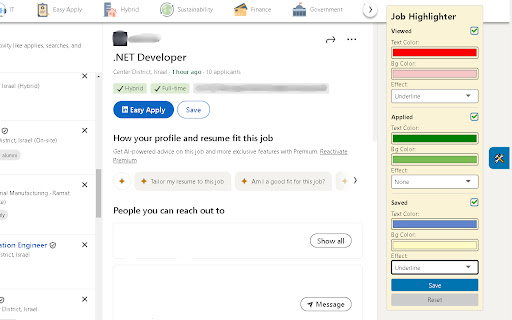
Organize your job applications with ease! LinkedIn Job Highlighter makes job hunting on LinkedIn more efficient by categorizing jobs into three states (Applied, Viewed, Saved), offering full customization for highlights, and now includes CSV export functionality for better tracking!

-- FEATURES --

- State Categorization: Divide jobs into Applied, Viewed, and Saved states for easy tracking.
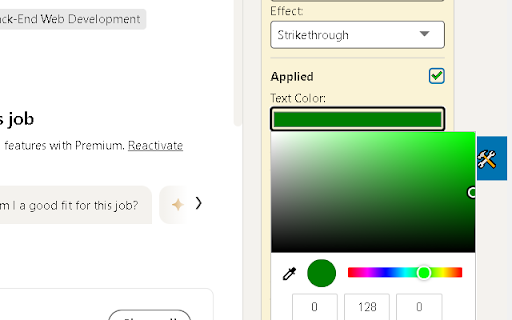
- Customization Options: Highlight states with your desired colors and effects (Strikethrough, Underline, or Border).
- Differentiation Between Application Types: Recognize and manage "Apply" and "Easy Apply" actions.
- Timestamp Tracking: Automatically record timestamps when a job state is updated. Pre-existing states remain untouched unless clicked again.
- Settings Management: Save and reset preferences anytime with intuitive controls.
- NEW! Export to CSV: Download your complete job application history in CSV format, including:
• Job titles and companies
• Application status (Applied/Viewed/Saved)
• Timestamps for each action
• Perfect for tracking and analyzing your job search progress!

-- HOW IT WORKS --

- Install the extension from the Chrome Web Store.
- Browse LinkedIn job postings as usual.
- Customize highlight colors and effects via the extension popup.
- Track application states and timestamps directly on LinkedIn.
- Export your job search history anytime with one click!

Make your job search more organized and data-driven! Install the LinkedIn Job Highlighter extension and never lose track of your applications again.
Technical
- Version
- 1.4
- Manifest
- V3
- Size
- 823KiB
- Min Chrome
- 88
- Languages
- 1
- Featured
- No
Metadata
- ID
- alcfpbahefdnlfbkeoebkmbkobdlnlmg
- Developer ID
- ub2e45f94a6559e17aedd310b0c794cdc
- Developer Email
- [email protected]
- Created
- Dec 27, 2024
- Last Updated (Store)
- Apr 10, 2025
- Last Scraped
- Jun 6, 2026
- Website
- —
- Support URL
- —
Similar extensions
Alternatives to LinkedIn Job Highlighter, ranked by description similarity.

LinkedIn Jobs Filtering Plus
An enhanced LinkedIn job search tool with advanced filters for faster, more precise job discovery.
51
★ 5.0

LinkedIn Job Filter & Highlighter
Filter and highlight LinkedIn jobs. Never apply twice! Hide jobs by company, location, salary. Track applications automatically.
15
★ 5.0

LinkedIn Job Stats Viewer
View hidden job posting statistics on LinkedIn
307
★ 3.0

Job Application Tracker for LinkedIn (Auto Apply)
Automatically track your LinkedIn job applications, add notes, manage status, and mark applied jobs directly on LinkedIn.
14

LinkedIn Job Application Tracker
Track your LinkedIn job applications with email integration
29
★ 5.0

LinkedIn Job Highlighter
Highlights LinkedIn job listings based on their status.
13

MaxOfJob - Save & Track Job Apps
Quickly save and manage your job applications from LinkedIn and other sites with MaxOfJob’s smart sidebar.
29
★ 5.0

ApplyEasy
Mark offers as applied on LinkedIn. More features and supported pages coming soon!
—
Data sourced from the Chrome Web Store · last verified Jun 6, 2026.