
Chat Curtain
Hide Twitch chat messages until approved by moderators
As of June 2026, Chat Curtain has 10 users in the Social & Communication category.
Usersdown 23.1 percent−23.1%
10
10
Ratingno change0%
—
— reviews
Reviewsno change0%
—
Version
1.0.5
Manifest V3
History
3 snapshotsTracking since Apr 23, 2026.
View as table
| Date | Users | Rating | Reviews | Version |
|---|---|---|---|---|
| Apr 23, 2026 | 13 | — | — | 1.0.5 |
| May 13, 2026 | 10 | — | — | 1.0.5 |
| Jun 8, 2026 | 11 | — | — | 1.0.5 |
| Now | 10 | — | — | 1.0.5 |
Permissions & access
- Permissions
- storage
- Host access
- None declared
Screenshots
About
Modifies Twitch chat to have an approved-messages-only view.
Perfect for new releases that might be prone to spoilers!!

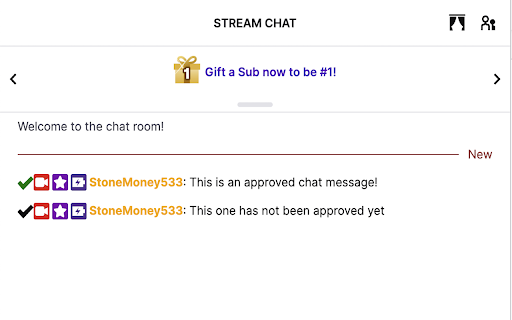
In active mode (curtains closed), only messages approved by your channel's moderators will appear in your chat.
In inactive mode (curtains open), all chat messages will be shown. If you are a moderator, an "approval checkmark" will appear alongside any message, clicking the check will allow it to be visible to users in active mode.
To toggle modes, click the curtain icon to the left of the chat list icon.
This is a client-side behavior, meaning only people using the extension will see the effects of it.

To get started, install the extension and open the extension options, you can then log in and connect with twitch. Doing so will request your list of moderators and enable the ability to use the extension on your channel.

Only moderators of the channel can approve messages, they must log in with twitch in the extension settings
Moderation list is obtained by signing in (i.e. the channel owner must also log into the extension to enable it on their channel)
A message with no text (just emotes) is always instantly approved
Messages will appear in order of chatted, not in order of approval
Identical messages from the same user don't need to be approved again (steve says hi twice, it only approves once)
Doesn't work when "channel surfing" (you need to directly load the page or refresh on the stream page)
Technical
- Version
- 1.0.5
- Manifest
- V3
- Size
- 14.53KiB
- Min Chrome
- 88
- Languages
- 1
- Featured
- No
Metadata
- ID
- ofdmpokiehfdakmadncelpmnnhmbgabp
- Developer ID
- uaa985251314c1660c28227e06e03db9c
- Developer Email
- [email protected]
- Created
- May 9, 2023
- Last Updated (Store)
- May 12, 2023
- Last Scraped
- Jun 8, 2026
- Website
- stone.money
- Support URL
- —
- Privacy Policy
- —
Similar extensions
Alternatives to Chat Curtain, ranked by description similarity.

Electric Chat for Twitch
Extra chat controls for Twitch.
17

Twitch Highlighter
Highlights mods, VIPs and verified users in Twitch chat.
16

Twitch-Chants
A twitch MODERATOR or BROADCASTER types '!chant' followed by the message to chant. Click 'Chant' button to take part in the chant
64
★ 5.0

Twitch Chat Nexus
Lets you view your Twitch chat history or collect chats of interest from the live chat window.
6.0K
★ 4.9

ChatBridge
ChatBridge - Link chats between Twitch and Kick
—
★ 4.0

Truffle
Enhance your livestream viewing experience
100.0K
★ 4.3

YTSaneChat
Sane Stream Chat
—
★ 5.0

BetterStreamChat
Some settings for YouTube or Trovo chat.
2.0K
★ 3.3
Data sourced from the Chrome Web Store · last verified Jun 8, 2026.