
Smart Previewer by Adzymic
Smart Previewer allows users to preview display ad on live environment by replacing existing ad slot with creative tag.
As of May 2026, Smart Previewer by Adzymic has 101 users and a 5.00/5 rating from 2 reviews in the Workflow & Planning category.
Usersup 9.8 percent+9.8%
101
101
Ratingno change0%
5.00
2 reviews
Reviewsno change0%
2
Version
2.0
Manifest V3
History
2 snapshotsTracking since Apr 24, 2026.
View as table
| Date | Users | Rating | Reviews | Version |
|---|---|---|---|---|
| Apr 24, 2026 | 92 | 5.00 | 2 | 2.0 |
| May 21, 2026 | 96 | 5.00 | 2 | 2.0 |
| Now | 101 | 5.00 | 2 | 2.0 |
Permissions & access
- Permissions
- scriptingtabsactiveTabstoragebackgroundpageCapturenotifications
- Host access
- <all_urls>
Screenshots


About
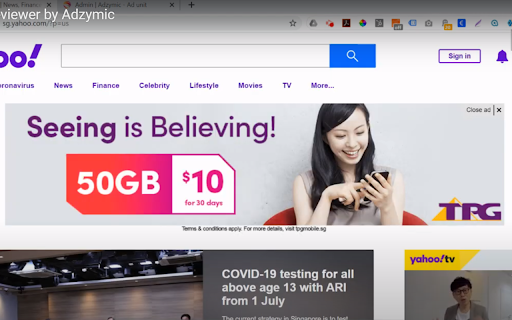
Save time on doing screenshots on how the ad looks like in real publisher's environment. . Rather than relying on manually doing screenshot and replacing the ad using photo editor, using Adzymic Smart Previewer is fast and easy. You can now use Adzymic Smart Previewer to preview creative tags on any live websites, by easy selection of elements and ad container. Once done, you can download the screenshot.

This Chrome extension allows user to select the ad container of a particular web page and replace it with a creative ad tag. User can specify the dimension of the ad. Once the creative ad tag is placed, the ad will be shown on the selected ad container. User can then take a screenshot and download the screenshot as png.

How to use
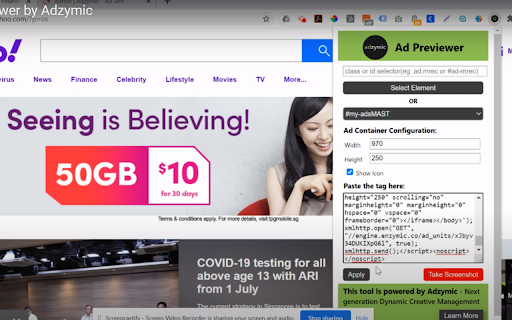
Select Element - Once selected, the mouse pointer will change to "+". Mouse over and click on area beside any ad slot that you want to replace.
OR
 Select Ad Container - Choose the ad container that you want replace. Our chrome extension scan the list of ad container available for the page.

Choose Ad Size - Select the dimension of the ad size you want to replace. e.g. 300x250, 970x250.

Show Icon - Select this if you would like to display "Ad Choice" icon.

Paste the Tag - Paste creative tag here. We accept any creative tags.

Click on Apply. Once apply, you should see the existing ad replace with the ad that you inserted.

Take a Screenshot - Click on this button to download the screenshot of the page rendered with the new ad.
Technical
- Version
- 2.0
- Manifest
- V3
- Size
- 22.82KiB
- Min Chrome
- 88
- Languages
- 1
- Featured
- No
Metadata
- ID
- odeaflgamfnnaehaohnfpfigphgehenc
- Developer ID
- u38d12dd9d0efcce017124e6ffcd5f91c
- Developer Email
- [email protected]
- Created
- Jun 27, 2020
- Last Updated (Store)
- Mar 7, 2025
- Last Scraped
- May 21, 2026
- Website
- adzymic.co
- Support URL
- http://www.adzymic.co
- Privacy Policy
- http://www.adzymic.co/privacy
Similar extensions
Alternatives to Smart Previewer by Adzymic, ranked by description similarity.

Ad Copy Pasta Writer
Ad Creator: An intuitive interface for quick, easy input of key product details for instant ad generation.
16
★ 5.0

GoBeaver AI
Create high-converting ads with GoBeaver. Swipe ads from FB/TikTok or use 'Swipe Text' on any site to generate similar ads.
500

AdShot Pro: Automated Ad Injection
Automated Ad Injection & Screenshot Verification Tool
9

AdScanner by PPC Ad Editor
AdScanner is an amazing tool for scraping and downloading ads from Google's ad transparency page.
748
★ 1.0
AdMinerX
Need creative inspiration? Want to save all of your competitor's ads? Quickly download Google search ads with AdMiner.
3.0K
★ 3.7

Ad Tracker v1.26 BETA
Provides a clean output of all GTM ad request/response info. Not compatible with AMP or video ads. By Mark Bland (C) 2025
164
★ 5.0
Youtube Video Skip Ad Trigger
A plugin for automatically pressing 'Skip Ads' button on youtube videos.
30.0K
★ 4.1

QuickDesign AI - Transform Any Image on the Web
Save and remix Meta Ad Library ads, plus right-click any web image for QuickDesign AI actions.
254
★ 4.3
Data sourced from the Chrome Web Store · last verified May 21, 2026.