
Excalisave
Save your excalidraw drawings.
As of June 2026, Excalisave has 1,000 users and a 4.89/5 rating from 18 reviews in the Workflow & Planning category.
Usersno change0%
1.0K
1,000
Ratingdown 2.2 percent−2.2%
4.89
18 reviews
Reviewsup 5.9 percent+5.9%
18
Version
2.3.1
Manifest V3
History
2 snapshotsTracking since Apr 18, 2026.
View as table
| Date | Users | Rating | Reviews | Version |
|---|---|---|---|---|
| Apr 18, 2026 | 1.0K | 5.00 | 17 | 2.3.1 |
| Jun 3, 2026 | 1.0K | 5.00 | 17 | 2.3.1 |
| Now | 1.0K | 4.89 | 18 | 2.3.1 |
Permissions & access
- Permissions
- activeTabtabsstoragescriptingunlimitedStorage
- Host access
- https://excalidraw.com/*
Screenshots
About
Whats new:
2.3.1
- Minor bugfixes


Excalidraw is an awesome tool for creating diagrams, sketches, and other visual representations of your ideas. However, it has one limitation - it only allows you to work on one drawing at a time. If you want to save your work and start a new drawing, you need to copy and paste the image, or download it to your device.

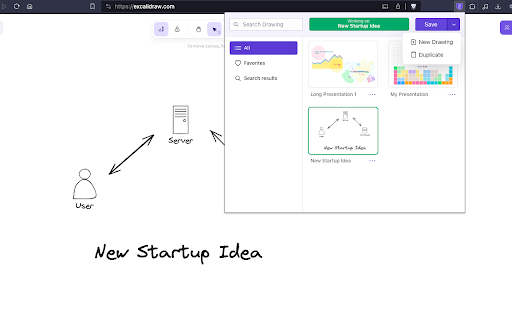
That's where Excalisave comes in! This extension makes it easy to save your Excalidraw drawings with just one click. You no longer have to worry about losing your work or cluttering your computer with multiple image files. With Excalisave, you can store your drawings in the browser storage and access them later whenever you need them.

Here are some key features of Excalisave:

1. One-click saving: Save your Excalidraw drawings with just one click. No need to copy and paste or download the image.
2. Browser storage: Store your drawings in the browser storage. Your drawings are safe and accessible even if you close the Excalidraw tab or restart your computer.
4. Easy retrieval: Access your saved drawings easily from the Excalisave menu. You can preview the image, delete it, or open it in a new tab.
5. Multiple drawings: Save as many drawings as you want. You can organize them by name and date, or search for a specific drawing using keywords.
6. User-friendly interface: Excalisave has a simple and intuitive interface. You don't need any technical skills to use it.
7. How to use Excalisave:

Install the extension from the Chrome Web Store.
Open Excalidraw and create your drawing.
Click on the Excalisave icon in the browser toolbar.
Choose a name for your drawing (optional).
Click "Save" to save your drawing in the browser storage.
To access your saved drawings, click on the Excalisave icon and select "Open Saved Drawings".
From the menu, you can preview, delete, or open your drawings in a new tab.
That's it! With Excalisave, you can enjoy the full benefits of Excalidraw without any limitations. Try it out today and let us know what you think.
Technical
- Version
- 2.3.1
- Manifest
- V3
- Size
- 4.02MiB
- Min Chrome
- 88
- Languages
- 1
- Featured
- Yes
Metadata
- ID
- obnjfbgikjcdfnbnmdamffacjfpankih
- Developer ID
- u33c0cc44146061a827785993f6fb78e0
- Developer Email
- [email protected]
- Created
- Mar 23, 2023
- Last Updated (Store)
- Dec 21, 2025
- Last Scraped
- Jun 3, 2026
- Website
- —
- Support URL
- https://github.com/atharvakadlag/excalisave
- Privacy Policy
- —
Similar extensions
Alternatives to Excalisave, ranked by description similarity.

Excalidraw organizer
Organize your Excalidraw drawings
75
★ 4.7

Scribble Pad - Paint On Web
Scribble Pad turns any website into your personal canvas. Draw, sketch, write notes, capture screenshots and annotate in real time.
300
★ 5.0

Web Paint Online
Transform Any Web Page into Your Canvas with Web Paint Online - The Browser Extension for Drawing on Web Pages!
40.0K
★ 4.3

Nimue — Github Storage for Excalidraw
Save, load, and autosync Excalidraw drawings to a private GitHub repository.
7

Excalidraw in New Tab
Opens Excalidraw in every new tab
24
★ 5.0

Paint Tool for Chrome
Paint tool to draw anything and anywhere in real-time, paint online. Take a screenshot of your drawing use screenshot tool.
70.0K
★ 4.5
WebSketch
Annotate Your Browser
93
★ 4.5

Easy Draw - Screenshot & Drawing Tool
Draw, annotate, and edit screenshots directly on any webpage. Perfect for collaboration and visual communication.
386
★ 5.0
Data sourced from the Chrome Web Store · last verified Jun 3, 2026.