BG Remaker - Replace & Remove Background
An efficient AI image background processing tool that can greatly improve your work efficiency
As of May 2026, BG Remaker - Replace & Remove Background has 10,000 users and a 4.78/5 rating from 18 reviews in the art category.
Usersdown 50.0 percent−50.0%
10.0K
10,000
Ratingno change0%
4.78
18 reviews
Reviewsno change0%
18
Version
1.0.20
Manifest V3
90-day change · In the last 90 days this extension lost 10.0K users.
History
2 snapshotsTracking since May 1, 2026.
View as table
| Date | Users | Rating | Reviews | Version |
|---|---|---|---|---|
| May 1, 2026 | 20.0K | 4.78 | 18 | 1.0.20 |
| May 30, 2026 | 20.0K | 4.78 | 18 | 1.0.20 |
| Now | 10.0K | 4.78 | 18 | 1.0.20 |
Permissions & access
- Permissions
- tabsstoragecontextMenus
- Host access
- <all_urls>
Screenshots


About
With the continuous development of artificial intelligence technology, more and more intelligent applications are widely used in our lives. In the field of image processing, artificial intelligence technology is also gradually becoming popular. In the past, removing the background of an image and replacing it with a new one required tedious operations. But now, with this intelligent extension, all you need is a short prompt, and you can easily generate high-quality original images that meet your requirements.

This extension includes a shortcut function to jump to ezremove.ai, which is designed to help users quickly access relevant resources.

This program can improve the efficiency of creative work. Creators only need to input a short prompt, and the program will use powerful artificial intelligence technology to quickly generate images that meet their requirements. Creators no longer need to spend a lot of time and cost learning image processing skills and tools. This program greatly shortens the time and difficulty of processing images for people, giving more people the opportunity to create beautiful original works.

Because the more specific the prompt, the better the image generated by the program can meet the creator's needs. Therefore, before using this program, creators should fully understand their own needs, and then describe in detail the images, colors, and expression techniques they want when entering the prompts. This way, the images generated by the program can better meet the creator's requirements.

We promise that the images generated using this extension will have high quality and high definition. The program uses the most advanced artificial intelligence technology and can automatically identify possible problems and defects in the image, ensuring that the generated images are very fine, natural, and precise in terms of clarity, color, and outline. Even beginners can easily create high-level original works.

In the age of artificial intelligence, we no longer need to rely on manual drawing to express our creativity and imagination, but can rely on intelligent technology to express our ideas more quickly and efficiently.

👉What can be done:
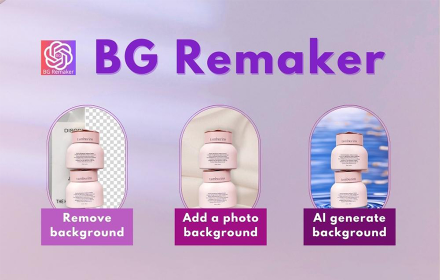
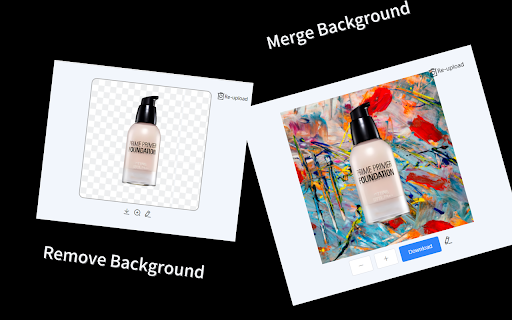
AI removes image background
AI replaces image background

👉How to use:
AI removes image background:
1. Open the browser plugin, select the image that needs to remove the background, and click the Remove Background button to remove the image background.
2. If you find a picture you want to remove the background from on another website, you can right-click the mouse and select BGRemaker, and the selected photo will be automatically loaded into the plugin.

AI replaces image background:
1. Open the browser plugin and select the image that needs to remove the background.
2. Enter the product description and the unwanted elements. Then select the product size.
3. Click the Replace Background button and wait for a moment to generate a completely new image.
4. Don't know how to write an image description? No problem, we will use ChatGPT to optimize the prompt you input. We also provide a prompt formula, which can help you generate the image you want better. Just move the mouse to the Tips button to display it.
5. For your convenience, we have saved the history of the images you created, and you can view them at any time.
Technical
- Version
- 1.0.20
- Manifest
- V3
- Size
- 3.89MiB
- Min Chrome
- 88
- Languages
- 54
- Featured
- Yes
Metadata
- ID
- oadjckehgdokecialgdhjkjdmjonfkkf
- Developer ID
- ub649731215a8d385694b28e8ad96a37d
- Developer Email
- [email protected]
- Created
- Apr 24, 2023
- Last Updated (Store)
- Mar 27, 2025
- Last Scraped
- May 30, 2026
- Website
- https://remaker.ai/
- Support URL
- —
- Privacy Policy
- https://remaker.ai/en/extension-privacy-policy
Similar extensions
Alternatives to BG Remaker - Replace & Remove Background, ranked by description similarity.

AI Photo Editor
Use AI Photo Editor app as an AI picture editor and image changer with prompt to edit photo and change text in image
662
★ 5.0

Remove background
Remove background from image easily with our convenient background remover tool. Select or upload your image in the browser.
40.0K
★ 4.7

AI Background Generator
Use AI Background Generator — edit photo background, change picture background or add new one with background replacer tool
452
★ 5.0

zzo.ai: AI Image Generator, Editor & BG Remover
Create AI art, edit photos, and remove or replace backgrounds instantly. Right-click any web image to process it with zzo.ai.
63
★ 5.0
AI Art Generator
Turn text prompts into an image with AI; you can get the best free stock photos without searching from Pexels or Unsplash.
830
★ 3.0

Blur Image Background
Create stylish pictures with Blur Image Background — an easy app to fade background and highlight your photo with background blur.
199
★ 5.0

Image Prompt co
image to prompt
49

Image to Prompt Generator by ColorBliss
Turn any image into a detailed image prompt for AI image generators like Flux, Midjourney, Recraft, ColorBliss or others.
127
★ 5.0
Data sourced from the Chrome Web Store · last verified May 30, 2026.