
Grammarly Dark
A dark theme for Grammarly documents.
As of June 2026, Grammarly Dark has 10,000 users and a 3.83/5 rating from 70 reviews in the Accessibility category.
Usersno change0%
10.0K
10,000
Ratingdown 0.8 percent−0.8%
3.83
70 reviews
Reviewsup 1.4 percent+1.4%
70
Version
1.0.13
Manifest V3
History
3 snapshotsTracking since Apr 1, 2026.
View as table
| Date | Users | Rating | Reviews | Version |
|---|---|---|---|---|
| Apr 1, 2026 | 10.0K | 3.86 | 69 | 1.0.13 |
| Apr 16, 2026 | 10.0K | 3.83 | 70 | 1.0.13 |
| Apr 27, 2026 | 10.0K | 3.83 | 70 | 1.0.13 |
| Now | 10.0K | 3.83 | 70 | 1.0.13 |
Permissions & access
- Permissions
- None declared
- Host access
- None declared
Screenshots

About
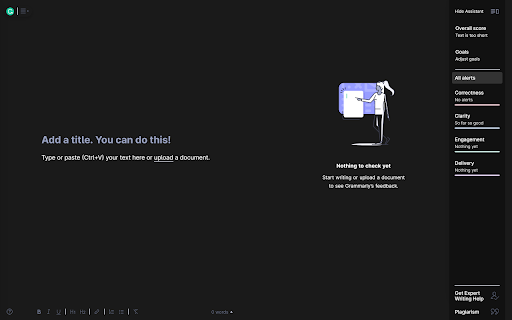
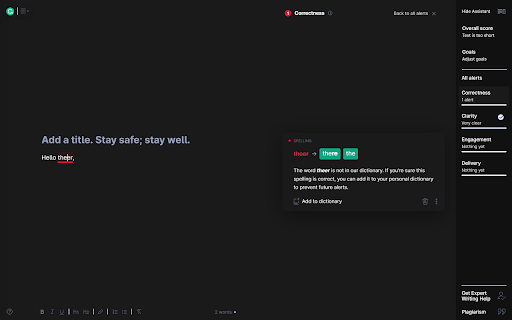
Unofficial Grammarly dark theme. Ease your eyes while writing in the Grammarly app.

Grammarly Dark for Google Chrome provides a dark mode for the Grammarly app online.

The benefits of using this extension:
✔ Beautiful, dark color theme (not inverted colors)
✔ Reduces eye strain
✔ Get proper sleep at night
✔ Eliminate the harmful blue light
✔ Created by a web developer

How to use it?
1. Install
2. Log in to your Grammarly account and head to the dashboard.

Grammarly Dark is an open-source project, available on GitHub:
https://github.com/bartzalewski/grammarly-dark
Technical
- Version
- 1.0.13
- Manifest
- V3
- Size
- 13.82KiB
- Min Chrome
- 88
- Languages
- 1
- Featured
- No
Metadata
- ID
- noojmhngiheennhgaffkfboanjpbkpep
- Developer ID
- u8849893bef7b55463fe9eaf32ce37011
- Developer Email
- [email protected]
- Created
- Jun 17, 2020
- Last Updated (Store)
- Feb 18, 2026
- Last Scraped
- Jun 2, 2026
- Website
- —
- Support URL
- —
- Privacy Policy
- —
Similar extensions
Alternatives to Grammarly Dark, ranked by description similarity.

Grammarly Nightfall
Dark theme for Grammarly documents by AIO.com.ai - reduce eye strain and write comfortably at night
20
★ 1.0
Dark Mode for Chrome
Dark mode for all websites. Use dark theme for night and daily browsing with dark reader. Night shift mode.
60.0K
★ 4.5

Dark Theme - Dark mode for Chrome
Dark mode switch any websites to dark theme. Take care of your eyes day using a classic dark reader or change screen brightness.
400.0K
★ 4.3

Google Translate Dark Theme
Adds dark mode, light mode, and system-aware theme switching to Google Translate.
36

Gmail Dark Mode
Gmail Dark Mode allows you quickly to enable a dark theme for Gmail.
10.0K
★ 3.9

DARK VISOR — darkmode for the web
Dark mode for the web. Protect your eyes with Dark Visor. Customize brightness, contrast, and night shift for comfortable browsing.
8.0K
★ 4.9
dark reader - dark mode for Chrome
Activate dark mode for Chrome. Protect your eyes, and use a dark theme for night and everyday browsing.
60.0K
★ 4.5

Dark Mode Chrome
Switch to Dark Mode Chrome in one click for a stylish dark background website. Enjoy your favorite night theme app anytime!
2.0K
★ 4.0
Data sourced from the Chrome Web Store · last verified Jun 2, 2026.