
Canvas Blocker - Fingerprint Protect
Prevent HTML canvas element from generating a unique identification key to protect user's privacy
As of June 2026, Canvas Blocker - Fingerprint Protect has 60,000 users and a 3.88/5 rating from 58 reviews in the Developer Tools category.
Usersdown 33.3 percent−33.3%
60.0K
60,000
Ratingdown 3.5 percent−3.5%
3.88
58 reviews
Reviewsup 11.5 percent+11.5%
58
Version
0.2.4
Manifest V3
90-day change · In the last 90 days this extension lost 30.0K users, 1 version update.
History
7 snapshotsTracking since Apr 1, 2026.
View as table
| Date | Users | Rating | Reviews | Version |
|---|---|---|---|---|
| Apr 1, 2026 | 90.0K | 4.02 | 52 | 0.2.3 |
| Apr 5, 2026 | 80.0K | 4.02 | 52 | 0.2.3 |
| Apr 16, 2026 | 70.0K | 4.02 | 52 | 0.2.3 |
| May 6, 2026 | 60.0K | 3.91 | 56 | 0.2.4 |
| May 8, 2026 | 60.0K | 3.93 | 57 | 0.2.4 |
| May 19, 2026 | 70.0K | 3.93 | 57 | 0.2.4 |
| Jun 12, 2026 | 70.0K | 3.88 | 58 | 0.2.4 |
| Now | 60.0K | 3.88 | 58 | 0.2.4 |
Permissions & access
- Permissions
- notificationsstoragecontextMenusscriptingdeclarativeNetRequestWithHostAccess
- Host access
- *://*/*
Screenshots
About
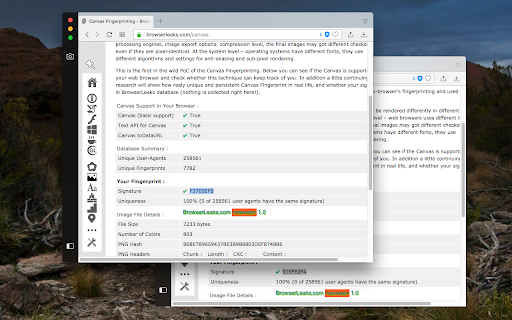
This browser extension safeguards user privacy by preventing malicious scripts from using the HTML canvas element for user fingerprinting. It introduces slight changes to the data generated by the canvas element when specific methods are invoked, rendering it unusable for fingerprinting. In comparison to similar extensions, this one is lighter and employs a more efficient method to obstruct fingerprinting across all frame elements (top and subframes). The extension operates in three modes:

1. Random noise
2. Random noise (per page) to maintain a consistent identity within the current page session
3. Fixed noise to sustain a constant yet unique identity continuously

Key Features:
1. Minimal footprint fingerprint defender
2. Ability to block or disable fingerprinting on specific hostnames
3. Notification when canvas fingerprinting is detected
4. Option to disable notification for select or all hostnames
5. Compatibility with cross-origin (CORS) and sandboxed iframes (such as Disqus and Hangouts)

Notes:
This extension doesn't entirely block the canvas element. Instead, it modifies two methods to prevent the JavaScript engine from creating a unique identification key from this element.

What is Canvas Fingerprinting:
Canvas fingerprinting is a method among several browser fingerprinting techniques used for tracking online users. It enables websites to identify and monitor visitors by leveraging the HTML5 canvas element rather than browser cookies or similar means. This technique functions by exploiting the HTML5 canvas element. When a user visits a webpage, the fingerprinting script initially writes text using the preferred font and size and adds background colors. Subsequently, the script calls the Canvas API's ToDataURL method to retrieve canvas pixel data in dataURL format, essentially a Base64 encoded representation of binary pixel data. Lastly, the script hashes the text-encoded pixel data, creating a unique fingerprint.
Technical
- Version
- 0.2.4
- Manifest
- V3
- Size
- 58.79KiB
- Min Chrome
- 88
- Languages
- 1
- Featured
- Yes
Metadata
- ID
- nomnklagbgmgghhjidfhnoelnjfndfpd
- Developer ID
- u998790a42d49632e0728e5a526305904
- Developer Email
- [email protected]
- Created
- Mar 3, 2018
- Last Updated (Store)
- Apr 14, 2026
- Last Scraped
- Jun 12, 2026
- Website
- —
- Privacy Policy
- —
Similar extensions
Alternatives to Canvas Blocker - Fingerprint Protect, ranked by description similarity.

Fingerprint Spoofer
Helps to spoof browser fingerprinting
10.0K
★ 4.0

CthulhuJs (Anti-Fingerprint)
Your browser, your rules — your digital fingerprint, in your control.
7.0K
★ 4.3

Easel UI
An extension that allows you to easily QA the design parity of your Figma Components on a web page.
23
★ 5.0

User-Agent Switcher: Device Identity Simulator
Simulate different device fingerprints for testing purposes
96
★ 4.0

Opt-out for Analytics™
Prevents Google Analytics, Adobe Analytics and Tag Manager from collecting data and recording the user
1.0K
★ 3.7

Piloterr: Anti Bots Checker
Advanced anti-bot and captcha detection system for web security analysis
142
★ 5.0

HyperRealm
Privacy-focused controls for browser-exposed region and location signals on supported pages.
2

Scrapfly: anti-bot detector
Detect CAPTCHAs, anti-bot systems and fingerprinting technologies on websites
1.0K
★ 5.0
Data sourced from the Chrome Web Store · last verified Jun 12, 2026.